 |\n| **门店活动方案** — 单店促销活动的机制确认与待办 |
  |\n| **CRM开发需求确认** — 品牌方与技术服务商的需求评审 |
  |\n| **支付核销一体化** — 三方技术对接方案(含技术链路流程图) |
  |\n| **省级会员推进** — 总部与分公司的多议题对齐会 |
  |\n\n## 视觉特点\n\n- 色块区分模块(红/蓝/绿/橙/紫/灰)\n- 白底卡片 + 清晰的文字层级\n- Checkbox 式待办清单,按责任方分组\n- 时间轴标记关键里程碑\n- 提示条标注风险和关键决定\n- 圆角、留白、手机优先\n\n## 📋 版本记录\n\n- **v1.1.13**(2026-07-28):修复 SkillHub 历史显示名,统一为「会议纪要卡片 · 马甲实战版」;功能、slug 与安装命令不变。\n- **v1.1.12**(2026-07-23):对外展示名去掉「SVG」技术词前缀,统一品牌标题。\n- **v1.1.11**(2026-05-21):效果预览换成完整 PNG,并补充功能说明与示例入口。\n\n完整变更历史见 [GitHub Releases](https://github.com/maojiebc/majia-meeting-svg/releases)。\n\n## 👤 作者 / 联系\n\n**马甲(@maojiebc)** · 超级马甲\n\n如果这份 skill 帮到你,欢迎在以下任意渠道找我交流踩坑实录、提需求、报 bug,也欢迎勾兑用户运营 / 数据中台 / BI 工程的实战经验:\n\n| 渠道 | 链接 |\n|---|---|\n| 📧 Email | [m9224@163.com](mailto:m9224@163.com) |\n| 🐙 GitHub | [github.com/maojiebc](https://github.com/maojiebc) |\n| 🪝 ClawHub | [clawhub.ai/p/maojiebc](https://clawhub.ai/p/maojiebc) |\n| 🐦 X | [@maojiebc](https://x.com/maojiebc) |\n| 📕 小红书 | [超级马甲](https://xhslink.com/m/4fQMJeHHWKC) |\n| 📰 微信公众号 | [超级马甲](https://mp.weixin.qq.com/mp/profile_ext?action=home&__biz=MzY5NzIzODk2NA==#wechat_redirect) |\n\n> 这份 skill 是 14 年用户运营 + 一线协同实战沉淀出来的,问题/合作随时聊。\n\n## License\n\nMIT\n\nFile v1.1.13:_meta.json\n\n{\n \"ownerId\": \"kn71njkqkab6a75db7hqb6ekz982jd29\",\n \"slug\": \"majia-meeting-svg\",\n \"version\": \"1.1.13\",\n \"publishedAt\": 1785220473729\n}\n\nFile v1.1.13:README.en.md\n\n# majia-meeting-svg\n\n[](./SKILL.md)\n[](https://skills.sh/maojiebc/majia-meeting-svg)\n\n> **会议纪要卡片 · 马甲实战版** (Meeting Card · Majia Real-World Edition)\n\nA Claude Code Skill that turns a multi-party meeting transcript into a single phone-friendly SVG summary card — auto-converted to PNG so it can be forwarded directly inside WeChat / DingTalk / Feishu and other IM channels.\n\n> 🇨🇳 Chinese readers: see [README.md](./README.md) for the full Chinese documentation.\n\n## What it does\n\nFeed in a meeting recording transcript / verbatim, get back a structured SVG card — color-blocked modules, checkbox-style action items, milestone timeline. Everyone in the meeting gets the *same* card; a 30-second scan tells them \"what was decided, who does what, when\".\n\n**Input**: multi-party meeting transcript / speech-to-text dump\n**Output**: SVG file + PNG image (2x Retina, generated automatically)\n\n## Install\n\n```bash\n# GitHub CLI (recommended)\ngh skill install maojiebc/majia-meeting-svg\n\n# skills.sh\nnpx skills add maojiebc/majia-meeting-svg\n\n# Manual clone\ngit clone https://github.com/maojiebc/majia-meeting-svg.git ~/.claude/skills/majia-meeting-svg\n```\n\n## Usage\n\n```bash\n/majia-meeting-svg path/to/transcript.txt\n/majia-meeting-svg # then paste the transcript inline\n```\n\n## Examples\n\nThe [`references/examples/`](references/examples/) directory contains five sanitized examples (SVG + PNG) covering different meeting scenarios:\n\n| Scenario | Preview |\n|------|------|\n| **Cross-brand alignment** — first-time collaboration between two brands, resource alignment and ownership | |\n| **Store campaign plan** — single-store promo mechanic confirmation and action items | |\n| **CRM dev requirements review** — brand owner / tech vendor requirements review | |\n| **Payment integration** — three-party technical integration plan (includes a technical flow diagram) | |\n| **Regional ops sync** — HQ / regional multi-topic alignment | |\n\n## Visual style\n\n- Color-blocked modules (red / blue / green / orange / purple / gray)\n- White card with clear typographic hierarchy\n- Checkbox-style action list, grouped by owner\n- Timeline marks key milestones\n- Callouts for risks and key decisions\n- Rounded corners, generous whitespace, phone-first layout\n\n## Version History\n\n- **v1.1.13** (2026-07-28): Corrected the historical SkillHub display name to `会议纪要卡片 · 马甲实战版`; functionality, slug, and install commands are unchanged.\n- **v1.1.12** (2026-07-23): Removed the technical `SVG` prefix from the public display name.\n- **v1.1.11** (2026-05-21): Replaced the cropped preview with the full PNG and improved example guidance.\n\nFull history: [GitHub Releases](https://github.com/maojiebc/majia-meeting-svg/releases).\n\n## 👤 Author / Contact\n\n**Majia (@maojiebc)** · 超级马甲 (Super Majia)\n\nIf this skill helps you, find me on any of these channels — happy to chat about field experience, take feature requests, hear bug reports, or trade notes on user operations / data platforms / BI engineering work:\n\n| Channel | Link |\n|---|---|\n| 📧 Email | [m9224@163.com](mailto:m9224@163.com) |\n| 🐙 GitHub | [github.com/maojiebc](https://github.com/maojiebc) |\n| 🪝 ClawHub | [clawhub.ai/p/maojiebc](https://clawhub.ai/p/maojiebc) |\n| 🐦 X | [@maojiebc](https://x.com/maojiebc) |\n| 📕 Xiaohongshu | [Super Majia](https://xhslink.com/m/4fQMJeHHWKC) |\n| 📰 WeChat Official Account | [超级马甲](https://mp.weixin.qq.com/mp/profile_ext?action=home&__biz=MzY5NzIzODk2NA==#wechat_redirect) |\n\n> Built from 14 years of user-operations work and field-tested team coordination workflows.\n\n## License\n\nMIT\n\nFile v1.1.13:SECURITY.md\n\n# Security\n\nThis skill processes user-provided meeting transcripts locally and outputs self-contained SVG + PNG files. The PNG conversion script (`scripts/svg2png.py`) uses Puppeteer (headless Chrome) or cairosvg — both run locally with no network requests beyond the one-time `npm install` of Puppeteer. No data is stored externally or sent to any service.\n\n## Reporting\n\nIf you find a security issue, please open a GitHub issue or contact the author directly.\n\nFile v1.1.13:skill-card.md\n\n## Description:\n\n将会议逐字稿或录音转写文本转化为手机端可直接转发的 SVG 会议纪要卡片,并自动转为 PNG 方便分享。\n\nThis skill is ready for commercial/non-commercial use.\n\n## Publisher:\n\n[maojiebc](https://clawhub.ai/user/maojiebc)\n\n### License/Terms of Use:\n\nMIT\n\n## Use Case:\n\nExternal users, employees, and developers use this skill to turn meeting transcripts or speech-to-text notes into concise visual minutes that align decisions, owners, open questions, milestones, and action items.\n\n### Deployment Geography for Use:\n\nGlobal\n\n## Known Risks and Mitigations:\n\nRisk: The skill processes meeting transcripts that may contain sensitive business or personal information.\n\nMitigation: Use it only on transcripts the user is authorized to process, and redact sensitive details before creating shareable images.\n\nRisk: The PNG converter uses local automatic execution paths for SVG rendering.\n\nMitigation: Review the skill before installing, avoid converting SVG files from untrusted sources, and run the converter in a pinned dependency environment without privileged accounts or broad secrets.\n\n## Reference(s):\n\n- [ClawHub Skill Page](https://clawhub.ai/maojiebc/skills/majia-meeting-svg)\n- [Project Homepage](https://github.com/maojiebc/majia-meeting-svg)\n- [Example Cards](https://github.com/maojiebc/majia-meeting-svg/tree/main/references/examples)\n- [GitHub Releases](https://github.com/maojiebc/majia-meeting-svg/releases)\n- [skills.sh Listing](https://skills.sh/maojiebc/majia-meeting-svg)\n\n## Skill Output:\n\n**Output Type(s):** [Text, Markdown, Code, Shell commands, Files, Guidance]\n\n**Output Format:** [Markdown guidance with SVG code, shell commands, and generated SVG/PNG files]\n\n**Output Parameters:** [1D]\n\n**Other Properties Related to Output:** [PNG conversion defaults to 2x scale for phone-friendly sharing.]\n\n## Skill Version(s):\n\n1.1.13 (source: evidence.release.version, evidence.parsed.metadata.version, SKILL.md metadata.version)\n\n## Ethical Considerations:\n\nUsers should evaluate whether this skill is appropriate for their environment, review any generated or modified files before relying on them, and apply their organization's safety, security, and compliance requirements before deployment.\n\nFile v1.1.13:LICENSE\n\nMIT License\n\nCopyright (c) 2026 majia9224\n\nPermission is hereby granted, free of charge, to any person obtaining a copy\nof this software and associated documentation files (the \"Software\"), to deal\nin the Software without restriction, including without limitation the rights\nto use, copy, modify, merge, publish, distribute, sublicense, and/or sell\ncopies of the Software, and to permit persons to whom the Software is\nfurnished to do so, subject to the following conditions:\n\nThe above copyright notice and this permission notice shall be included in all\ncopies or substantial portions of the Software.\n\nTHE SOFTWARE IS PROVIDED \"AS IS\", WITHOUT WARRANTY OF ANY KIND, EXPRESS OR\nIMPLIED, INCLUDING BUT NOT LIMITED TO THE WARRANTIES OF MERCHANTABILITY,\nFITNESS FOR A PARTICULAR PURPOSE AND NONINFRINGEMENT. IN NO EVENT SHALL THE\nAUTHORS OR COPYRIGHT HOLDERS BE LIABLE FOR ANY CLAIM, DAMAGES OR OTHER\nLIABILITY, WHETHER IN AN ACTION OF CONTRACT, TORT OR OTHERWISE, ARISING FROM,\nOUT OF OR IN CONNECTION WITH THE SOFTWARE OR THE USE OR OTHER DEALINGS IN THE\nSOFTWARE.\n\nFile v1.1.13:llms.txt\n\n# majia-meeting-svg\n\n> Claude Code Skill that converts meeting transcripts into mobile-friendly SVG summary cards with auto PNG export.\n\n## What it does\n\nTakes multi-party meeting transcripts (voice-to-text or verbatim notes) and produces a structured SVG card with color-coded sections, checkbox action items, timeline milestones, and risk callouts. Automatically converts to PNG (2x Retina) for instant sharing via WeChat, DingTalk, Feishu, or any IM.\n\n## Install\n\n```\ngh skill install maojiebc/majia-meeting-svg\n```\n\n## Links\n\n- GitHub: https://github.com/maojiebc/majia-meeting-svg\n- skills.sh: https://skills.sh/maojiebc/majia-meeting-svg\n\nArchive v1.1.12: 14 files, 29044 bytes\n\nFiles: LICENSE (1066b), llms.txt (644b), README.en.md (3497b), README.md (3080b), references/examples/example-campaign-plan.svg (7539b), references/examples/example-crm-dev-review.svg (13302b), references/examples/example-cross-brand.svg (8208b), references/examples/example-payment-integration.svg (15001b), references/examples/example-regional-ops.svg (11167b), scripts/svg2png.py (3822b), SECURITY.md (464b), skill-card.md (2490b), SKILL.md (9045b), _meta.json (137b)\n\nFile v1.1.12:SKILL.md\n\n---\nname: majia-meeting-svg\ndescription: \"将会议逐字稿或录音转写文本转化为手机端可直接转发的 SVG 会议纪要卡片,并自动转为 PNG 方便分享。产出双方/多方都能用的结构化可视摘要。当用户提供会议录音转写、逐字稿、会议记录并要求生成会议纪要、会议摘要、meeting minutes、会议框架图、SVG 纪要时使用此技能。即使用户只是说「帮我整理一下这个会议」「把这段对话做个纪要」「会议总结一下」,也应触发。\"\nlicense: MIT\nmetadata:\n version: 1.1.12\n openclaw:\n homepage: https://github.com/maojiebc/majia-meeting-svg\n---\n\n# 会议纪要卡片 · 马甲实战版\n\n将多方会议的逐字稿提炼为一张手机端可直接转发的 SVG 卡片——所有参会方拿到同一张图,对齐结论、明确待办。生成 SVG 后自动转 PNG,方便微信/钉钉/飞书直接发送。\n\n## Usage\n\n```\n/majia-meeting-svg path/to/transcript.txt\n/majia-meeting-svg # then paste transcript\n```\n\n## 效果预览\n\n会议纪要 SVG 卡片完整效果(自动转 PNG,可直接转发到微信/钉钉/飞书):\n\n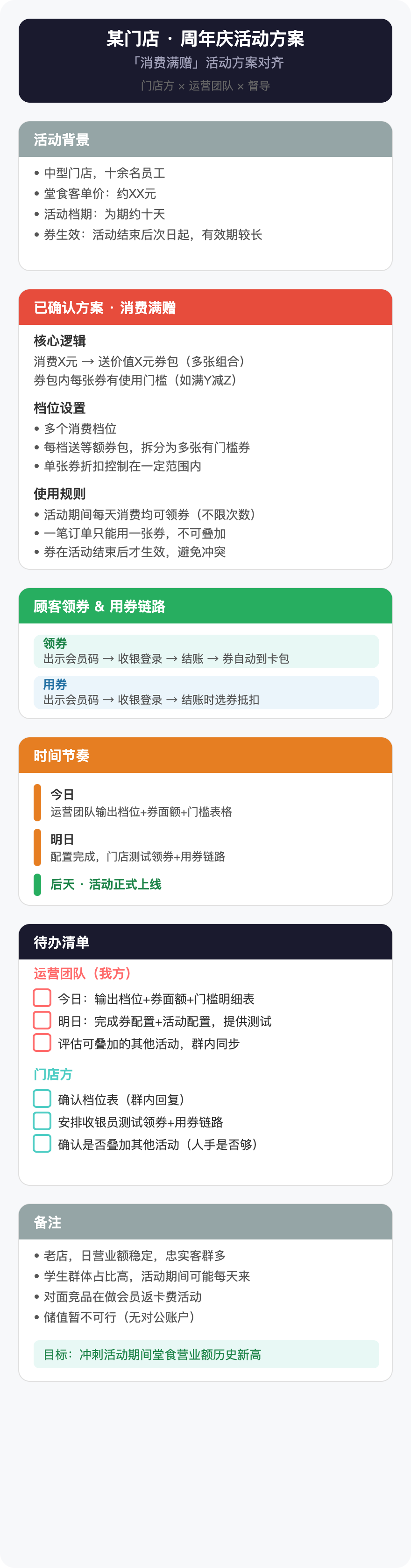\n\n更多场景示例(异业合作 / CRM 评审 / 支付对接 / 多议题对齐)见 [references/examples/](https://github.com/maojiebc/majia-meeting-svg/tree/main/references/examples)。\n\n---\n\n## 信息提炼原则\n\n会议逐字稿天然冗长——闲聊、重复、跑题占大量篇幅。这张卡片的价值在于**让每个参会方用 30 秒扫完就知道「定了什么、谁做什么、什么时候」**。\n\n1. **做减法**:只留结构骨架,砍掉寒暄、重复、发散讨论\n2. **结构化**:把散乱对话重组为逻辑模块(背景、结论、待办、分工……)\n3. **区分已定与未定**:标注「已敲定」和「待确认」——这是纪要最核心的价值,比内容本身还重要\n4. **保留关键原话**:重要判断、核心数字直接引用,不要过度改写\n\n---\n\n## 内容框架\n\n不限会议类型。根据逐字稿的实际内容,从以下模块中选取 4–7 个组成卡片(不要超过 7 个模块——超过说明还没砍够):\n\n| 模块 | 用途 | 建议色 |\n|------|------|--------|\n| 背景与目标 | 为什么开这个会、要解决什么 | `#95A5A6` 灰 |\n| 各方诉求 | 每一方想要什么、关心什么 | `#8E44AD` 紫 |\n| 已确认方案 | 敲定的机制、规则、方案细节 | `#E74C3C` 红 |\n| 执行链路 | 操作流程、用户路径、技术实现 | `#27AE60` 绿 |\n| 资源与分工 | 谁提供什么、谁负责什么 | `#4A6CF7` 蓝 |\n| 待确认事项 | 还没定的、有分歧的、需要回去确认的 | `#E67E22` 橙 |\n| 时间节奏 | 里程碑、截止日期、上线时间 | `#E67E22` 橙 |\n| 待办清单 | 按责任方分组的行动项,带 checkbox | `#1A1A2E` 深 |\n| 备注 | 背景数据、历史经验、补充信息 | `#95A5A6` 灰 |\n\n**选取原则**:\n- 「待办清单」几乎必选——没有 action item 的纪要是废纸\n- 「已确认方案」和「待确认事项」至少出现一个\n- 不是每个模块都要用;宁可少一个模块也不要水内容\n\n---\n\n## 版式规范(竖版 · 手机优先)\n\n```\nviewBox: 0 0 440 [动态高度]\nwidth=\"100%\" style=\"max-width: 440px;\"\n模块宽度: 400(左右各留 20px)\n标题字号: 19px\n模块标题: 14–15px\n正文: 13px\n补充说明: 12px\n行间距: 20–22px\n模块间距: ≥20px\n```\n\n---\n\n## SVG 代码模式\n\n### 基础骨架\n\n```xml\n\n```\n\n### 页面标题栏\n\n```xml\n |\n| **门店活动方案** — 单店促销活动的机制确认与待办 | |\n| **CRM开发需求确认** — 品牌方与技术服务商的需求评审 | |\n| **支付核销一体化** — 三方技术对接方案(含技术链路流程图) | |\n| **省级会员推进** — 总部与分公司的多议题对齐会 | |\n\n## 视觉特点\n\n- 色块区分模块(红/蓝/绿/橙/紫/灰)\n- 白底卡片 + 清晰的文字层级\n- Checkbox 式待办清单,按责任方分组\n- 时间轴标记关键里程碑\n- 提示条标注风险和关键决定\n- 圆角、留白、手机优先\n\n## 👤 作者 / 联系\n\n**马甲(@maojiebc)** · 超级马甲\n\n如果这份 skill 帮到你,欢迎在以下任意渠道找我交流踩坑实录、提需求、报 bug,也欢迎勾兑用户运营 / 数据中台 / BI 工程的实战经验:\n\n| 渠道 | 链接 |\n|---|---|\n| 📧 Email | [m9224@163.com](mailto:m9224@163.com) |\n| 🐙 GitHub | [github.com/maojiebc](https://github.com/maojiebc) |\n| 🪝 ClawHub | [clawhub.ai/p/maojiebc](https://clawhub.ai/p/maojiebc) |\n| 🐦 X | [@maojiebc](https://x.com/maojiebc) |\n| 📕 小红书 | [超级马甲](https://xhslink.com/m/4fQMJeHHWKC) |\n| 📰 微信公众号 | **超级马甲** |\n\n> 这份 skill 是 14 年用户运营 + 一线协同实战沉淀出来的,问题/合作随时聊。\n\n## License\n\nMIT\n\nFile v1.1.12:_meta.json\n\n{\n \"ownerId\": \"kn71njkqkab6a75db7hqb6ekz982jd29\",\n \"slug\": \"majia-meeting-svg\",\n \"version\": \"1.1.12\",\n \"publishedAt\": 1784770418671\n}\n\nFile v1.1.12:README.en.md\n\n# majia-meeting-svg\n\n[](https://skills.sh/maojiebc/majia-meeting-svg)\n\n> **会议纪要卡片 · 马甲实战版** (Meeting Card · Majia Real-World Edition)\n\nA Claude Code Skill that turns a multi-party meeting transcript into a single phone-friendly SVG summary card — auto-converted to PNG so it can be forwarded directly inside WeChat / DingTalk / Feishu and other IM channels.\n\n> 🇨🇳 Chinese readers: see [README.md](./README.md) for the full Chinese documentation.\n\n## What it does\n\nFeed in a meeting recording transcript / verbatim, get back a structured SVG card — color-blocked modules, checkbox-style action items, milestone timeline. Everyone in the meeting gets the *same* card; a 30-second scan tells them \"what was decided, who does what, when\".\n\n**Input**: multi-party meeting transcript / speech-to-text dump\n**Output**: SVG file + PNG image (2x Retina, generated automatically)\n\n## Install\n\n```bash\n# GitHub CLI (recommended)\ngh skill install maojiebc/majia-meeting-svg\n\n# skills.sh\nnpx skills add maojiebc/majia-meeting-svg\n\n# Manual clone\ngit clone https://github.com/maojiebc/majia-meeting-svg.git ~/.claude/skills/majia-meeting-svg\n```\n\n## Usage\n\n```bash\n/majia-meeting-svg path/to/transcript.txt\n/majia-meeting-svg # then paste the transcript inline\n```\n\n## Examples\n\nThe [`references/examples/`](references/examples/) directory contains five sanitized examples (SVG + PNG) covering different meeting scenarios:\n\n| Scenario | Preview |\n|------|------|\n| **Cross-brand alignment** — first-time collaboration between two brands, resource alignment and ownership | |\n| **Store campaign plan** — single-store promo mechanic confirmation and action items | |\n| **CRM dev requirements review** — brand owner / tech vendor requirements review | |\n| **Payment integration** — three-party technical integration plan (includes a technical flow diagram) | |\n| **Regional ops sync** — HQ / regional multi-topic alignment | |\n\n## Visual style\n\n- Color-blocked modules (red / blue / green / orange / purple / gray)\n- White card with clear typographic hierarchy\n- Checkbox-style action list, grouped by owner\n- Timeline marks key milestones\n- Callouts for risks and key decisions\n- Rounded corners, generous whitespace, phone-first layout\n\n## 👤 Author / Contact\n\n**Majia (@maojiebc)** · 超级马甲 (Super Majia)\n\nIf this skill helps you, find me on any of these channels — happy to chat about field experience, take feature requests, hear bug reports, or trade notes on user operations / data platforms / BI engineering work:\n\n| Channel | Link |\n|---|---|\n| 📧 Email | [m9224@163.com](mailto:m9224@163.com) |\n| 🐙 GitHub | [github.com/maojiebc](https://github.com/maojiebc) |\n| 🪝 ClawHub | [clawhub.ai/p/maojiebc](https://clawhub.ai/p/maojiebc) |\n| 🐦 X | [@maojiebc](https://x.com/maojiebc) |\n| 📕 Xiaohongshu | [Super Majia](https://xhslink.com/m/4fQMJeHHWKC) |\n| 📰 WeChat Official Account | **超级马甲** |\n\n> Built from 14 years of user-operations work and field-tested team coordination workflows.\n\n## License\n\nMIT\n\nFile v1.1.12:SECURITY.md\n\n# Security\n\nThis skill processes user-provided meeting transcripts locally and outputs self-contained SVG + PNG files. The PNG conversion script (`scripts/svg2png.py`) uses Puppeteer (headless Chrome) or cairosvg — both run locally with no network requests beyond the one-time `npm install` of Puppeteer. No data is stored externally or sent to any service.\n\n## Reporting\n\nIf you find a security issue, please open a GitHub issue or contact the author directly.\n\nFile v1.1.12:skill-card.md\n\n## Description:
|\n\n## 视觉特点\n\n- 色块区分模块(红/蓝/绿/橙/紫/灰)\n- 白底卡片 + 清晰的文字层级\n- Checkbox 式待办清单,按责任方分组\n- 时间轴标记关键里程碑\n- 提示条标注风险和关键决定\n- 圆角、留白、手机优先\n\n## 📋 版本记录\n\n- **v1.1.13**(2026-07-28):修复 SkillHub 历史显示名,统一为「会议纪要卡片 · 马甲实战版」;功能、slug 与安装命令不变。\n- **v1.1.12**(2026-07-23):对外展示名去掉「SVG」技术词前缀,统一品牌标题。\n- **v1.1.11**(2026-05-21):效果预览换成完整 PNG,并补充功能说明与示例入口。\n\n完整变更历史见 [GitHub Releases](https://github.com/maojiebc/majia-meeting-svg/releases)。\n\n## 👤 作者 / 联系\n\n**马甲(@maojiebc)** · 超级马甲\n\n如果这份 skill 帮到你,欢迎在以下任意渠道找我交流踩坑实录、提需求、报 bug,也欢迎勾兑用户运营 / 数据中台 / BI 工程的实战经验:\n\n| 渠道 | 链接 |\n|---|---|\n| 📧 Email | [m9224@163.com](mailto:m9224@163.com) |\n| 🐙 GitHub | [github.com/maojiebc](https://github.com/maojiebc) |\n| 🪝 ClawHub | [clawhub.ai/p/maojiebc](https://clawhub.ai/p/maojiebc) |\n| 🐦 X | [@maojiebc](https://x.com/maojiebc) |\n| 📕 小红书 | [超级马甲](https://xhslink.com/m/4fQMJeHHWKC) |\n| 📰 微信公众号 | [超级马甲](https://mp.weixin.qq.com/mp/profile_ext?action=home&__biz=MzY5NzIzODk2NA==#wechat_redirect) |\n\n> 这份 skill 是 14 年用户运营 + 一线协同实战沉淀出来的,问题/合作随时聊。\n\n## License\n\nMIT\n\nFile v1.1.13:_meta.json\n\n{\n \"ownerId\": \"kn71njkqkab6a75db7hqb6ekz982jd29\",\n \"slug\": \"majia-meeting-svg\",\n \"version\": \"1.1.13\",\n \"publishedAt\": 1785220473729\n}\n\nFile v1.1.13:README.en.md\n\n# majia-meeting-svg\n\n[](./SKILL.md)\n[](https://skills.sh/maojiebc/majia-meeting-svg)\n\n> **会议纪要卡片 · 马甲实战版** (Meeting Card · Majia Real-World Edition)\n\nA Claude Code Skill that turns a multi-party meeting transcript into a single phone-friendly SVG summary card — auto-converted to PNG so it can be forwarded directly inside WeChat / DingTalk / Feishu and other IM channels.\n\n> 🇨🇳 Chinese readers: see [README.md](./README.md) for the full Chinese documentation.\n\n## What it does\n\nFeed in a meeting recording transcript / verbatim, get back a structured SVG card — color-blocked modules, checkbox-style action items, milestone timeline. Everyone in the meeting gets the *same* card; a 30-second scan tells them \"what was decided, who does what, when\".\n\n**Input**: multi-party meeting transcript / speech-to-text dump\n**Output**: SVG file + PNG image (2x Retina, generated automatically)\n\n## Install\n\n```bash\n# GitHub CLI (recommended)\ngh skill install maojiebc/majia-meeting-svg\n\n# skills.sh\nnpx skills add maojiebc/majia-meeting-svg\n\n# Manual clone\ngit clone https://github.com/maojiebc/majia-meeting-svg.git ~/.claude/skills/majia-meeting-svg\n```\n\n## Usage\n\n```bash\n/majia-meeting-svg path/to/transcript.txt\n/majia-meeting-svg # then paste the transcript inline\n```\n\n## Examples\n\nThe [`references/examples/`](references/examples/) directory contains five sanitized examples (SVG + PNG) covering different meeting scenarios:\n\n| Scenario | Preview |\n|------|------|\n| **Cross-brand alignment** — first-time collaboration between two brands, resource alignment and ownership | |\n| **Store campaign plan** — single-store promo mechanic confirmation and action items | |\n| **CRM dev requirements review** — brand owner / tech vendor requirements review | |\n| **Payment integration** — three-party technical integration plan (includes a technical flow diagram) | |\n| **Regional ops sync** — HQ / regional multi-topic alignment | |\n\n## Visual style\n\n- Color-blocked modules (red / blue / green / orange / purple / gray)\n- White card with clear typographic hierarchy\n- Checkbox-style action list, grouped by owner\n- Timeline marks key milestones\n- Callouts for risks and key decisions\n- Rounded corners, generous whitespace, phone-first layout\n\n## Version History\n\n- **v1.1.13** (2026-07-28): Corrected the historical SkillHub display name to `会议纪要卡片 · 马甲实战版`; functionality, slug, and install commands are unchanged.\n- **v1.1.12** (2026-07-23): Removed the technical `SVG` prefix from the public display name.\n- **v1.1.11** (2026-05-21): Replaced the cropped preview with the full PNG and improved example guidance.\n\nFull history: [GitHub Releases](https://github.com/maojiebc/majia-meeting-svg/releases).\n\n## 👤 Author / Contact\n\n**Majia (@maojiebc)** · 超级马甲 (Super Majia)\n\nIf this skill helps you, find me on any of these channels — happy to chat about field experience, take feature requests, hear bug reports, or trade notes on user operations / data platforms / BI engineering work:\n\n| Channel | Link |\n|---|---|\n| 📧 Email | [m9224@163.com](mailto:m9224@163.com) |\n| 🐙 GitHub | [github.com/maojiebc](https://github.com/maojiebc) |\n| 🪝 ClawHub | [clawhub.ai/p/maojiebc](https://clawhub.ai/p/maojiebc) |\n| 🐦 X | [@maojiebc](https://x.com/maojiebc) |\n| 📕 Xiaohongshu | [Super Majia](https://xhslink.com/m/4fQMJeHHWKC) |\n| 📰 WeChat Official Account | [超级马甲](https://mp.weixin.qq.com/mp/profile_ext?action=home&__biz=MzY5NzIzODk2NA==#wechat_redirect) |\n\n> Built from 14 years of user-operations work and field-tested team coordination workflows.\n\n## License\n\nMIT\n\nFile v1.1.13:SECURITY.md\n\n# Security\n\nThis skill processes user-provided meeting transcripts locally and outputs self-contained SVG + PNG files. The PNG conversion script (`scripts/svg2png.py`) uses Puppeteer (headless Chrome) or cairosvg — both run locally with no network requests beyond the one-time `npm install` of Puppeteer. No data is stored externally or sent to any service.\n\n## Reporting\n\nIf you find a security issue, please open a GitHub issue or contact the author directly.\n\nFile v1.1.13:skill-card.md\n\n## Description:\n\n将会议逐字稿或录音转写文本转化为手机端可直接转发的 SVG 会议纪要卡片,并自动转为 PNG 方便分享。\n\nThis skill is ready for commercial/non-commercial use.\n\n## Publisher:\n\n[maojiebc](https://clawhub.ai/user/maojiebc)\n\n### License/Terms of Use:\n\nMIT\n\n## Use Case:\n\nExternal users, employees, and developers use this skill to turn meeting transcripts or speech-to-text notes into concise visual minutes that align decisions, owners, open questions, milestones, and action items.\n\n### Deployment Geography for Use:\n\nGlobal\n\n## Known Risks and Mitigations:\n\nRisk: The skill processes meeting transcripts that may contain sensitive business or personal information.\n\nMitigation: Use it only on transcripts the user is authorized to process, and redact sensitive details before creating shareable images.\n\nRisk: The PNG converter uses local automatic execution paths for SVG rendering.\n\nMitigation: Review the skill before installing, avoid converting SVG files from untrusted sources, and run the converter in a pinned dependency environment without privileged accounts or broad secrets.\n\n## Reference(s):\n\n- [ClawHub Skill Page](https://clawhub.ai/maojiebc/skills/majia-meeting-svg)\n- [Project Homepage](https://github.com/maojiebc/majia-meeting-svg)\n- [Example Cards](https://github.com/maojiebc/majia-meeting-svg/tree/main/references/examples)\n- [GitHub Releases](https://github.com/maojiebc/majia-meeting-svg/releases)\n- [skills.sh Listing](https://skills.sh/maojiebc/majia-meeting-svg)\n\n## Skill Output:\n\n**Output Type(s):** [Text, Markdown, Code, Shell commands, Files, Guidance]\n\n**Output Format:** [Markdown guidance with SVG code, shell commands, and generated SVG/PNG files]\n\n**Output Parameters:** [1D]\n\n**Other Properties Related to Output:** [PNG conversion defaults to 2x scale for phone-friendly sharing.]\n\n## Skill Version(s):\n\n1.1.13 (source: evidence.release.version, evidence.parsed.metadata.version, SKILL.md metadata.version)\n\n## Ethical Considerations:\n\nUsers should evaluate whether this skill is appropriate for their environment, review any generated or modified files before relying on them, and apply their organization's safety, security, and compliance requirements before deployment.\n\nFile v1.1.13:LICENSE\n\nMIT License\n\nCopyright (c) 2026 majia9224\n\nPermission is hereby granted, free of charge, to any person obtaining a copy\nof this software and associated documentation files (the \"Software\"), to deal\nin the Software without restriction, including without limitation the rights\nto use, copy, modify, merge, publish, distribute, sublicense, and/or sell\ncopies of the Software, and to permit persons to whom the Software is\nfurnished to do so, subject to the following conditions:\n\nThe above copyright notice and this permission notice shall be included in all\ncopies or substantial portions of the Software.\n\nTHE SOFTWARE IS PROVIDED \"AS IS\", WITHOUT WARRANTY OF ANY KIND, EXPRESS OR\nIMPLIED, INCLUDING BUT NOT LIMITED TO THE WARRANTIES OF MERCHANTABILITY,\nFITNESS FOR A PARTICULAR PURPOSE AND NONINFRINGEMENT. IN NO EVENT SHALL THE\nAUTHORS OR COPYRIGHT HOLDERS BE LIABLE FOR ANY CLAIM, DAMAGES OR OTHER\nLIABILITY, WHETHER IN AN ACTION OF CONTRACT, TORT OR OTHERWISE, ARISING FROM,\nOUT OF OR IN CONNECTION WITH THE SOFTWARE OR THE USE OR OTHER DEALINGS IN THE\nSOFTWARE.\n\nFile v1.1.13:llms.txt\n\n# majia-meeting-svg\n\n> Claude Code Skill that converts meeting transcripts into mobile-friendly SVG summary cards with auto PNG export.\n\n## What it does\n\nTakes multi-party meeting transcripts (voice-to-text or verbatim notes) and produces a structured SVG card with color-coded sections, checkbox action items, timeline milestones, and risk callouts. Automatically converts to PNG (2x Retina) for instant sharing via WeChat, DingTalk, Feishu, or any IM.\n\n## Install\n\n```\ngh skill install maojiebc/majia-meeting-svg\n```\n\n## Links\n\n- GitHub: https://github.com/maojiebc/majia-meeting-svg\n- skills.sh: https://skills.sh/maojiebc/majia-meeting-svg\n\nArchive v1.1.12: 14 files, 29044 bytes\n\nFiles: LICENSE (1066b), llms.txt (644b), README.en.md (3497b), README.md (3080b), references/examples/example-campaign-plan.svg (7539b), references/examples/example-crm-dev-review.svg (13302b), references/examples/example-cross-brand.svg (8208b), references/examples/example-payment-integration.svg (15001b), references/examples/example-regional-ops.svg (11167b), scripts/svg2png.py (3822b), SECURITY.md (464b), skill-card.md (2490b), SKILL.md (9045b), _meta.json (137b)\n\nFile v1.1.12:SKILL.md\n\n---\nname: majia-meeting-svg\ndescription: \"将会议逐字稿或录音转写文本转化为手机端可直接转发的 SVG 会议纪要卡片,并自动转为 PNG 方便分享。产出双方/多方都能用的结构化可视摘要。当用户提供会议录音转写、逐字稿、会议记录并要求生成会议纪要、会议摘要、meeting minutes、会议框架图、SVG 纪要时使用此技能。即使用户只是说「帮我整理一下这个会议」「把这段对话做个纪要」「会议总结一下」,也应触发。\"\nlicense: MIT\nmetadata:\n version: 1.1.12\n openclaw:\n homepage: https://github.com/maojiebc/majia-meeting-svg\n---\n\n# 会议纪要卡片 · 马甲实战版\n\n将多方会议的逐字稿提炼为一张手机端可直接转发的 SVG 卡片——所有参会方拿到同一张图,对齐结论、明确待办。生成 SVG 后自动转 PNG,方便微信/钉钉/飞书直接发送。\n\n## Usage\n\n```\n/majia-meeting-svg path/to/transcript.txt\n/majia-meeting-svg # then paste transcript\n```\n\n## 效果预览\n\n会议纪要 SVG 卡片完整效果(自动转 PNG,可直接转发到微信/钉钉/飞书):\n\n\n\n更多场景示例(异业合作 / CRM 评审 / 支付对接 / 多议题对齐)见 [references/examples/](https://github.com/maojiebc/majia-meeting-svg/tree/main/references/examples)。\n\n---\n\n## 信息提炼原则\n\n会议逐字稿天然冗长——闲聊、重复、跑题占大量篇幅。这张卡片的价值在于**让每个参会方用 30 秒扫完就知道「定了什么、谁做什么、什么时候」**。\n\n1. **做减法**:只留结构骨架,砍掉寒暄、重复、发散讨论\n2. **结构化**:把散乱对话重组为逻辑模块(背景、结论、待办、分工……)\n3. **区分已定与未定**:标注「已敲定」和「待确认」——这是纪要最核心的价值,比内容本身还重要\n4. **保留关键原话**:重要判断、核心数字直接引用,不要过度改写\n\n---\n\n## 内容框架\n\n不限会议类型。根据逐字稿的实际内容,从以下模块中选取 4–7 个组成卡片(不要超过 7 个模块——超过说明还没砍够):\n\n| 模块 | 用途 | 建议色 |\n|------|------|--------|\n| 背景与目标 | 为什么开这个会、要解决什么 | `#95A5A6` 灰 |\n| 各方诉求 | 每一方想要什么、关心什么 | `#8E44AD` 紫 |\n| 已确认方案 | 敲定的机制、规则、方案细节 | `#E74C3C` 红 |\n| 执行链路 | 操作流程、用户路径、技术实现 | `#27AE60` 绿 |\n| 资源与分工 | 谁提供什么、谁负责什么 | `#4A6CF7` 蓝 |\n| 待确认事项 | 还没定的、有分歧的、需要回去确认的 | `#E67E22` 橙 |\n| 时间节奏 | 里程碑、截止日期、上线时间 | `#E67E22` 橙 |\n| 待办清单 | 按责任方分组的行动项,带 checkbox | `#1A1A2E` 深 |\n| 备注 | 背景数据、历史经验、补充信息 | `#95A5A6` 灰 |\n\n**选取原则**:\n- 「待办清单」几乎必选——没有 action item 的纪要是废纸\n- 「已确认方案」和「待确认事项」至少出现一个\n- 不是每个模块都要用;宁可少一个模块也不要水内容\n\n---\n\n## 版式规范(竖版 · 手机优先)\n\n```\nviewBox: 0 0 440 [动态高度]\nwidth=\"100%\" style=\"max-width: 440px;\"\n模块宽度: 400(左右各留 20px)\n标题字号: 19px\n模块标题: 14–15px\n正文: 13px\n补充说明: 12px\n行间距: 20–22px\n模块间距: ≥20px\n```\n\n---\n\n## SVG 代码模式\n\n### 基础骨架\n\n```xml\n\n```\n\n### 页面标题栏\n\n```xml\n |\n| **门店活动方案** — 单店促销活动的机制确认与待办 | |\n| **CRM开发需求确认** — 品牌方与技术服务商的需求评审 | |\n| **支付核销一体化** — 三方技术对接方案(含技术链路流程图) | |\n| **省级会员推进** — 总部与分公司的多议题对齐会 | |\n\n## 视觉特点\n\n- 色块区分模块(红/蓝/绿/橙/紫/灰)\n- 白底卡片 + 清晰的文字层级\n- Checkbox 式待办清单,按责任方分组\n- 时间轴标记关键里程碑\n- 提示条标注风险和关键决定\n- 圆角、留白、手机优先\n\n## 👤 作者 / 联系\n\n**马甲(@maojiebc)** · 超级马甲\n\n如果这份 skill 帮到你,欢迎在以下任意渠道找我交流踩坑实录、提需求、报 bug,也欢迎勾兑用户运营 / 数据中台 / BI 工程的实战经验:\n\n| 渠道 | 链接 |\n|---|---|\n| 📧 Email | [m9224@163.com](mailto:m9224@163.com) |\n| 🐙 GitHub | [github.com/maojiebc](https://github.com/maojiebc) |\n| 🪝 ClawHub | [clawhub.ai/p/maojiebc](https://clawhub.ai/p/maojiebc) |\n| 🐦 X | [@maojiebc](https://x.com/maojiebc) |\n| 📕 小红书 | [超级马甲](https://xhslink.com/m/4fQMJeHHWKC) |\n| 📰 微信公众号 | **超级马甲** |\n\n> 这份 skill 是 14 年用户运营 + 一线协同实战沉淀出来的,问题/合作随时聊。\n\n## License\n\nMIT\n\nFile v1.1.12:_meta.json\n\n{\n \"ownerId\": \"kn71njkqkab6a75db7hqb6ekz982jd29\",\n \"slug\": \"majia-meeting-svg\",\n \"version\": \"1.1.12\",\n \"publishedAt\": 1784770418671\n}\n\nFile v1.1.12:README.en.md\n\n# majia-meeting-svg\n\n[](https://skills.sh/maojiebc/majia-meeting-svg)\n\n> **会议纪要卡片 · 马甲实战版** (Meeting Card · Majia Real-World Edition)\n\nA Claude Code Skill that turns a multi-party meeting transcript into a single phone-friendly SVG summary card — auto-converted to PNG so it can be forwarded directly inside WeChat / DingTalk / Feishu and other IM channels.\n\n> 🇨🇳 Chinese readers: see [README.md](./README.md) for the full Chinese documentation.\n\n## What it does\n\nFeed in a meeting recording transcript / verbatim, get back a structured SVG card — color-blocked modules, checkbox-style action items, milestone timeline. Everyone in the meeting gets the *same* card; a 30-second scan tells them \"what was decided, who does what, when\".\n\n**Input**: multi-party meeting transcript / speech-to-text dump\n**Output**: SVG file + PNG image (2x Retina, generated automatically)\n\n## Install\n\n```bash\n# GitHub CLI (recommended)\ngh skill install maojiebc/majia-meeting-svg\n\n# skills.sh\nnpx skills add maojiebc/majia-meeting-svg\n\n# Manual clone\ngit clone https://github.com/maojiebc/majia-meeting-svg.git ~/.claude/skills/majia-meeting-svg\n```\n\n## Usage\n\n```bash\n/majia-meeting-svg path/to/transcript.txt\n/majia-meeting-svg # then paste the transcript inline\n```\n\n## Examples\n\nThe [`references/examples/`](references/examples/) directory contains five sanitized examples (SVG + PNG) covering different meeting scenarios:\n\n| Scenario | Preview |\n|------|------|\n| **Cross-brand alignment** — first-time collaboration between two brands, resource alignment and ownership | |\n| **Store campaign plan** — single-store promo mechanic confirmation and action items | |\n| **CRM dev requirements review** — brand owner / tech vendor requirements review | |\n| **Payment integration** — three-party technical integration plan (includes a technical flow diagram) | |\n| **Regional ops sync** — HQ / regional multi-topic alignment | |\n\n## Visual style\n\n- Color-blocked modules (red / blue / green / orange / purple / gray)\n- White card with clear typographic hierarchy\n- Checkbox-style action list, grouped by owner\n- Timeline marks key milestones\n- Callouts for risks and key decisions\n- Rounded corners, generous whitespace, phone-first layout\n\n## 👤 Author / Contact\n\n**Majia (@maojiebc)** · 超级马甲 (Super Majia)\n\nIf this skill helps you, find me on any of these channels — happy to chat about field experience, take feature requests, hear bug reports, or trade notes on user operations / data platforms / BI engineering work:\n\n| Channel | Link |\n|---|---|\n| 📧 Email | [m9224@163.com](mailto:m9224@163.com) |\n| 🐙 GitHub | [github.com/maojiebc](https://github.com/maojiebc) |\n| 🪝 ClawHub | [clawhub.ai/p/maojiebc](https://clawhub.ai/p/maojiebc) |\n| 🐦 X | [@maojiebc](https://x.com/maojiebc) |\n| 📕 Xiaohongshu | [Super Majia](https://xhslink.com/m/4fQMJeHHWKC) |\n| 📰 WeChat Official Account | **超级马甲** |\n\n> Built from 14 years of user-operations work and field-tested team coordination workflows.\n\n## License\n\nMIT\n\nFile v1.1.12:SECURITY.md\n\n# Security\n\nThis skill processes user-provided meeting transcripts locally and outputs self-contained SVG + PNG files. The PNG conversion script (`scripts/svg2png.py`) uses Puppeteer (headless Chrome) or cairosvg — both run locally with no network requests beyond the one-time `npm install` of Puppeteer. No data is stored externally or sent to any service.\n\n## Reporting\n\nIf you find a security issue, please open a GitHub issue or contact the author directly.\n\nFile v1.1.12:skill-card.md\n\n## Description: \nTurns meeting transcripts into phone-friendly SVG meeting-summary cards and PNG images for sharing in workplace chat tools.
\n\nThis skill is ready for commercial/non-commercial use.
\n\n## Publisher:
\n[maojiebc](https://clawhub.ai/user/maojiebc)
\n\n### License/Terms of Use:
\nMIT
\n\n\n## Use Case:
\nEmployees, external collaborators, and operations teams use this skill to convert meeting transcripts into a shared visual summary that captures decisions, open questions, action owners, and timelines.
\n\n### Deployment Geography for Use:
\nGlobal
\n\n## Known Risks and Mitigations:
\nRisk: The PNG conversion helper may automatically install cairosvg into the active Python environment with --break-system-packages.
\nMitigation: Review the helper before use, install dependencies explicitly where possible, and run the conversion in an isolated or disposable environment.
\nRisk: Meeting transcripts may contain confidential business discussions, and generated SVG or PNG files are written to disk for manual sharing.
\nMitigation: Use approved local workspaces for sensitive transcripts, review generated files before sharing, and delete outputs when retention is not needed.
\nRisk: The converter relies on local Node/Puppeteer or cairosvg behavior, which may be unsuitable in shared, locked-down, or production environments.
\nMitigation: Confirm dependency and execution policies before installation or conversion, especially on managed systems.
\n\n\n## Reference(s):
\n- [ClawHub skill page](https://clawhub.ai/maojiebc/skills/majia-meeting-svg)
\n- [Project homepage](https://github.com/maojiebc/majia-meeting-svg)
\n- [Example meeting cards](references/examples/)
\n\n\n## Skill Output:
\n**Output Type(s):** [text, code, shell commands, files]
\n**Output Format:** [SVG markup, PNG image files, and a short Markdown or text summary.]
\n**Output Parameters:** [1D]
\n**Other Properties Related to Output:** [PNG conversion targets 2x scale for phone-friendly sharing when local conversion dependencies are available.]
\n\n## Skill Version(s):
\n1.1.12 (source: server release evidence and frontmatter)
\n\n## Ethical Considerations:
\nUsers should evaluate whether this skill is appropriate for their environment, review any generated or modified files before relying on them, and apply their organization's safety, security, and compliance requirements before deployment.
\n\nFile v1.1.12:LICENSE\n\nMIT License\n\nCopyright (c) 2026 majia9224\n\nPermission is hereby granted, free of charge, to any person obtaining a copy\nof this software and associated documentation files (the \"Software\"), to deal\nin the Software without restriction, including without limitation the rights\nto use, copy, modify, merge, publish, distribute, sublicense, and/or sell\ncopies of the Software, and to permit persons to whom the Software is\nfurnished to do so, subject to the following conditions:\n\nThe above copyright notice and this permission notice shall be included in all\ncopies or substantial portions of the Software.\n\nTHE SOFTWARE IS PROVIDED \"AS IS\", WITHOUT WARRANTY OF ANY KIND, EXPRESS OR\nIMPLIED, INCLUDING BUT NOT LIMITED TO THE WARRANTIES OF MERCHANTABILITY,\nFITNESS FOR A PARTICULAR PURPOSE AND NONINFRINGEMENT. IN NO EVENT SHALL THE\nAUTHORS OR COPYRIGHT HOLDERS BE LIABLE FOR ANY CLAIM, DAMAGES OR OTHER\nLIABILITY, WHETHER IN AN ACTION OF CONTRACT, TORT OR OTHERWISE, ARISING FROM,\nOUT OF OR IN CONNECTION WITH THE SOFTWARE OR THE USE OR OTHER DEALINGS IN THE\nSOFTWARE.\n\nFile v1.1.12:llms.txt\n\n# majia-meeting-svg\n\n> Claude Code Skill that converts meeting transcripts into mobile-friendly SVG summary cards with auto PNG export.\n\n## What it does\n\nTakes multi-party meeting transcripts (voice-to-text or verbatim notes) and produces a structured SVG card with color-coded sections, checkbox action items, timeline milestones, and risk callouts. Automatically converts to PNG (2x Retina) for instant sharing via WeChat, DingTalk, Feishu, or any IM.\n\n## Install\n\n```\ngh skill install maojiebc/majia-meeting-svg\n```\n\n## Links\n\n- GitHub: https://github.com/maojiebc/majia-meeting-svg\n- skills.sh: https://skills.sh/maojiebc/majia-meeting-svg\n\nArchive v1.1.11: 14 files, 28879 bytes\n\nFiles: LICENSE (1066b), llms.txt (644b), README.en.md (3505b), README.md (3084b), references/examples/example-campaign-plan.svg (7539b), references/examples/example-crm-dev-review.svg (13302b), references/examples/example-cross-brand.svg (8208b), references/examples/example-payment-integration.svg (15001b), references/examples/example-regional-ops.svg (11167b), scripts/svg2png.py (3822b), SECURITY.md (464b), skill-card.md (2164b), SKILL.md (9049b), _meta.json (137b)\n\nFile v1.1.11:SKILL.md\n\n---\nname: majia-meeting-svg\ndescription: \"将会议逐字稿或录音转写文本转化为手机端可直接转发的 SVG 会议纪要卡片,并自动转为 PNG 方便分享。产出双方/多方都能用的结构化可视摘要。当用户提供会议录音转写、逐字稿、会议记录并要求生成会议纪要、会议摘要、meeting minutes、会议框架图、SVG 纪要时使用此技能。即使用户只是说「帮我整理一下这个会议」「把这段对话做个纪要」「会议总结一下」,也应触发。\"\nlicense: MIT\nmetadata:\n version: 1.1.11\n openclaw:\n homepage: https://github.com/maojiebc/majia-meeting-svg\n---\n\n# SVG 会议纪要卡片 · 马甲实战版\n\n将多方会议的逐字稿提炼为一张手机端可直接转发的 SVG 卡片——所有参会方拿到同一张图,对齐结论、明确待办。生成 SVG 后自动转 PNG,方便微信/钉钉/飞书直接发送。\n\n## Usage\n\n```\n/majia-meeting-svg path/to/transcript.txt\n/majia-meeting-svg # then paste transcript\n```\n\n## 效果预览\n\n会议纪要 SVG 卡片完整效果(自动转 PNG,可直接转发到微信/钉钉/飞书):\n\n\n\n更多场景示例(异业合作 / CRM 评审 / 支付对接 / 多议题对齐)见 [references/examples/](https://github.com/maojiebc/majia-meeting-svg/tree/main/references/examples)。\n\n---\n\n## 信息提炼原则\n\n会议逐字稿天然冗长——闲聊、重复、跑题占大量篇幅。这张卡片的价值在于**让每个参会方用 30 秒扫完就知道「定了什么、谁做什么、什么时候」**。\n\n1. **做减法**:只留结构骨架,砍掉寒暄、重复、发散讨论\n2. **结构化**:把散乱对话重组为逻辑模块(背景、结论、待办、分工……)\n3. **区分已定与未定**:标注「已敲定」和「待确认」——这是纪要最核心的价值,比内容本身还重要\n4. **保留关键原话**:重要判断、核心数字直接引用,不要过度改写\n\n---\n\n## 内容框架\n\n不限会议类型。根据逐字稿的实际内容,从以下模块中选取 4–7 个组成卡片(不要超过 7 个模块——超过说明还没砍够):\n\n| 模块 | 用途 | 建议色 |\n|------|------|--------|\n| 背景与目标 | 为什么开这个会、要解决什么 | `#95A5A6` 灰 |\n| 各方诉求 | 每一方想要什么、关心什么 | `#8E44AD` 紫 |\n| 已确认方案 | 敲定的机制、规则、方案细节 | `#E74C3C` 红 |\n| 执行链路 | 操作流程、用户路径、技术实现 | `#27AE60` 绿 |\n| 资源与分工 | 谁提供什么、谁负责什么 | `#4A6CF7` 蓝 |\n| 待确认事项 | 还没定的、有分歧的、需要回去确认的 | `#E67E22` 橙 |\n| 时间节奏 | 里程碑、截止日期、上线时间 | `#E67E22` 橙 |\n| 待办清单 | 按责任方分组的行动项,带 checkbox | `#1A1A2E` 深 |\n| 备注 | 背景数据、历史经验、补充信息 | `#95A5A6` 灰 |\n\n**选取原则**:\n- 「待办清单」几乎必选——没有 action item 的纪要是废纸\n- 「已确认方案」和「待确认事项」至少出现一个\n- 不是每个模块都要用;宁可少一个模块也不要水内容\n\n---\n\n## 版式规范(竖版 · 手机优先)\n\n```\nviewBox: 0 0 440 [动态高度]\nwidth=\"100%\" style=\"max-width: 440px;\"\n模块宽度: 400(左右各留 20px)\n标题字号: 19px\n模块标题: 14–15px\n正文: 13px\n补充说明: 12px\n行间距: 20–22px\n模块间距: ≥20px\n```\n\n---\n\n## SVG 代码模式\n\n### 基础骨架\n\n```xml\n\n```\n\n### 页面标题栏\n\n```xml\n
|\n| **门店活动方案** — 单店促销活动的机制确认与待办 | |\n| **CRM开发需求确认** — 品牌方与技术服务商的需求评审 | |\n| **支付核销一体化** — 三方技术对接方案(含技术链路流程图) | |\n| **省级会员推进** — 总部与分公司的多议题对齐会 | |\n\n## 视觉特点\n\n- 色块区分模块(红/蓝/绿/橙/紫/灰)\n- 白底卡片 + 清晰的文字层级\n- Checkbox 式待办清单,按责任方分组\n- 时间轴标记关键里程碑\n- 提示条标注风险和关键决定\n- 圆角、留白、手机优先\n\n## 👤 作者 / 联系\n\n**马甲(@maojiebc)** · 超级马甲\n\n如果这份 skill 帮到你,欢迎在以下任意渠道找我交流踩坑实录、提需求、报 bug,也欢迎勾兑用户运营 / 数据中台 / BI 工程的实战经验:\n\n| 渠道 | 链接 |\n|---|---|\n| 📧 Email | [m9224@163.com](mailto:m9224@163.com) |\n| 🐙 GitHub | [github.com/maojiebc](https://github.com/maojiebc) |\n| 🪝 ClawHub | [clawhub.ai/p/maojiebc](https://clawhub.ai/p/maojiebc) |\n| 🐦 X | [@maojiebc](https://x.com/maojiebc) |\n| 📕 小红书 | [超级马甲](https://xhslink.com/m/4fQMJeHHWKC) |\n| 📰 微信公众号 | **超级马甲** |\n\n> 这份 skill 是 14 年用户运营 + 一线协同实战沉淀出来的,问题/合作随时聊。\n\n## License\n\nMIT\n\nFile v1.1.11:_meta.json\n\n{\n \"ownerId\": \"kn71njkqkab6a75db7hqb6ekz982jd29\",\n \"slug\": \"majia-meeting-svg\",\n \"version\": \"1.1.11\",\n \"publishedAt\": 1779357614669\n}\n\nFile v1.1.11:README.en.md\n\n# majia-meeting-svg\n\n[](https://skills.sh/maojiebc/majia-meeting-svg)\n\n> **SVG 会议纪要卡片 · 马甲实战版** (SVG Meeting Card · Majia Real-World Edition)\n\nA Claude Code Skill that turns a multi-party meeting transcript into a single phone-friendly SVG summary card — auto-converted to PNG so it can be forwarded directly inside WeChat / DingTalk / Feishu and other IM channels.\n\n> 🇨🇳 Chinese readers: see [README.md](./README.md) for the full Chinese documentation.\n\n## What it does\n\nFeed in a meeting recording transcript / verbatim, get back a structured SVG card — color-blocked modules, checkbox-style action items, milestone timeline. Everyone in the meeting gets the *same* card; a 30-second scan tells them \"what was decided, who does what, when\".\n\n**Input**: multi-party meeting transcript / speech-to-text dump\n**Output**: SVG file + PNG image (2x Retina, generated automatically)\n\n## Install\n\n```bash\n# GitHub CLI (recommended)\ngh skill install maojiebc/majia-meeting-svg\n\n# skills.sh\nnpx skills add maojiebc/majia-meeting-svg\n\n# Manual clone\ngit clone https://github.com/maojiebc/majia-meeting-svg.git ~/.claude/skills/majia-meeting-svg\n```\n\n## Usage\n\n```bash\n/majia-meeting-svg path/to/transcript.txt\n/majia-meeting-svg # then paste the transcript inline\n```\n\n## Examples\n\nThe [`references/examples/`](references/examples/) directory contains five sanitized examples (SVG + PNG) covering different meeting scenarios:\n\n| Scenario | Preview |\n|------|------|\n| **Cross-brand alignment** — first-time collaboration between two brands, resource alignment and ownership | |\n| **Store campaign plan** — single-store promo mechanic confirmation and action items | |\n| **CRM dev requirements review** — brand owner / tech vendor requirements review | |\n| **Payment integration** — three-party technical integration plan (includes a technical flow diagram) | |\n| **Regional ops sync** — HQ / regional multi-topic alignment | |\n\n## Visual style\n\n- Color-blocked modules (red / blue / green / orange / purple / gray)\n- White card with clear typographic hierarchy\n- Checkbox-style action list, grouped by owner\n- Timeline marks key milestones\n- Callouts for risks and key decisions\n- Rounded corners, generous whitespace, phone-first layout\n\n## 👤 Author / Contact\n\n**Majia (@maojiebc)** · 超级马甲 (Super Majia)\n\nIf this skill helps you, find me on any of these channels — happy to chat about field experience, take feature requests, hear bug reports, or trade notes on user operations / data platforms / BI engineering work:\n\n| Channel | Link |\n|---|---|\n| 📧 Email | [m9224@163.com](mailto:m9224@163.com) |\n| 🐙 GitHub | [github.com/maojiebc](https://github.com/maojiebc) |\n| 🪝 ClawHub | [clawhub.ai/p/maojiebc](https://clawhub.ai/p/maojiebc) |\n| 🐦 X | [@maojiebc](https://x.com/maojiebc) |\n| 📕 Xiaohongshu | [Super Majia](https://xhslink.com/m/4fQMJeHHWKC) |\n| 📰 WeChat Official Account | **超级马甲** |\n\n> Built from 14 years of user-operations work and field-tested team coordination workflows.\n\n## License\n\nMIT\n\nFile v1.1.11:SECURITY.md\n\n# Security\n\nThis skill processes user-provided meeting transcripts locally and outputs self-contained SVG + PNG files. The PNG conversion script (`scripts/svg2png.py`) uses Puppeteer (headless Chrome) or cairosvg — both run locally with no network requests beyond the one-time `npm install` of Puppeteer. No data is stored externally or sent to any service.\n\n## Reporting\n\nIf you find a security issue, please open a GitHub issue or contact the author directly.\n\nFile v1.1.11:skill-card.md\n\n## Description: \nConverts meeting transcripts into phone-friendly SVG meeting-summary cards and automatically exports PNG images for sharing.
\n\nThis skill is ready for commercial/non-commercial use.
\n\n## Publisher:
\n[maojiebc](https://clawhub.ai/user/maojiebc)
\n\n### License/Terms of Use:
\nMIT
\n\n\n## Use Case:
\nEmployees, operators, and project teams use this skill to turn meeting transcripts or speech-to-text notes into structured visual minutes that summarize decisions, unresolved items, action owners, and milestones.
\n\n### Deployment Geography for Use:
\nGlobal
\n\n## Known Risks and Mitigations:
\nRisk: Meeting transcripts may contain sensitive or confidential information.
\nMitigation: Use only with transcript content approved for local processing and sharing, and review generated SVG/PNG files before forwarding them.
\nRisk: The converter can create files and may modify the host Python environment through a runtime pip install fallback.
\nMitigation: Run conversion in an isolated environment or remove the runtime install fallback; confirm output paths before execution.
\n\n\n## Reference(s):
\n- [ClawHub release page](https://clawhub.ai/maojiebc/majia-meeting-svg)
\n- [Project homepage](https://github.com/maojiebc/majia-meeting-svg)
\n- [Examples directory](https://github.com/maojiebc/majia-meeting-svg/tree/main/references/examples)
\n\n\n## Skill Output:
\n**Output Type(s):** [text, markdown, code, shell commands]
\n**Output Format:** [SVG XML, PNG image output, and a short Markdown or text summary]
\n**Output Parameters:** [1D]
\n**Other Properties Related to Output:** [Produces phone-first meeting-summary cards from transcript input and may invoke a local SVG-to-PNG converter.]
\n\n## Skill Version(s):
\n1.1.11 (source: ClawHub release metadata and skill metadata)
\n\n## Ethical Considerations:
\nUsers should evaluate whether this skill is appropriate for their environment, review any generated or modified files before relying on them, and apply their organization's safety, security, and compliance requirements before deployment.
\n\nFile v1.1.11:LICENSE\n\nMIT License\n\nCopyright (c) 2026 majia9224\n\nPermission is hereby granted, free of charge, to any person obtaining a copy\nof this software and associated documentation files (the \"Software\"), to deal\nin the Software without restriction, including without limitation the rights\nto use, copy, modify, merge, publish, distribute, sublicense, and/or sell\ncopies of the Software, and to permit persons to whom the Software is\nfurnished to do so, subject to the following conditions:\n\nThe above copyright notice and this permission notice shall be included in all\ncopies or substantial portions of the Software.\n\nTHE SOFTWARE IS PROVIDED \"AS IS\", WITHOUT WARRANTY OF ANY KIND, EXPRESS OR\nIMPLIED, INCLUDING BUT NOT LIMITED TO THE WARRANTIES OF MERCHANTABILITY,\nFITNESS FOR A PARTICULAR PURPOSE AND NONINFRINGEMENT. IN NO EVENT SHALL THE\nAUTHORS OR COPYRIGHT HOLDERS BE LIABLE FOR ANY CLAIM, DAMAGES OR OTHER\nLIABILITY, WHETHER IN AN ACTION OF CONTRACT, TORT OR OTHERWISE, ARISING FROM,\nOUT OF OR IN CONNECTION WITH THE SOFTWARE OR THE USE OR OTHER DEALINGS IN THE\nSOFTWARE.\n\nFile v1.1.11:llms.txt\n\n# majia-meeting-svg\n\n> Claude Code Skill that converts meeting transcripts into mobile-friendly SVG summary cards with auto PNG export.\n\n## What it does\n\nTakes multi-party meeting transcripts (voice-to-text or verbatim notes) and produces a structured SVG card with color-coded sections, checkbox action items, timeline milestones, and risk callouts. Automatically converts to PNG (2x Retina) for instant sharing via WeChat, DingTalk, Feishu, or any IM.\n\n## Install\n\n```\ngh skill install maojiebc/majia-meeting-svg\n```\n\n## Links\n\n- GitHub: https://github.com/maojiebc/majia-meeting-svg\n- skills.sh: https://skills.sh/maojiebc/majia-meeting-svg\n\nArchive v1.1.10: 13 files, 27642 bytes\n\nFiles: LICENSE (1066b), llms.txt (644b), README.en.md (3505b), README.md (3084b), references/examples/example-campaign-plan.svg (7539b), references/examples/example-crm-dev-review.svg (13302b), references/examples/example-cross-brand.svg (8208b), references/examples/example-payment-integration.svg (15001b), references/examples/example-regional-ops.svg (11167b), scripts/svg2png.py (3822b), SECURITY.md (464b), SKILL.md (8812b), _meta.json (137b)\n\nFile v1.1.10:SKILL.md\n\n---\nname: majia-meeting-svg\ndescription: \"将会议逐字稿或录音转写文本转化为手机端可直接转发的 SVG 会议纪要卡片,并自动转为 PNG 方便分享。产出双方/多方都能用的结构化可视摘要。当用户提供会议录音转写、逐字稿、会议记录并要求生成会议纪要、会议摘要、meeting minutes、会议框架图、SVG 纪要时使用此技能。即使用户只是说「帮我整理一下这个会议」「把这段对话做个纪要」「会议总结一下」,也应触发。\"\nlicense: MIT\nmetadata:\n version: 1.1.10\n openclaw:\n homepage: https://github.com/maojiebc/majia-meeting-svg\n---\n\n# SVG 会议纪要卡片 · 马甲实战版\n\n将多方会议的逐字稿提炼为一张手机端可直接转发的 SVG 卡片——所有参会方拿到同一张图,对齐结论、明确待办。生成 SVG 后自动转 PNG,方便微信/钉钉/飞书直接发送。\n\n## Usage\n\n```\n/majia-meeting-svg path/to/transcript.txt\n/majia-meeting-svg # then paste transcript\n```\n\n## 效果预览\n\n[](https://github.com/maojiebc/majia-meeting-svg/tree/main/references/examples)\n\n---\n\n## 信息提炼原则\n\n会议逐字稿天然冗长——闲聊、重复、跑题占大量篇幅。这张卡片的价值在于**让每个参会方用 30 秒扫完就知道「定了什么、谁做什么、什么时候」**。\n\n1. **做减法**:只留结构骨架,砍掉寒暄、重复、发散讨论\n2. **结构化**:把散乱对话重组为逻辑模块(背景、结论、待办、分工……)\n3. **区分已定与未定**:标注「已敲定」和「待确认」——这是纪要最核心的价值,比内容本身还重要\n4. **保留关键原话**:重要判断、核心数字直接引用,不要过度改写\n\n---\n\n## 内容框架\n\n不限会议类型。根据逐字稿的实际内容,从以下模块中选取 4–7 个组成卡片(不要超过 7 个模块——超过说明还没砍够):\n\n| 模块 | 用途 | 建议色 |\n|------|------|--------|\n| 背景与目标 | 为什么开这个会、要解决什么 | `#95A5A6` 灰 |\n| 各方诉求 | 每一方想要什么、关心什么 | `#8E44AD` 紫 |\n| 已确认方案 | 敲定的机制、规则、方案细节 | `#E74C3C` 红 |\n| 执行链路 | 操作流程、用户路径、技术实现 | `#27AE60` 绿 |\n| 资源与分工 | 谁提供什么、谁负责什么 | `#4A6CF7` 蓝 |\n| 待确认事项 | 还没定的、有分歧的、需要回去确认的 | `#E67E22` 橙 |\n| 时间节奏 | 里程碑、截止日期、上线时间 | `#E67E22` 橙 |\n| 待办清单 | 按责任方分组的行动项,带 checkbox | `#1A1A2E` 深 |\n| 备注 | 背景数据、历史经验、补充信息 | `#95A5A6` 灰 |\n\n**选取原则**:\n- 「待办清单」几乎必选——没有 action item 的纪要是废纸\n- 「已确认方案」和「待确认事项」至少出现一个\n- 不是每个模块都要用;宁可少一个模块也不要水内容\n\n---\n\n## 版式规范(竖版 · 手机优先)\n\n```\nviewBox: 0 0 440 [动态高度]\nwidth=\"100%\" style=\"max-width: 440px;\"\n模块宽度: 400(左右各留 20px)\n标题字号: 19px\n模块标题: 14–15px\n正文: 13px\n补充说明: 12px\n行间距: 20–22px\n模块间距: ≥20px\n```\n\n---\n\n## SVG 代码模式\n\n### 基础骨架\n\n```xml\n\n```\n\n### 页面标题栏\n\n```xml\n
|\n| **门店活动方案** — 单店促销活动的机制确认与待办 | |\n| **CRM开发需求确认** — 品牌方与技术服务商的需求评审 | |\n| **支付核销一体化** — 三方技术对接方案(含技术链路流程图) | |\n| **省级会员推进** — 总部与分公司的多议题对齐会 | |\n\n## 视觉特点\n\n- 色块区分模块(红/蓝/绿/橙/紫/灰)\n- 白底卡片 + 清晰的文字层级\n- Checkbox 式待办清单,按责任方分组\n- 时间轴标记关键里程碑\n- 提示条标注风险和关键决定\n- 圆角、留白、手机优先\n\n## 👤 作者 / 联系\n\n**马甲(@maojiebc)** · 超级马甲\n\n如果这份 skill 帮到你,欢迎在以下任意渠道找我交流踩坑实录、提需求、报 bug,也欢迎勾兑用户运营 / 数据中台 / BI 工程的实战经验:\n\n| 渠道 | 链接 |\n|---|---|\n| 📧 Email | [m9224@163.com](mailto:m9224@163.com) |\n| 🐙 GitHub | [github.com/maojiebc](https://github.com/maojiebc) |\n| 🪝 ClawHub | [clawhub.ai/p/maojiebc](https://clawhub.ai/p/maojiebc) |\n| 🐦 X | [@maojiebc](https://x.com/maojiebc) |\n| 📕 小红书 | [超级马甲](https://xhslink.com/m/4fQMJeHHWKC) |\n| 📰 微信公众号 | **超级马甲** |\n\n> 这份 skill 是 14 年用户运营 + 一线协同实战沉淀出来的,问题/合作随时聊。\n\n## License\n\nMIT\n\nFile v1.1.10:_meta.json\n\n{\n \"ownerId\": \"kn71njkqkab6a75db7hqb6ekz982jd29\",\n \"slug\": \"majia-meeting-svg\",\n \"version\": \"1.1.10\",\n \"publishedAt\": 1779356943814\n}\n\nFile v1.1.10:README.en.md\n\n# majia-meeting-svg\n\n[](https://skills.sh/maojiebc/majia-meeting-svg)\n\n> **SVG 会议纪要卡片 · 马甲实战版** (SVG Meeting Card · Majia Real-World Edition)\n\nA Claude Code Skill that turns a multi-party meeting transcript into a single phone-friendly SVG summary card — auto-converted to PNG so it can be forwarded directly inside WeChat / DingTalk / Feishu and other IM channels.\n\n> 🇨🇳 Chinese readers: see [README.md](./README.md) for the full Chinese documentation.\n\n## What it does\n\nFeed in a meeting recording transcript / verbatim, get back a structured SVG card — color-blocked modules, checkbox-style action items, milestone timeline. Everyone in the meeting gets the *same* card; a 30-second scan tells them \"what was decided, who does what, when\".\n\n**Input**: multi-party meeting transcript / speech-to-text dump\n**Output**: SVG file + PNG image (2x Retina, generated automatically)\n\n## Install\n\n```bash\n# GitHub CLI (recommended)\ngh skill install maojiebc/majia-meeting-svg\n\n# skills.sh\nnpx skills add maojiebc/majia-meeting-svg\n\n# Manual clone\ngit clone https://github.com/maojiebc/majia-meeting-svg.git ~/.claude/skills/majia-meeting-svg\n```\n\n## Usage\n\n```bash\n/majia-meeting-svg path/to/transcript.txt\n/majia-meeting-svg # then paste the transcript inline\n```\n\n## Examples\n\nThe [`references/examples/`](references/examples/) directory contains five sanitized examples (SVG + PNG) covering different meeting scenarios:\n\n| Scenario | Preview |\n|------|------|\n| **Cross-brand alignment** — first-time collaboration between two brands, resource alignment and ownership | |\n| **Store campaign plan** — single-store promo mechanic confirmation and action items | |\n| **CRM dev requirements review** — brand owner / tech vendor requirements review | |\n| **Payment integration** — three-party technical integration plan (includes a technical flow diagram) | |\n| **Regional ops sync** — HQ / regional multi-topic alignment | |\n\n## Visual style\n\n- Color-blocked modules (red / blue / green / orange / purple / gray)\n- White card with clear typographic hierarchy\n- Checkbox-style action list, grouped by owner\n- Timeline marks key milestones\n- Callouts for risks and key decisions\n- Rounded corners, generous whitespace, phone-first layout\n\n## 👤 Author / Contact\n\n**Majia (@maojiebc)** · 超级马甲 (Super Majia)\n\nIf this skill helps you, find me on any of these channels — happy to chat about field experience, take feature requests, hear bug reports, or trade notes on user operations / data platforms / BI engineering work:\n\n| Channel | Link |\n|---|---|\n| 📧 Email | [m9224@163.com](mailto:m9224@163.com) |\n| 🐙 GitHub | [github.com/maojiebc](https://github.com/maojiebc) |\n| 🪝 ClawHub | [clawhub.ai/p/maojiebc](https://clawhub.ai/p/maojiebc) |\n| 🐦 X | [@maojiebc](https://x.com/maojiebc) |\n| 📕 Xiaohongshu | [Super Majia](https://xhslink.com/m/4fQMJeHHWKC) |\n| 📰 WeChat Official Account | **超级马甲** |\n\n> Built from 14 years of user-operations work and field-tested team coordination workflows.\n\n## License\n\nMIT\n\nFile v1.1.10:SECURITY.md\n\n# Security\n\nThis skill processes user-provided meeting transcripts locally and outputs self-contained SVG + PNG files. The PNG conversion script (`scripts/svg2png.py`) uses Puppeteer (headless Chrome) or cairosvg — both run locally with no network requests beyond the one-time `npm install` of Puppeteer. No data is stored externally or sent to any service.\n\n## Reporting\n\nIf you find a security issue, please open a GitHub issue or contact the author directly.\n\nFile v1.1.10:LICENSE\n\nMIT License\n\nCopyright (c) 2026 majia9224\n\nPermission is hereby granted, free of charge, to any person obtaining a copy\nof this software and associated documentation files (the \"Software\"), to deal\nin the Software without restriction, including without limitation the rights\nto use, copy, modify, merge, publish, distribute, sublicense, and/or sell\ncopies of the Software, and to permit persons to whom the Software is\nfurnished to do so, subject to the following conditions:\n\nThe above copyright notice and this permission notice shall be included in all\ncopies or substantial portions of the Software.\n\nTHE SOFTWARE IS PROVIDED \"AS IS\", WITHOUT WARRANTY OF ANY KIND, EXPRESS OR\nIMPLIED, INCLUDING BUT NOT LIMITED TO THE WARRANTIES OF MERCHANTABILITY,\nFITNESS FOR A PARTICULAR PURPOSE AND NONINFRINGEMENT. IN NO EVENT SHALL THE\nAUTHORS OR COPYRIGHT HOLDERS BE LIABLE FOR ANY CLAIM, DAMAGES OR OTHER\nLIABILITY, WHETHER IN AN ACTION OF CONTRACT, TORT OR OTHERWISE, ARISING FROM,\nOUT OF OR IN CONNECTION WITH THE SOFTWARE OR THE USE OR OTHER DEALINGS IN THE\nSOFTWARE.\n\nFile v1.1.10:llms.txt\n\n# majia-meeting-svg\n\n> Claude Code Skill that converts meeting transcripts into mobile-friendly SVG summary cards with auto PNG export.\n\n## What it does\n\nTakes multi-party meeting transcripts (voice-to-text or verbatim notes) and produces a structured SVG card with color-coded sections, checkbox action items, timeline milestones, and risk callouts. Automatically converts to PNG (2x Retina) for instant sharing via WeChat, DingTalk, Feishu, or any IM.\n\n## Install\n\n```\ngh skill install maojiebc/majia-meeting-svg\n```\n\n## Links\n\n- GitHub: https://github.com/maojiebc/majia-meeting-svg\n- skills.sh: https://skills.sh/maojiebc/majia-meeting-svg\n\nArchive v1.1.9: 12 files, 26787 bytes\n\nFiles: llms.txt (644b), README.en.md (3409b), README.md (3035b), references/examples/example-campaign-plan.svg (7539b), references/examples/example-crm-dev-review.svg (13302b), references/examples/example-cross-brand.svg (8208b), references/examples/example-payment-integration.svg (15001b), references/examples/example-regional-ops.svg (11167b), scripts/svg2png.py (3822b), SECURITY.md (464b), SKILL.md (8792b), _meta.json (136b)\n\nFile v1.1.9:SKILL.md\n\n---\nname: majia-meeting-svg\ndescription: \"将会议逐字稿或录音转写文本转化为手机端可直接转发的 SVG 会议纪要卡片,并自动转为 PNG 方便分享。产出双方/多方都能用的结构化可视摘要。当用户提供会议录音转写、逐字稿、会议记录并要求生成会议纪要、会议摘要、meeting minutes、会议框架图、SVG 纪要时使用此技能。即使用户只是说「帮我整理一下这个会议」「把这段对话做个纪要」「会议总结一下」,也应触发。\"\nlicense: MIT\nmetadata:\n version: 1.1.9\n openclaw:\n homepage: https://github.com/maojiebc/majia-meeting-svg\n---\n\n# SVG 会议纪要卡片\n\n将多方会议的逐字稿提炼为一张手机端可直接转发的 SVG 卡片——所有参会方拿到同一张图,对齐结论、明确待办。生成 SVG 后自动转 PNG,方便微信/钉钉/飞书直接发送。\n\n## Usage\n\n```\n/majia-meeting-svg path/to/transcript.txt\n/majia-meeting-svg # then paste transcript\n```\n\n## 效果预览\n\n[](https://github.com/maojiebc/majia-meeting-svg/tree/main/references/examples)\n\n---\n\n## 信息提炼原则\n\n会议逐字稿天然冗长——闲聊、重复、跑题占大量篇幅。这张卡片的价值在于**让每个参会方用 30 秒扫完就知道「定了什么、谁做什么、什么时候」**。\n\n1. **做减法**:只留结构骨架,砍掉寒暄、重复、发散讨论\n2. **结构化**:把散乱对话重组为逻辑模块(背景、结论、待办、分工……)\n3. **区分已定与未定**:标注「已敲定」和「待确认」——这是纪要最核心的价值,比内容本身还重要\n4. **保留关键原话**:重要判断、核心数字直接引用,不要过度改写\n\n---\n\n## 内容框架\n\n不限会议类型。根据逐字稿的实际内容,从以下模块中选取 4–7 个组成卡片(不要超过 7 个模块——超过说明还没砍够):\n\n| 模块 | 用途 | 建议色 |\n|------|------|--------|\n| 背景与目标 | 为什么开这个会、要解决什么 | `#95A5A6` 灰 |\n| 各方诉求 | 每一方想要什么、关心什么 | `#8E44AD` 紫 |\n| 已确认方案 | 敲定的机制、规则、方案细节 | `#E74C3C` 红 |\n| 执行链路 | 操作流程、用户路径、技术实现 | `#27AE60` 绿 |\n| 资源与分工 | 谁提供什么、谁负责什么 | `#4A6CF7` 蓝 |\n| 待确认事项 | 还没定的、有分歧的、需要回去确认的 | `#E67E22` 橙 |\n| 时间节奏 | 里程碑、截止日期、上线时间 | `#E67E22` 橙 |\n| 待办清单 | 按责任方分组的行动项,带 checkbox | `#1A1A2E` 深 |\n| 备注 | 背景数据、历史经验、补充信息 | `#95A5A6` 灰 |\n\n**选取原则**:\n- 「待办清单」几乎必选——没有 action item 的纪要是废纸\n- 「已确认方案」和「待确认事项」至少出现一个\n- 不是每个模块都要用;宁可少一个模块也不要水内容\n\n---\n\n## 版式规范(竖版 · 手机优先)\n\n```\nviewBox: 0 0 440 [动态高度]\nwidth=\"100%\" style=\"max-width: 440px;\"\n模块宽度: 400(左右各留 20px)\n标题字号: 19px\n模块标题: 14–15px\n正文: 13px\n补充说明: 12px\n行间距: 20–22px\n模块间距: ≥20px\n```\n\n---\n\n## SVG 代码模式\n\n### 基础骨架\n\n```xml\n\n```\n\n### 页面标题栏\n\n```xml\n |\n| **门店活动方案** — 单店促销活动的机制确认与待办 | |\n| **CRM开发需求确认** — 品牌方与技术服务商的需求评审 | |\n| **支付核销一体化** — 三方技术对接方案(含技术链路流程图) | |\n| **省级会员推进** — 总部与分公司的多议题对齐会 | |\n\n## 视觉特点\n\n- 色块区分模块(红/蓝/绿/橙/紫/灰)\n- 白底卡片 + 清晰的文字层级\n- Checkbox 式待办清单,按责任方分组\n- 时间轴标记关键里程碑\n- 提示条标注风险和关键决定\n- 圆角、留白、手机优先\n\n## 👤 作者 / 联系\n\n**马甲(@maojiebc)** · 超级马甲\n\n如果这份 skill 帮到你,欢迎在以下任意渠道找我交流踩坑实录、提需求、报 bug,也欢迎勾兑用户运营 / 数据中台 / BI 工程的实战经验:\n\n| 渠道 | 链接 |\n|---|---|\n| 📧 Email | [m9224@163.com](mailto:m9224@163.com) |\n| 🐙 GitHub | [github.com/maojiebc](https://github.com/maojiebc) |\n| 🪝 ClawHub | [clawhub.ai/p/maojiebc](https://clawhub.ai/p/maojiebc) |\n| 🐦 X | [@maojiebc](https://x.com/maojiebc) |\n| 📕 小红书 | [超级马甲](https://xhslink.com/m/4fQMJeHHWKC) |\n| 📰 微信公众号 | **超级马甲** |\n\n> 这份 skill 是 14 年用户运营 + 一线协同实战沉淀出来的,问题/合作随时聊。\n\n## License\n\nMIT\n\nFile v1.1.9:_meta.json\n\n{\n \"ownerId\": \"kn71njkqkab6a75db7hqb6ekz982jd29\",\n \"slug\": \"majia-meeting-svg\",\n \"version\": \"1.1.9\",\n \"publishedAt\": 1778495973964\n}\n\nFile v1.1.9:README.en.md\n\n# majia-meeting-svg\n\n[](https://skills.sh/maojiebc/majia-meeting-svg)\n\nA Claude Code Skill that turns a multi-party meeting transcript into a single phone-friendly SVG summary card — auto-converted to PNG so it can be forwarded directly inside WeChat / DingTalk / Feishu and other IM channels.\n\n> 🇨🇳 Chinese readers: see [README.md](./README.md) for the full Chinese documentation.\n\n## What it does\n\nFeed in a meeting recording transcript / verbatim, get back a structured SVG card — color-blocked modules, checkbox-style action items, milestone timeline. Everyone in the meeting gets the *same* card; a 30-second scan tells them \"what was decided, who does what, when\".\n\n**Input**: multi-party meeting transcript / speech-to-text dump\n**Output**: SVG file + PNG image (2x Retina, generated automatically)\n\n## Install\n\n```bash\n# GitHub CLI (recommended)\ngh skill install maojiebc/majia-meeting-svg\n\n# skills.sh\nnpx skills add maojiebc/majia-meeting-svg\n\n# Manual clone\ngit clone https://github.com/maojiebc/majia-meeting-svg.git ~/.claude/skills/majia-meeting-svg\n```\n\n## Usage\n\n```bash\n/majia-meeting-svg path/to/transcript.txt\n/majia-meeting-svg # then paste the transcript inline\n```\n\n## Examples\n\nThe [`references/examples/`](references/examples/) directory contains five sanitized examples (SVG + PNG) covering different meeting scenarios:\n\n| Scenario | Preview |\n|------|------|\n| **Cross-brand alignment** — first-time collaboration between two brands, resource alignment and ownership | |\n| **Store campaign plan** — single-store promo mechanic confirmation and action items | |\n| **CRM dev requirements review** — brand owner / tech vendor requirements review | |\n| **Payment integration** — three-party technical integration plan (includes a technical flow diagram) | |\n| **Regional ops sync** — HQ / regional multi-topic alignment | |\n\n## Visual style\n\n- Color-blocked modules (red / blue / green / orange / purple / gray)\n- White card with clear typographic hierarchy\n- Checkbox-style action list, grouped by owner\n- Timeline marks key milestones\n- Callouts for risks and key decisions\n- Rounded corners, generous whitespace, phone-first layout\n\n## 👤 Author / Contact\n\n**Majia (@maojiebc)** · 超级马甲 (Super Majia)\n\nIf this skill helps you, find me on any of these channels — happy to chat about field experience, take feature requests, hear bug reports, or trade notes on user operations / data platforms / BI engineering work:\n\n| Channel | Link |\n|---|---|\n| 📧 Email | [m9224@163.com](mailto:m9224@163.com) |\n| 🐙 GitHub | [github.com/maojiebc](https://github.com/maojiebc) |\n| 🪝 ClawHub | [clawhub.ai/p/maojiebc](https://clawhub.ai/p/maojiebc) |\n| 🐦 X | [@maojiebc](https://x.com/maojiebc) |\n| 📕 Xiaohongshu | [Super Majia](https://xhslink.com/m/4fQMJeHHWKC) |\n| 📰 WeChat Official Account | **超级马甲** |\n\n> Built from 14 years of user-operations work and field-tested team coordination workflows.\n\n## License\n\nMIT\n\nFile v1.1.9:SECURITY.md\n\n# Security\n\nThis skill processes user-provided meeting transcripts locally and outputs self-contained SVG + PNG files. The PNG conversion script (`scripts/svg2png.py`) uses Puppeteer (headless Chrome) or cairosvg — both run locally with no network requests beyond the one-time `npm install` of Puppeteer. No data is stored externally or sent to any service.\n\n## Reporting\n\nIf you find a security issue, please open a GitHub issue or contact the author directly.\n\nFile v1.1.9:llms.txt\n\n# majia-meeting-svg\n\n> Claude Code Skill that converts meeting transcripts into mobile-friendly SVG summary cards with auto PNG export.\n\n## What it does\n\nTakes multi-party meeting transcripts (voice-to-text or verbatim notes) and produces a structured SVG card with color-coded sections, checkbox action items, timeline milestones, and risk callouts. Automatically converts to PNG (2x Retina) for instant sharing via WeChat, DingTalk, Feishu, or any IM.\n\n## Install\n\n```\ngh skill install maojiebc/majia-meeting-svg\n```\n\n## Links\n\n- GitHub: https://github.com/maojiebc/majia-meeting-svg\n- skills.sh: https://skills.sh/maojiebc/majia-meeting-svg\n\nArchive v1.1.8: 11 files, 25011 bytes\n\nFiles: llms.txt (644b), README.md (3035b), references/examples/example-campaign-plan.svg (7539b), references/examples/example-crm-dev-review.svg (13302b), references/examples/example-cross-brand.svg (8208b), references/examples/example-payment-integration.svg (15001b), references/examples/example-regional-ops.svg (11167b), scripts/svg2png.py (3822b), SECURITY.md (464b), SKILL.md (8792b), _meta.json (136b)\n\nFile v1.1.8:SKILL.md\n\n---\nname: majia-meeting-svg\ndescription: \"将会议逐字稿或录音转写文本转化为手机端可直接转发的 SVG 会议纪要卡片,并自动转为 PNG 方便分享。产出双方/多方都能用的结构化可视摘要。当用户提供会议录音转写、逐字稿、会议记录并要求生成会议纪要、会议摘要、meeting minutes、会议框架图、SVG 纪要时使用此技能。即使用户只是说「帮我整理一下这个会议」「把这段对话做个纪要」「会议总结一下」,也应触发。\"\nlicense: MIT\nmetadata:\n version: 1.1.8\n openclaw:\n homepage: https://github.com/maojiebc/majia-meeting-svg\n---\n\n# SVG 会议纪要卡片\n\n将多方会议的逐字稿提炼为一张手机端可直接转发的 SVG 卡片——所有参会方拿到同一张图,对齐结论、明确待办。生成 SVG 后自动转 PNG,方便微信/钉钉/飞书直接发送。\n\n## Usage\n\n```\n/majia-meeting-svg path/to/transcript.txt\n/majia-meeting-svg # then paste transcript\n```\n\n## 效果预览\n\n[](https://github.com/maojiebc/majia-meeting-svg/tree/main/references/examples)\n\n---\n\n## 信息提炼原则\n\n会议逐字稿天然冗长——闲聊、重复、跑题占大量篇幅。这张卡片的价值在于**让每个参会方用 30 秒扫完就知道「定了什么、谁做什么、什么时候」**。\n\n1. **做减法**:只留结构骨架,砍掉寒暄、重复、发散讨论\n2. **结构化**:把散乱对话重组为逻辑模块(背景、结论、待办、分工……)\n3. **区分已定与未定**:标注「已敲定」和「待确认」——这是纪要最核心的价值,比内容本身还重要\n4. **保留关键原话**:重要判断、核心数字直接引用,不要过度改写\n\n---\n\n## 内容框架\n\n不限会议类型。根据逐字稿的实际内容,从以下模块中选取 4–7 个组成卡片(不要超过 7 个模块——超过说明还没砍够):\n\n| 模块 | 用途 | 建议色 |\n|------|------|--------|\n| 背景与目标 | 为什么开这个会、要解决什么 | `#95A5A6` 灰 |\n| 各方诉求 | 每一方想要什么、关心什么 | `#8E44AD` 紫 |\n| 已确认方案 | 敲定的机制、规则、方案细节 | `#E74C3C` 红 |\n| 执行链路 | 操作流程、用户路径、技术实现 | `#27AE60` 绿 |\n| 资源与分工 | 谁提供什么、谁负责什么 | `#4A6CF7` 蓝 |\n| 待确认事项 | 还没定的、有分歧的、需要回去确认的 | `#E67E22` 橙 |\n| 时间节奏 | 里程碑、截止日期、上线时间 | `#E67E22` 橙 |\n| 待办清单 | 按责任方分组的行动项,带 checkbox | `#1A1A2E` 深 |\n| 备注 | 背景数据、历史经验、补充信息 | `#95A5A6` 灰 |\n\n**选取原则**:\n- 「待办清单」几乎必选——没有 action item 的纪要是废纸\n- 「已确认方案」和「待确认事项」至少出现一个\n- 不是每个模块都要用;宁可少一个模块也不要水内容\n\n---\n\n## 版式规范(竖版 · 手机优先)\n\n```\nviewBox: 0 0 440 [动态高度]\nwidth=\"100%\" style=\"max-width: 440px;\"\n模块宽度: 400(左右各留 20px)\n标题字号: 19px\n模块标题: 14–15px\n正文: 13px\n补充说明: 12px\n行间距: 20–22px\n模块间距: ≥20px\n```\n\n---\n\n## SVG 代码模式\n\n### 基础骨架\n\n```xml\n\n```\n\n### 页面标题栏\n\n```xml\n |\n| **门店活动方案** — 单店促销活动的机制确认与待办 | |\n| **CRM开发需求确认** — 品牌方与技术服务商的需求评审 | |\n| **支付核销一体化** — 三方技术对接方案(含技术链路流程图) | |\n| **省级会员推进** — 总部与分公司的多议题对齐会 | |\n\n## 视觉特点\n\n- 色块区分模块(红/蓝/绿/橙/紫/灰)\n- 白底卡片 + 清晰的文字层级\n- Checkbox 式待办清单,按责任方分组\n- 时间轴标记关键里程碑\n- 提示条标注风险和关键决定\n- 圆角、留白、手机优先\n\n## 👤 作者 / 联系\n\n**马甲(@maojiebc)** · 超级马甲\n\n如果这份 skill 帮到你,欢迎在以下任意渠道找我交流踩坑实录、提需求、报 bug,也欢迎勾兑用户运营 / 数据中台 / BI 工程的实战经验:\n\n| 渠道 | 链接 |\n|---|---|\n| 📧 Email | [m9224@163.com](mailto:m9224@163.com) |\n| 🐙 GitHub | [github.com/maojiebc](https://github.com/maojiebc) |\n| 🪝 ClawHub | [clawhub.ai/p/maojiebc](https://clawhub.ai/p/maojiebc) |\n| 🐦 X | [@maojiebc](https://x.com/maojiebc) |\n| 📕 小红书 | [超级马甲](https://xhslink.com/m/4fQMJeHHWKC) |\n| 📰 微信公众号 | **超级马甲** |\n\n> 这份 skill 是 14 年用户运营 + 一线协同实战沉淀出来的,问题/合作随时聊。\n\n## License\n\nMIT\n\nFile v1.1.8:_meta.json\n\n{\n \"ownerId\": \"kn71njkqkab6a75db7hqb6ekz982jd29\",\n \"slug\": \"majia-meeting-svg\",\n \"version\": \"1.1.8\",\n \"publishedAt\": 1778495706143\n}\n\nFile v1.1.8:SECURITY.md\n\n# Security\n\nThis skill processes user-provided meeting transcripts locally and outputs self-contained SVG + PNG files. The PNG conversion script (`scripts/svg2png.py`) uses Puppeteer (headless Chrome) or cairosvg — both run locally with no network requests beyond the one-time `npm install` of Puppeteer. No data is stored externally or sent to any service.\n\n## Reporting\n\nIf you find a security issue, please open a GitHub issue or contact the author directly.\n\nFile v1.1.8:llms.txt\n\n# majia-meeting-svg\n\n> Claude Code Skill that converts meeting transcripts into mobile-friendly SVG summary cards with auto PNG export.\n\n## What it does\n\nTakes multi-party meeting transcripts (voice-to-text or verbatim notes) and produces a structured SVG card with color-coded sections, checkbox action items, timeline milestones, and risk callouts. Automatically converts to PNG (2x Retina) for instant sharing via WeChat, DingTalk, Feishu, or any IM.\n\n## Install\n\n```\ngh skill install maojiebc/majia-meeting-svg\n```\n\n## Links\n\n- GitHub: https://github.com/maojiebc/majia-meeting-svg\n- skills.sh: https://skills.sh/maojiebc/majia-meeting-svg\n\nArchive v1.1.7: 11 files, 24621 bytes\n\nFiles: llms.txt (644b), README.md (3035b), references/examples/example-campaign-plan.svg (7539b), references/examples/example-crm-dev-review.svg (13302b), references/examples/example-cross-brand.svg (8208b), references/examples/example-payment-integration.svg (15001b), references/examples/example-regional-ops.svg (11167b), scripts/svg2png.py (3822b), SECURITY.md (464b), SKILL.md (8047b), _meta.json (136b)\n\nFile v1.1.7:SKILL.md\n\n---\nname: majia-meeting-svg\ndescription: \"将会议逐字稿或录音转写文本转化为手机端可直接转发的 SVG 会议纪要卡片,并自动转为 PNG 方便分享。产出双方/多方都能用的结构化可视摘要。当用户提供会议录音转写、逐字稿、会议记录并要求生成会议纪要、会议摘要、meeting minutes、会议框架图、SVG 纪要时使用此技能。即使用户只是说「帮我整理一下这个会议」「把这段对话做个纪要」「会议总结一下」,也应触发。\"\nlicense: MIT\nmetadata:\n version: 1.1.7\n openclaw:\n homepage: https://github.com/maojiebc/majia-meeting-svg\n---\n\n# SVG 会议纪要卡片\n\n将多方会议的逐字稿提炼为一张手机端可直接转发的 SVG 卡片——所有参会方拿到同一张图,对齐结论、明确待办。生成 SVG 后自动转 PNG,方便微信/钉钉/飞书直接发送。\n\n## Usage\n\n```\n/majia-meeting-svg path/to/transcript.txt\n/majia-meeting-svg # then paste transcript\n```\n\n## 效果预览\n\n[](https://github.com/maojiebc/majia-meeting-svg/tree/main/references/examples)\n\n---\n\n## 信息提炼原则\n\n会议逐字稿天然冗长——闲聊、重复、跑题占大量篇幅。这张卡片的价值在于**让每个参会方用 30 秒扫完就知道「定了什么、谁做什么、什么时候」**。\n\n1. **做减法**:只留结构骨架,砍掉寒暄、重复、发散讨论\n2. **结构化**:把散乱对话重组为逻辑模块(背景、结论、待办、分工……)\n3. **区分已定与未定**:标注「已敲定」和「待确认」——这是纪要最核心的价值,比内容本身还重要\n4. **保留关键原话**:重要判断、核心数字直接引用,不要过度改写\n\n---\n\n## 内容框架\n\n不限会议类型。根据逐字稿的实际内容,从以下模块中选取 4–7 个组成卡片(不要超过 7 个模块——超过说明还没砍够):\n\n| 模块 | 用途 | 建议色 |\n|------|------|--------|\n| 背景与目标 | 为什么开这个会、要解决什么 | `#95A5A6` 灰 |\n| 各方诉求 | 每一方想要什么、关心什么 | `#8E44AD` 紫 |\n| 已确认方案 | 敲定的机制、规则、方案细节 | `#E74C3C` 红 |\n| 执行链路 | 操作流程、用户路径、技术实现 | `#27AE60` 绿 |\n| 资源与分工 | 谁提供什么、谁负责什么 | `#4A6CF7` 蓝 |\n| 待确认事项 | 还没定的、有分歧的、需要回去确认的 | `#E67E22` 橙 |\n| 时间节奏 | 里程碑、截止日期、上线时间 | `#E67E22` 橙 |\n| 待办清单 | 按责任方分组的行动项,带 checkbox | `#1A1A2E` 深 |\n| 备注 | 背景数据、历史经验、补充信息 | `#95A5A6` 灰 |\n\n**选取原则**:\n- 「待办清单」几乎必选——没有 action item 的纪要是废纸\n- 「已确认方案」和「待确认事项」至少出现一个\n- 不是每个模块都要用;宁可少一个模块也不要水内容\n\n---\n\n## 版式规范(竖版 · 手机优先)\n\n```\nviewBox: 0 0 440 [动态高度]\nwidth=\"100%\" style=\"max-width: 440px;\"\n模块宽度: 400(左右各留 20px)\n标题字号: 19px\n模块标题: 14–15px\n正文: 13px\n补充说明: 12px\n行间距: 20–22px\n模块间距: ≥20px\n```\n\n---\n\n## SVG 代码模式\n\n### 基础骨架\n\n```xml\n\n```\n\n### 页面标题栏\n\n```xml\n |\n| **门店活动方案** — 单店促销活动的机制确认与待办 | |\n| **CRM开发需求确认** — 品牌方与技术服务商的需求评审 | |\n| **支付核销一体化** — 三方技术对接方案(含技术链路流程图) | |\n| **省级会员推进** — 总部与分公司的多议题对齐会 | |\n\n## 视觉特点\n\n- 色块区分模块(红/蓝/绿/橙/紫/灰)\n- 白底卡片 + 清晰的文字层级\n- Checkbox 式待办清单,按责任方分组\n- 时间轴标记关键里程碑\n- 提示条标注风险和关键决定\n- 圆角、留白、手机优先\n\n## 👤 作者 / 联系\n\n**马甲(@maojiebc)** · 超级马甲\n\n如果这份 skill 帮到你,欢迎在以下任意渠道找我交流踩坑实录、提需求、报 bug,也欢迎勾兑用户运营 / 数据中台 / BI 工程的实战经验:\n\n| 渠道 | 链接 |\n|---|---|\n| 📧 Email | [m9224@163.com](mailto:m9224@163.com) |\n| 🐙 GitHub | [github.com/maojiebc](https://github.com/maojiebc) |\n| 🪝 ClawHub | [clawhub.ai/p/maojiebc](https://clawhub.ai/p/maojiebc) |\n| 🐦 X | [@maojiebc](https://x.com/maojiebc) |\n| 📕 小红书 | [超级马甲](https://xhslink.com/m/4fQMJeHHWKC) |\n| 📰 微信公众号 | **超级马甲** |\n\n> 这份 skill 是 14 年用户运营 + 一线协同实战沉淀出来的,问题/合作随时聊。\n\n## License\n\nMIT\n\nFile v1.1.7:_meta.json\n\n{\n \"ownerId\": \"kn71njkqkab6a75db7hqb6ekz982jd29\",\n \"slug\": \"majia-meeting-svg\",\n \"version\": \"1.1.7\",\n \"publishedAt\": 1778494768708\n}\n\nFile v1.1.7:SECURITY.md\n\n# Security\n\nThis skill processes user-provided meeting transcripts locally and outputs self-contained SVG + PNG files. The PNG conversion script (`scripts/svg2png.py`) uses Puppeteer (headless Chrome) or cairosvg — both run locally with no network requests beyond the one-time `npm install` of Puppeteer. No data is stored externally or sent to any service.\n\n## Reporting\n\nIf you find a security issue, please open a GitHub issue or contact the author directly.\n\nFile v1.1.7:llms.txt\n\n# majia-meeting-svg\n\n> Claude Code Skill that converts meeting transcripts into mobile-friendly SVG summary cards with auto PNG export.\n\n## What it does\n\nTakes multi-party meeting transcripts (voice-to-text or verbatim notes) and produces a structured SVG card with color-coded sections, checkbox action items, timeline milestones, and risk callouts. Automatically converts to PNG (2x Retina) for instant sharing via WeChat, DingTalk, Feishu, or any IM.\n\n## Install\n\n```\ngh skill install maojiebc/majia-meeting-svg\n```\n\n## Links\n\n- GitHub: https://github.com/maojiebc/majia-meeting-svg\n- skills.sh: https://skills.sh/maojiebc/majia-meeting-svg\n\nArchive v1.1.6: 11 files, 24619 bytes\n\nFiles: llms.txt (644b), README.md (3031b), references/examples/example-campaign-plan.svg (7539b), references/examples/example-crm-dev-review.svg (13302b), references/examples/example-cross-brand.svg (8208b), references/examples/example-payment-integration.svg (15001b), references/examples/example-regional-ops.svg (11167b), scripts/svg2png.py (3822b), SECURITY.md (464b), SKILL.md (8047b), _meta.json (136b)\n\nFile v1.1.6:SKILL.md\n\n---\nname: majia-meeting-svg\ndescription: \"将会议逐字稿或录音转写文本转化为手机端可直接转发的 SVG 会议纪要卡片,并自动转为 PNG 方便分享。产出双方/多方都能用的结构化可视摘要。当用户提供会议录音转写、逐字稿、会议记录并要求生成会议纪要、会议摘要、meeting minutes、会议框架图、SVG 纪要时使用此技能。即使用户只是说「帮我整理一下这个会议」「把这段对话做个纪要」「会议总结一下」,也应触发。\"\nlicense: MIT\nmetadata:\n version: 1.1.6\n openclaw:\n homepage: https://github.com/maojiebc/majia-meeting-svg\n---\n\n# SVG 会议纪要卡片\n\n将多方会议的逐字稿提炼为一张手机端可直接转发的 SVG 卡片——所有参会方拿到同一张图,对齐结论、明确待办。生成 SVG 后自动转 PNG,方便微信/钉钉/飞书直接发送。\n\n## Usage\n\n```\n/majia-meeting-svg path/to/transcript.txt\n/majia-meeting-svg # then paste transcript\n```\n\n## 效果预览\n\n[](https://github.com/maojiebc/majia-meeting-svg/tree/main/references/examples)\n\n---\n\n## 信息提炼原则\n\n会议逐字稿天然冗长——闲聊、重复、跑题占大量篇幅。这张卡片的价值在于**让每个参会方用 30 秒扫完就知道「定了什么、谁做什么、什么时候」**。\n\n1. **做减法**:只留结构骨架,砍掉寒暄、重复、发散讨论\n2. **结构化**:把散乱对话重组为逻辑模块(背景、结论、待办、分工……)\n3. **区分已定与未定**:标注「已敲定」和「待确认」——这是纪要最核心的价值,比内容本身还重要\n4. **保留关键原话**:重要判断、核心数字直接引用,不要过度改写\n\n---\n\n## 内容框架\n\n不限会议类型。根据逐字稿的实际内容,从以下模块中选取 4–7 个组成卡片(不要超过 7 个模块——超过说明还没砍够):\n\n| 模块 | 用途 | 建议色 |\n|------|------|--------|\n| 背景与目标 | 为什么开这个会、要解决什么 | `#95A5A6` 灰 |\n| 各方诉求 | 每一方想要什么、关心什么 | `#8E44AD` 紫 |\n| 已确认方案 | 敲定的机制、规则、方案细节 | `#E74C3C` 红 |\n| 执行链路 | 操作流程、用户路径、技术实现 | `#27AE60` 绿 |\n| 资源与分工 | 谁提供什么、谁负责什么 | `#4A6CF7` 蓝 |\n| 待确认事项 | 还没定的、有分歧的、需要回去确认的 | `#E67E22` 橙 |\n| 时间节奏 | 里程碑、截止日期、上线时间 | `#E67E22` 橙 |\n| 待办清单 | 按责任方分组的行动项,带 checkbox | `#1A1A2E` 深 |\n| 备注 | 背景数据、历史经验、补充信息 | `#95A5A6` 灰 |\n\n**选取原则**:\n- 「待办清单」几乎必选——没有 action item 的纪要是废纸\n- 「已确认方案」和「待确认事项」至少出现一个\n- 不是每个模块都要用;宁可少一个模块也不要水内容\n\n---\n\n## 版式规范(竖版 · 手机优先)\n\n```\nviewBox: 0 0 440 [动态高度]\nwidth=\"100%\" style=\"max-width: 440px;\"\n模块宽度: 400(左右各留 20px)\n标题字号: 19px\n模块标题: 14–15px\n正文: 13px\n补充说明: 12px\n行间距: 20–22px\n模块间距: ≥20px\n```\n\n---\n\n## SVG 代码模式\n\n### 基础骨架\n\n```xml\n\n```\n\n### 页面标题栏\n\n```xml\n |\n| **门店活动方案** — 单店促销活动的机制确认与待办 | |\n| **CRM开发需求确认** — 品牌方与技术服务商的需求评审 | |\n| **支付核销一体化** — 三方技术对接方案(含技术链路流程图) | |\n| **省级会员推进** — 总部与分公司的多议题对齐会 | |\n\n## 视觉特点\n\n- 色块区分模块(红/蓝/绿/橙/紫/灰)\n- 白底卡片 + 清晰的文字层级\n- Checkbox 式待办清单,按责任方分组\n- 时间轴标记关键里程碑\n- 提示条标注风险和关键决定\n- 圆角、留白、手机优先\n\n## 👤 作者 / 联系\n\n**马甲(@maojiebc)** · 超级马甲\n\n如果这份 skill 帮到你,欢迎在以下任意渠道找我交流踩坑实录、提需求、报 bug,也欢迎勾兑用户运营 / 数据中台 / BI 工程的实战经验:\n\n| 渠道 | 链接 |\n|---|---|\n| 📧 Email | [m9224@163.com](mailto:m9224@163.com) |\n| 🐙 GitHub | [github.com/maojiebc](https://github.com/maojiebc) |\n| 🪝 ClawHub | [clawhub.ai/maojiebc](https://clawhub.ai/maojiebc) |\n| 🐦 X | [@maojiebc](https://x.com/maojiebc) |\n| 📕 小红书 | [超级马甲](https://xhslink.com/m/4fQMJeHHWKC) |\n| 📰 微信公众号 | **超级马甲** |\n\n> 这份 skill 是 14 年用户运营 + 一线协同实战沉淀出来的,问题/合作随时聊。\n\n## License\n\nMIT\n\nFile v1.1.6:_meta.json\n\n{\n \"ownerId\": \"kn71njkqkab6a75db7hqb6ekz982jd29\",\n \"slug\": \"majia-meeting-svg\",\n \"version\": \"1.1.6\",\n \"publishedAt\": 1778494642116\n}\n\nFile v1.1.6:SECURITY.md\n\n# Security\n\nThis skill processes user-provided meeting transcripts locally and outputs self-contained SVG + PNG files. The PNG conversion script (`scripts/svg2png.py`) uses Puppeteer (headless Chrome) or cairosvg — both run locally with no network requests beyond the one-time `npm install` of Puppeteer. No data is stored externally or sent to any service.\n\n## Reporting\n\nIf you find a security issue, please open a GitHub issue or contact the author directly.\n\nFile v1.1.6:llms.txt\n\n# majia-meeting-svg\n\n> Claude Code Skill that converts meeting transcripts into mobile-friendly SVG summary cards with auto PNG export.\n\n## What it does\n\nTakes multi-party meeting transcripts (voice-to-text or verbatim notes) and produces a structured SVG card with color-coded sections, checkbox action items, timeline milestones, and risk callouts. Automatically converts to PNG (2x Retina) for instant sharing via WeChat, DingTalk, Feishu, or any IM.\n\n## Install\n\n```\ngh skill install maojiebc/majia-meeting-svg\n```\n\n## Links\n\n- GitHub: https://github.com/maojiebc/majia-meeting-svg\n- skills.sh: https://skills.sh/maojiebc/majia-meeting-svg\n\nArchive v1.1.5: 11 files, 24369 bytes\n\nFiles: llms.txt (644b), README.md (2547b), references/examples/example-campaign-plan.svg (7539b), references/examples/example-crm-dev-review.svg (13302b), references/examples/example-cross-brand.svg (8208b), references/examples/example-payment-integration.svg (15001b), references/examples/example-regional-ops.svg (11167b), scripts/svg2png.py (3822b), SECURITY.md (464b), SKILL.md (8047b), _meta.json (136b)\n\nFile v1.1.5:SKILL.md\n\n---\nname: majia-meeting-svg\ndescription: \"将会议逐字稿或录音转写文本转化为手机端可直接转发的 SVG 会议纪要卡片,并自动转为 PNG 方便分享。产出双方/多方都能用的结构化可视摘要。当用户提供会议录音转写、逐字稿、会议记录并要求生成会议纪要、会议摘要、meeting minutes、会议框架图、SVG 纪要时使用此技能。即使用户只是说「帮我整理一下这个会议」「把这段对话做个纪要」「会议总结一下」,也应触发。\"\nlicense: MIT\nmetadata:\n version: 1.1.5\n openclaw:\n homepage: https://github.com/maojiebc/majia-meeting-svg\n---\n\n# SVG 会议纪要卡片\n\n将多方会议的逐字稿提炼为一张手机端可直接转发的 SVG 卡片——所有参会方拿到同一张图,对齐结论、明确待办。生成 SVG 后自动转 PNG,方便微信/钉钉/飞书直接发送。\n\n## Usage\n\n```\n/majia-meeting-svg path/to/transcript.txt\n/majia-meeting-svg # then paste transcript\n```\n\n## 效果预览\n\n[](https://github.com/maojiebc/majia-meeting-svg/tree/main/references/examples)\n\n---\n\n## 信息提炼原则\n\n会议逐字稿天然冗长——闲聊、重复、跑题占大量篇幅。这张卡片的价值在于**让每个参会方用 30 秒扫完就知道「定了什么、谁做什么、什么时候」**。\n\n1. **做减法**:只留结构骨架,砍掉寒暄、重复、发散讨论\n2. **结构化**:把散乱对话重组为逻辑模块(背景、结论、待办、分工……)\n3. **区分已定与未定**:标注「已敲定」和「待确认」——这是纪要最核心的价值,比内容本身还重要\n4. **保留关键原话**:重要判断、核心数字直接引用,不要过度改写\n\n---\n\n## 内容框架\n\n不限会议类型。根据逐字稿的实际内容,从以下模块中选取 4–7 个组成卡片(不要超过 7 个模块——超过说明还没砍够):\n\n| 模块 | 用途 | 建议色 |\n|------|------|--------|\n| 背景与目标 | 为什么开这个会、要解决什么 | `#95A5A6` 灰 |\n| 各方诉求 | 每一方想要什么、关心什么 | `#8E44AD` 紫 |\n| 已确认方案 | 敲定的机制、规则、方案细节 | `#E74C3C` 红 |\n| 执行链路 | 操作流程、用户路径、技术实现 | `#27AE60` 绿 |\n| 资源与分工 | 谁提供什么、谁负责什么 | `#4A6CF7` 蓝 |\n| 待确认事项 | 还没定的、有分歧的、需要回去确认的 | `#E67E22` 橙 |\n| 时间节奏 | 里程碑、截止日期、上线时间 | `#E67E22` 橙 |\n| 待办清单 | 按责任方分组的行动项,带 checkbox | `#1A1A2E` 深 |\n| 备注 | 背景数据、历史经验、补充信息 | `#95A5A6` 灰 |\n\n**选取原则**:\n- 「待办清单」几乎必选——没有 action item 的纪要是废纸\n- 「已确认方案」和「待确认事项」至少出现一个\n- 不是每个模块都要用;宁可少一个模块也不要水内容\n\n---\n\n## 版式规范(竖版 · 手机优先)\n\n```\nviewBox: 0 0 440 [动态高度]\nwidth=\"100%\" style=\"max-width: 440px;\"\n模块宽度: 400(左右各留 20px)\n标题字号: 19px\n模块标题: 14–15px\n正文: 13px\n补充说明: 12px\n行间距: 20–22px\n模块间距: ≥20px\n```\n\n---\n\n## SVG 代码模式\n\n### 基础骨架\n\n```xml\n\n```\n\n### 页面标题栏\n\n```xml\n |\n| **门店活动方案** — 单店促销活动的机制确认与待办 | |\n| **CRM开发需求确认** — 品牌方与技术服务商的需求评审 | |\n| **支付核销一体化** — 三方技术对接方案(含技术链路流程图) | |\n| **省级会员推进** — 总部与分公司的多议题对齐会 | |\n\n## 视觉特点\n\n- 色块区分模块(红/蓝/绿/橙/紫/灰)\n- 白底卡片 + 清晰的文字层级\n- Checkbox 式待办清单,按责任方分组\n- 时间轴标记关键里程碑\n- 提示条标注风险和关键决定\n- 圆角、留白、手机优先\n\n## Author\n\n**超级马甲** — 用户运营 × AI Skill 手艺人\n\n- 公众号:超级马甲\n- [GitHub](https://github.com/maojiebc)\n- [小红书](https://www.xiaohongshu.com/user/profile/5af2d2634eacab4e1e0ed4a0)\n- [X / Twitter](https://x.com/maojiebc)\n\n## License\n\nMIT\n\nFile v1.1.5:_meta.json\n\n{\n \"ownerId\": \"kn71njkqkab6a75db7hqb6ekz982jd29\",\n \"slug\": \"majia-meeting-svg\",\n \"version\": \"1.1.5\",\n \"publishedAt\": 1778491103534\n}\n\nFile v1.1.5:SECURITY.md\n\n# Security\n\nThis skill processes user-provided meeting transcripts locally and outputs self-contained SVG + PNG files. The PNG conversion script (`scripts/svg2png.py`) uses Puppeteer (headless Chrome) or cairosvg — both run locally with no network requests beyond the one-time `npm install` of Puppeteer. No data is stored externally or sent to any service.\n\n## Reporting\n\nIf you find a security issue, please open a GitHub issue or contact the author directly.\n\nFile v1.1.5:llms.txt\n\n# majia-meeting-svg\n\n> Claude Code Skill that converts meeting transcripts into mobile-friendly SVG summary cards with auto PNG export.\n\n## What it does\n\nTakes multi-party meeting transcripts (voice-to-text or verbatim notes) and produces a structured SVG card with color-coded sections, checkbox action items, timeline milestones, and risk callouts. Automatically converts to PNG (2x Retina) for instant sharing via WeChat, DingTalk, Feishu, or any IM.\n\n## Install\n\n```\ngh skill install maojiebc/majia-meeting-svg\n```\n\n## Links\n\n- GitHub: https://github.com/maojiebc/majia-meeting-svg\n- skills.sh: https://skills.sh/maojiebc/majia-meeting-svg\n\nArchive v1.1.4: 11 files, 24368 bytes\n\nFiles: llms.txt (644b), README.md (2547b), references/examples/example-campaign-plan.svg (7539b), references/examples/example-crm-dev-review.svg (13302b), references/examples/example-cross-brand.svg (8208b), references/examples/example-payment-integration.svg (15001b), references/examples/example-regional-ops.svg (11167b), scripts/svg2png.py (3822b), SECURITY.md (464b), SKILL.md (8047b), _meta.json (136b)\n\nFile v1.1.4:SKILL.md\n\n---\nname: majia-meeting-svg\ndescription: \"将会议逐字稿或录音转写文本转化为手机端可直接转发的 SVG 会议纪要卡片,并自动转为 PNG 方便分享。产出双方/多方都能用的结构化可视摘要。当用户提供会议录音转写、逐字稿、会议记录并要求生成会议纪要、会议摘要、meeting minutes、会议框架图、SVG 纪要时使用此技能。即使用户只是说「帮我整理一下这个会议」「把这段对话做个纪要」「会议总结一下」,也应触发。\"\nlicense: MIT\nmetadata:\n version: 1.1.4\n openclaw:\n homepage: https://github.com/maojiebc/majia-meeting-svg\n---\n\n# SVG 会议纪要卡片\n\n将多方会议的逐字稿提炼为一张手机端可直接转发的 SVG 卡片——所有参会方拿到同一张图,对齐结论、明确待办。生成 SVG 后自动转 PNG,方便微信/钉钉/飞书直接发送。\n\n## Usage\n\n```\n/majia-meeting-svg path/to/transcript.txt\n/majia-meeting-svg # then paste transcript\n```\n\n## 效果预览\n\n[](https://github.com/maojiebc/majia-meeting-svg/tree/main/references/examples)\n\n---\n\n## 信息提炼原则\n\n会议逐字稿天然冗长——闲聊、重复、跑题占大量篇幅。这张卡片的价值在于**让每个参会方用 30 秒扫完就知道「定了什么、谁做什么、什么时候」**。\n\n1. **做减法**:只留结构骨架,砍掉寒暄、重复、发散讨论\n2. **结构化**:把散乱对话重组为逻辑模块(背景、结论、待办、分工……)\n3. **区分已定与未定**:标注「已敲定」和「待确认」——这是纪要最核心的价值,比内容本身还重要\n4. **保留关键原话**:重要判断、核心数字直接引用,不要过度改写\n\n---\n\n## 内容框架\n\n不限会议类型。根据逐字稿的实际内容,从以下模块中选取 4–7 个组成卡片(不要超过 7 个模块——超过说明还没砍够):\n\n| 模块 | 用途 | 建议色 |\n|------|------|--------|\n| 背景与目标 | 为什么开这个会、要解决什么 | `#95A5A6` 灰 |\n| 各方诉求 | 每一方想要什么、关心什么 | `#8E44AD` 紫 |\n| 已确认方案 | 敲定的机制、规则、方案细节 | `#E74C3C` 红 |\n| 执行链路 | 操作流程、用户路径、技术实现 | `#27AE60` 绿 |\n| 资源与分工 | 谁提供什么、谁负责什么 | `#4A6CF7` 蓝 |\n| 待确认事项 | 还没定的、有分歧的、需要回去确认的 | `#E67E22` 橙 |\n| 时间节奏 | 里程碑、截止日期、上线时间 | `#E67E22` 橙 |\n| 待办清单 | 按责任方分组的行动项,带 checkbox | `#1A1A2E` 深 |\n| 备注 | 背景数据、历史经验、补充信息 | `#95A5A6` 灰 |\n\n**选取原则**:\n- 「待办清单」几乎必选——没有 action item 的纪要是废纸\n- 「已确认方案」和「待确认事项」至少出现一个\n- 不是每个模块都要用;宁可少一个模块也不要水内容\n\n---\n\n## 版式规范(竖版 · 手机优先)\n\n```\nviewBox: 0 0 440 [动态高度]\nwidth=\"100%\" style=\"max-width: 440px;\"\n模块宽度: 400(左右各留 20px)\n标题字号: 19px\n模块标题: 14–15px\n正文: 13px\n补充说明: 12px\n行间距: 20–22px\n模块间距: ≥20px\n```\n\n---\n\n## SVG 代码模式\n\n### 基础骨架\n\n```xml\n\n```\n\n### 页面标题栏\n\n```xml\n |\n| **门店活动方案** — 单店促销活动的机制确认与待办 | |\n| **CRM开发需求确认** — 品牌方与技术服务商的需求评审 | |\n| **支付核销一体化** — 三方技术对接方案(含技术链路流程图) | |\n| **省级会员推进** — 总部与分公司的多议题对齐会 | |\n\n## 视觉特点\n\n- 色块区分模块(红/蓝/绿/橙/紫/灰)\n- 白底卡片 + 清晰的文字层级\n- Checkbox 式待办清单,按责任方分组\n- 时间轴标记关键里程碑\n- 提示条标注风险和关键决定\n- 圆角、留白、手机优先\n\n## Author\n\n**超级马甲** — 用户运营 × AI Skill 手艺人\n\n- 公众号:超级马甲\n- [GitHub](https://github.com/maojiebc)\n- [小红书](https://www.xiaohongshu.com/user/profile/5af2d2634eacab4e1e0ed4a0)\n- [X / Twitter](https://x.com/maojiebc)\n\n## License\n\nMIT\n\nFile v1.1.4:_meta.json\n\n{\n \"ownerId\": \"kn71njkqkab6a75db7hqb6ekz982jd29\",\n \"slug\": \"majia-meeting-svg\",\n \"version\": \"1.1.4\",\n \"publishedAt\": 1778491029690\n}\n\nFile v1.1.4:SECURITY.md\n\n# Security\n\nThis skill processes user-provided meeting transcripts locally and outputs self-contained SVG + PNG files. The PNG conversion script (`scripts/svg2png.py`) uses Puppeteer (headless Chrome) or cairosvg — both run locally with no network requests beyond the one-time `npm install` of Puppeteer. No data is stored externally or sent to any service.\n\n## Reporting\n\nIf you find a security issue, please open a GitHub issue or contact the author directly.\n\nFile v1.1.4:llms.txt\n\n# majia-meeting-svg\n\n> Claude Code Skill that converts meeting transcripts into mobile-friendly SVG summary cards with auto PNG export.\n\n## What it does\n\nTakes multi-party meeting transcripts (voice-to-text or verbatim notes) and produces a structured SVG card with color-coded sections, checkbox action items, timeline milestones, and risk callouts. Automatically converts to PNG (2x Retina) for instant sharing via WeChat, DingTalk, Feishu, or any IM.\n\n## Install\n\n```\ngh skill install maojiebc/majia-meeting-svg\n```\n\n## Links\n\n- GitHub: https://github.com/maojiebc/majia-meeting-svg\n- skills.sh: https://skills.sh/maojiebc/majia-meeting-svg","readmeExcerpt":"Skill: 会议纪要卡片 · 马甲实战版 Owner: maojiebc Summary: 将会议逐字稿或录音转写文本转化为手机端可直接转发的 SVG 会议纪要卡片,并自动转为 PNG 方便分享。产出双方/多方都能用的结构化可视摘要。当用户提供会议录音转写、逐字稿、会议记录并要求生成会议纪要、会议摘要、meeting minutes、会议框架图、SVG 纪要时使用此技能。即使用户只是说「帮我整理一下这个会议」「把这段对话做个纪要」「会议总结一下」,也应触发。 Tags: agent-skills:1.1.13, claude-code:1.1.13, latest:1.1.13, meeting-minutes:1.1.13, png:1.1.13, svg:1.1.13 Version history: v1.1.13 | 2026-07-28T06:34:33.729Z | user 修复 SkillHub 历史显示名,统","codeSnippets":[],"executableExamples":[{"language":"text","snippet":"/majia-meeting-svg path/to/transcript.txt\n/majia-meeting-svg # then paste transcript"},{"language":"text","snippet":"viewBox: 0 0 440 [动态高度]\nwidth=\"100%\" style=\"max-width: 440px;\"\n模块宽度: 400(左右各留 20px)\n标题字号: 19px\n模块标题: 14–15px\n正文: 13px\n补充说明: 12px\n行间距: 20–22px\n模块间距: ≥20px"},{"language":"xml","snippet":""},{"language":"xml","snippet":" |\n| **门店活动方案** — 单店促销活动的机制确认与待办 | |\n| **CRM开发需求确认** — 品牌方与技术服务商的需求评审 | |\n| **支付核销一体化** — 三方技术对接方案(含技术链路流程图) | |\n| **省级会员推进** — 总部与分公司的多议题对齐会 | |\n\n## 视觉特点\n\n- 色块区分模块(红/蓝/绿/橙/紫/灰)\n- 白底卡片 + 清晰的文字层级\n- Checkbox 式待办清单,按责任方分组\n- 时间轴标记关键里程碑\n- 提示条标注风险和关键决定\n- 圆角、留白、手机优先\n\n## 📋 版本记录\n\n- **v1.1.13**(2026-07-28):修复 SkillHub 历史显示名,统一为「会议纪要卡片 · 马甲实战版」;功能、slug 与安装命令不变。\n- **v1.1.12**(2026-07-23):对外展示名去掉「SVG」技术词前缀,统一品牌标题。\n- **v1.1.11**(2026-05-21):效果预览换成完整 PNG,并补充功能说明与示例入口。\n\n完整变更历史见 [GitHub Releases](https://github.com/maojiebc/majia-meeting-svg/releases)。\n\n## 👤 作者 / 联系\n\n**马甲(@maojiebc)** · 超级马甲\n\n如果这份 skill 帮到你,欢迎在以下任意渠道找我交流踩坑实录、提需求、报 bug,也欢迎勾兑用户运营 / 数据中台 / BI 工程的实战经验:\n\n| 渠道 | 链接 |\n|---|---|\n| 📧 Email | [m9224@163.com](mailto:m9224@163.com) |\n| 🐙 GitHub | [github.com/maojiebc](https://github.com/maojiebc) |\n| 🪝 ClawHub | [clawhub.ai/p/maojiebc](https://clawhub.ai/p/maojiebc) |\n| 🐦 X | [@maojiebc](https://x.com/maojiebc) |\n| 📕 小红书 | [超级马甲](https://xhslink.com/m/4fQMJeHHWKC) |\n| 📰 微信公众号 | [超级马甲](https://mp.weixin.qq.com/mp/profile_ext?action=home&__biz=MzY5NzIzODk2NA==#wechat_redirect) |\n\n> 这份 skill 是 14 年用户运营 + 一线协同实战沉淀出来的,问题/合作随时聊。\n\n## License\n\nMIT"},{"path":"_meta.json","content":"{\n \"ownerId\": \"kn71njkqkab6a75db7hqb6ekz982jd29\",\n \"slug\": \"majia-meeting-svg\",\n \"version\": \"1.1.13\",\n \"publishedAt\": 1785220473729\n}"},{"path":"README.en.md","content":"# majia-meeting-svg\n\n[](./SKILL.md)\n[](https://skills.sh/maojiebc/majia-meeting-svg)\n\n> **会议纪要卡片 · 马甲实战版** (Meeting Card · Majia Real-World Edition)\n\nA Claude Code Skill that turns a multi-party meeting transcript into a single phone-friendly SVG summary card — auto-converted to PNG so it can be forwarded directly inside WeChat / DingTalk / Feishu and other IM channels.\n\n> 🇨🇳 Chinese readers: see [README.md](./README.md) for the full Chinese documentation.\n\n## What it does\n\nFeed in a meeting recording transcript / verbatim, get back a structured SVG card — color-blocked modules, checkbox-style action items, milestone timeline. Everyone in the meeting gets the *same* card; a 30-second scan tells them \"what was decided, who does what, when\".\n\n**Input**: multi-party meeting transcript / speech-to-text dump\n**Output**: SVG file + PNG image (2x Retina, generated automatically)\n\n## Install\n\n```bash\n# GitHub CLI (recommended)\ngh skill install maojiebc/majia-meeting-svg\n\n# skills.sh\nnpx skills add maojiebc/majia-meeting-svg\n\n# Manual clone\ngit clone https://github.com/maojiebc/majia-meeting-svg.git ~/.claude/skills/majia-meeting-svg\n```\n\n## Usage\n\n```bash\n/majia-meeting-svg path/to/transcript.txt\n/majia-meeting-svg # then paste the transcript inline\n```\n\n## Examples\n\nThe [`references/examples/`](references/examples/) directory contains five sanitized examples (SVG + PNG) covering different meeting scenarios:\n\n| Scenario | Preview |\n|------|------|\n| **Cross-brand alignment** — first-time collaboration between two brands, resource alignment and ownership | |\n| **Store campaign plan** — single-store promo mechanic confirmation and action items | |\n| **CRM dev requirements review** — brand owner / tech vendor requirements review | |\n| **Payment integration** — three-party technical integration plan (includes a technical flow diagram) | |\n| **Regional ops sync** — HQ / regional multi-topic alignment | |\n\n## Visual style\n\n- Color-blocked modules (red / blue / green / orange / purple / gray)\n- White card with clear typographic hierarchy\n- Checkbox-style action list, grouped by owner\n- Timeline marks key milestones\n- Callouts for risks and key decisions\n- Rounded corners, generous whitespace, phone-first layout\n\n## Version History\n\n- **v1.1.13** (2026-07-28): Corrected the historical SkillHub display name to `会议纪要卡片 · 马甲实战版`; functionality, slug, and install commands are unchanged.\n- **v1.1.12** (2026-07-23): Removed the technical `SVG` prefix from the public display name.\n- **"},{"path":"SECURITY.md","content":"# Security\n\nThis skill processes user-provided meeting transcripts locally and outputs self-contained SVG + PNG files. The PNG conversion script (`scripts/svg2png.py`) uses Puppeteer (headless Chrome) or cairosvg — both run locally with no network requests beyond the one-time `npm install` of Puppeteer. No data is stored externally or sent to any service.\n\n## Reporting\n\nIf you find a security issue, please open a GitHub issue or contact the author directly."}],"languages":[],"docsSourceLabel":"CLAWHUB","editorialOverview":"将会议逐字稿或录音转写文本转化为手机端可直接转发的 SVG 会议纪要卡片,并自动转为 PNG 方便分享。产出双方/多方都能用的结构化可视摘要。当用户提供会议录音转写、逐字稿、会议记录并要求生成会议纪要、会议摘要、meeting minutes、会议框架图、SVG 纪要时使用此技能。即使用户只是说「帮我整理一下这个会议」「把这段对话做个纪要」「会议总结一下」,也应触发。 Skill: 会议纪要卡片 · 马甲实战版 Owner: maojiebc Summary: 将会议逐字稿或录音转写文本转化为手机端可直接转发的 SVG 会议纪要卡片,并自动转为 PNG 方便分享。产出双方/多方都能用的结构化可视摘要。当用户提供会议录音转写、逐字稿、会议记录并要求生成会议纪要、会议摘要、meeting minutes、会议框架图、SVG 纪要时使用此技能。即使用户只是说「帮我整理一下这个会议」「把这段对话做个纪要」「会议总结一下」,也应触发。 Tags: agent-skills:1.1.13, claude-code:1.1.13, latest:1.1.13, meeting-minutes:1.1.13, png:1.1.13, svg:1.1.13 Version history: v1.1.13 | 2026-07-28T06:34:33.729Z | user 修复 SkillHub 历史显示名,统","editorialQuality":{"score":100,"threshold":65,"status":"ready","wordCount":783,"uniquenessScore":59,"reasons":[]}},"media":{"evidence":{"source":"no-media","verified":false,"confidence":"low","updatedAt":"2026-10-10T16:45:50.383Z","emptyReason":"No screenshots, media assets, or demo links are available."},"primaryImageUrl":null,"mediaAssetCount":0,"assets":[],"demoUrl":null},"ownerResources":{"evidence":{"source":"unclaimed","verified":false,"confidence":"low","updatedAt":"2026-10-10T16:45:50.383Z","emptyReason":"This page has not been claimed by the agent owner."},"hasCustomPage":false,"customPageUpdatedAt":null,"customLinks":[],"structuredLinks":{"docsUrl":null,"demoUrl":null,"supportUrl":null,"pricingUrl":null,"statusUrl":null},"customPage":null},"relatedAgents":{"evidence":{"source":"protocol-neighbors","verified":false,"confidence":"medium","updatedAt":"2026-10-10T21:58:24.637Z","emptyReason":null},"items":[{"id":"8ebccd8e-3863-4187-8355-c3f14e1f9edf","entityType":"agent","canonicalPath":"/agent/iofficeai-aionui","slug":"iofficeai-aionui","name":"AionUi","description":"Free, local, open-source 24/7 Cowork app and OpenClaw for Gemini CLI, Claude Code, Codex, OpenCode, Qwen Code, Goose CLI, Auggie, and more | 🌟 Star if you like it!","url":"https://github.com/iOfficeAI/AionUi","homepage":"https://www.aionui.com","source":"GITHUB_REPOS","protocols":["MCP","OPENCLAW"],"capabilities":[],"safetyScore":100,"overallRank":70,"updatedAt":"2026-10-09T19:11:12.944Z","createdAt":"2026-02-25T03:38:16.584Z","downloads":null},{"id":"b917f68a-ebff-438e-84f8-3f4b2494c0bc","entityType":"agent","canonicalPath":"/agent/activepieces-activepieces","slug":"activepieces-activepieces","name":"activepieces","description":"AI Agents & MCPs & AI Workflow Automation • (~400 MCP servers for AI agents) • AI Automation / AI Agent with MCPs • AI Workflows & AI Agents • MCPs for AI Agents","url":"https://github.com/activepieces/activepieces","homepage":"https://www.activepieces.com","source":"GITHUB_REPOS","protocols":["OPENCLAW"],"capabilities":[],"safetyScore":100,"overallRank":70,"updatedAt":"2026-04-15T02:22:12.426Z","createdAt":"2026-02-25T03:38:12.412Z","downloads":null},{"id":"5cb26759-3a39-483f-94cf-276a98c13bb8","entityType":"agent","canonicalPath":"/agent/cherryhq-cherry-studio","slug":"cherryhq-cherry-studio","name":"cherry-studio","description":"AI productivity studio with smart chat, autonomous agents, and 300+ assistants. Unified access to frontier LLMs","url":"https://github.com/CherryHQ/cherry-studio","homepage":"https://cherry-ai.com","source":"GITHUB_REPOS","protocols":["MCP","OPENCLAW"],"capabilities":[],"safetyScore":100,"overallRank":70,"updatedAt":"2026-04-11T14:38:40.986Z","createdAt":"2026-02-25T03:38:19.379Z","downloads":null},{"id":"6f6582d0-5d76-4f0f-b81d-86520247950b","entityType":"agent","canonicalPath":"/agent/copilotkit-copilotkit","slug":"copilotkit-copilotkit","name":"CopilotKit","description":"The Frontend for Agents & Generative UI. React + Angular","url":"https://github.com/CopilotKit/CopilotKit","homepage":"https://docs.copilotkit.ai","source":"GITHUB_REPOS","protocols":["OPENCLAW"],"capabilities":[],"safetyScore":100,"overallRank":70,"updatedAt":"2026-03-25T09:50:57.846Z","createdAt":"2026-02-25T03:39:14.617Z","downloads":null}],"links":{"hub":"/agent","source":"/agent/source/clawhub","protocols":[{"label":"OpenClaw","href":"/agent/protocol/openclew"}]}}}