
workbuddy-usage-status
离线可视化 WorkBuddy 本机使用数据,以 token 消耗为主指标、credit 为逐次实测精确值,涵盖思考效率、模型分布、成本与费率、单次提问成本、缓存命中率、日期区间筛选、错误监控、用量高峰探查,生成本地使用信息看板,并同步导出全量 CSV 与 xlsx。仅当用户**明确**想查看、生成或导出**自己 WorkBuddy 本机/本账号**的使用状态 / 使用统计 / 工作信息看板时调用;不用于其他产品或系统的用量统计,也不为任意数据生成通用看板。纯本地、全程零网络、可搬运;可选 --credit-xlsx 作参考补充,只在本地缺少逐次明细的日期上补入。 EN: Offline dashboard for WorkBuddy local usage analytics, with token as primary metric and credit measured per call, covering thinking efficiency, model distribution, model cost & rates, costliest single prompts, cache hit rate, date-range filtering, error monitoring, usage-spike inspection; a full CSV and xlsx export is written on every run. Triggers only when the user explicitly wants to view, generate, or export their own WorkBuddy local/account usage status / stats / activity dashboard; not for other products' usage analytics, nor for building generic dashboards from arbitrary data. Fully local and zero-network; the optional --credit-xlsx serves as a reference supplement only, filling days that lack local per-call detail.
Rank
62
Safety
84
Downloads
1.3k
Updated
Oct 10, 2026
Version
1.5.1
Source
CLAWHUB
About
What it does, and when to use it.
Capability contract not published. No trust telemetry is available yet. 1.3K downloads reported by the source. Last updated 10/10/2026.
Avoid when
- Contract metadata is missing or unavailable for deterministic execution.
Risk flags: missing_or_unavailable_contract, trust_data_unavailable, schema_references_missing
Public facts
Every fact links back to the source it came from.
- Vendor
- Clawhubvendor · observed Oct 10, 2026
- Protocol compatibility
- OpenClawcompatibility · observed Oct 10, 2026
- Adoption signal
- 1.3K downloadsadoption · observed Oct 10, 2026
- Latest release
- 1.5.1release · observed Oct 1, 2026
- Handshake status
- UNKNOWNsecurity
Install and run
Setup complexity: low.
clawhub skill install s1701bz85anhvvp7bdb7ppmy4d8b16z6:workbuddy-usage-status- Install using `clawhub skill install s1701bz85anhvvp7bdb7ppmy4d8b16z6:workbuddy-usage-status` in an isolated environment before connecting it to live workloads.
- No published capability contract is available yet, so validate auth and request/response behavior manually.
- Review the upstream CLAWHUB listing at https://clawhub.ai/clancy-feng/workbuddy-usage-status before using production credentials.
Contract: missing
curl -s "https://www.xpersona.co/api/v1/agents/clawhub-clancy-feng-workbuddy-usage-status/snapshot"
Documentation
CLAWHUB
147,598 characters of source documentation, loaded on request.
Extracted files
5 files captured from the source.
SKILL.md
---
name: "workbuddy-usage-status"
slug: workbuddy-usage-status
displayName: "WorkBuddy 使用状态看板"
version: 1.5.1
description: "离线可视化 WorkBuddy 本机使用数据,以 token 消耗为主指标、credit 为逐次实测精确值,涵盖思考效率、模型分布、成本与费率、单次提问成本、缓存命中率、日期区间筛选、错误监控、用量高峰探查,生成本地使用信息看板,并同步导出全量 CSV 与 xlsx。仅当用户**明确**想查看、生成或导出**自己 WorkBuddy 本机/本账号**的使用状态 / 使用统计 / 工作信息看板时调用;不用于其他产品或系统的用量统计,也不为任意数据生成通用看板。纯本地、全程零网络、可搬运;可选 --credit-xlsx 作参考补充,只在本地缺少逐次明细的日期上补入。 EN: Offline dashboard for WorkBuddy local usage analytics, with token as primary metric and credit measured per call, covering thinking efficiency, model distribution, model cost & rates, costliest single prompts, cache hit rate, date-range filtering, error monitoring, usage-spike inspection; a full CSV and xlsx export is written on every run. Triggers only when the user explicitly wants to view, generate, or export their own WorkBuddy local/account usage status / stats / activity dashboard; not for other products' usage analytics, nor for building generic dashboards from arbitrary data. Fully local and zero-network; the optional --credit-xlsx serves as a reference supplement only, filling days that lack local per-call detail."
agent_created: true
license: MIT
summary: "离线可视化 WorkBuddy 本机使用数据,以 token 消耗为主指标、credit 为逐次实测精确值,涵盖思考效率、模型分布、成本与费率、单次提问成本、缓存命中率、日期区间筛选、错误监控、用量高峰探查,生成本地使用信息看板,并同步导出全量 CSV 与 xlsx。仅当用户**明确**想查看、生成或导出**自己 WorkBuddy 本机/本账号**的使用状态 / 使用统计 / 工作信息看板时调用;不用于其他产品或系统的用量统计,也不为任意数据生成通用看板。纯本地、全程零网络、可搬运;可选 --credit-xlsx 作参考补充,只在本地缺少逐次明细的日期上补入。 EN: Offline dashboard for WorkBuddy local usage analytics, with token as primary metric and credit measured per call, covering thinking efficiency, model distribution, model cost & rates, costliest single prompts, cache hit rate, date-range filtering, error monitoring, usage-spike inspection; a full CSV and xlsx export is written on every run. Triggers only when the user explicitly wants to view, generate, or export their own WorkBuddy local/account usage status / stats / activity dashboard; not for other products' usage analytics, nor for building generic dashboards from arbitrary data. Fully local and zero-network; the optional --credit-xlsx serves as a reference supplement only, filling days that lack local per-call detail."
trigger:
- 查看 WorkBuddy 使用状态
- 生成 WorkBuddy 用量看板
- 导出 WorkBuddy 用量数据
- WorkBuddy token 消耗统计
- WorkBuddy 积分消耗 / 对账
- WorkBuddy 模型分布与性价比
- WorkBuddy 用量高峰 / 错误监控
allowed-tools: python3, read_file, write_file
metadata:
clawdbot:
emoji: "📊"
requires:
bins:
- python3
---
#
## 💖 支持这个项目
> 📊 已被 **4000+** WorkBuddy 用户下载使用,覆盖 SkillHub & ClawHub 双平台。
如果这个工具帮到了你,欢迎:
- ⭐ 去 GitHub 点个 Star
- 🐛 遇到问题提 Issue
- 📢 分享给你的 WorkBuddy 用户朋友
**GitHub**:<https://github.com/clancy-feng/workbuddy-usage-status>
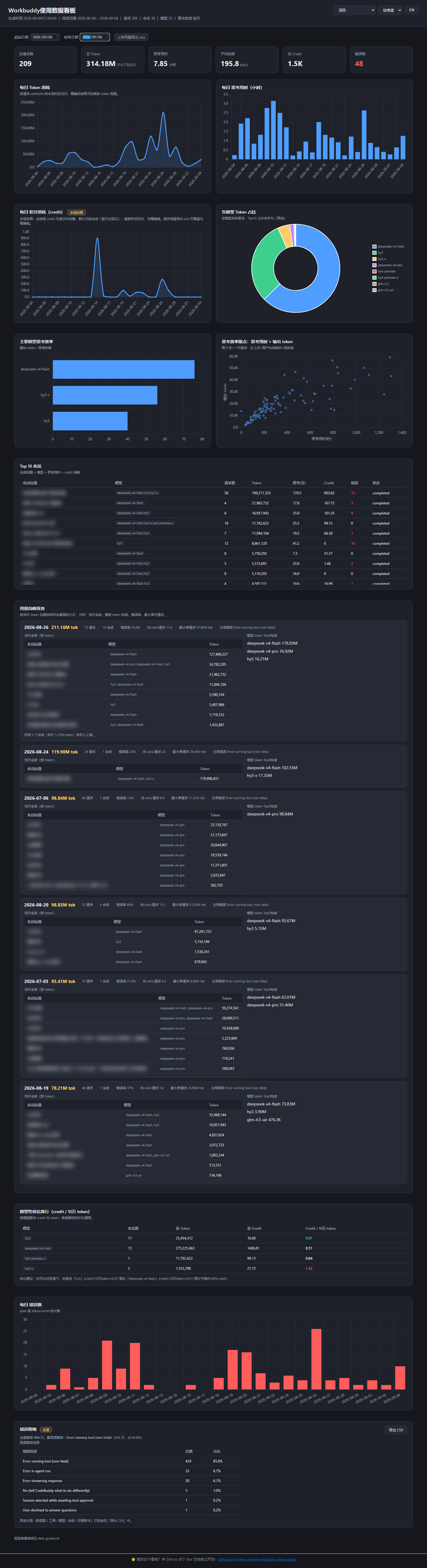
## 界面预览
## 技能简介
把 WorkBuddy 自己的本地使用数据,变成一份离线可查的 Dashboard。
可以看到:toREADME.md
> **Skill Overview**
>
> WorkBuddy Usage Status turns WorkBuddy's own local usage data into an offline dashboard — token spend, thinking time, thinking efficiency, model distribution, error count, and credit consumption. It ranks model cost-performance and shows per-model rates so you can pick the cheapest model, and supports a date-range filter so you can zoom into any period. All model-share charts are limited to the top 10 models with the rest grouped as "Other". All data stays on your machine under `~/.workbuddy/`; **default zero network, no external APIs**. The generated dashboard is one HTML file plus a local Chart.js copy written into the same folder, so it renders offline with zero dependencies.
>
> **What it does**: Offline dashboard for WorkBuddy's local usage data — token / credit consumption, thinking efficiency, model distribution & cost-performance, date-range filtering, error monitoring, and usage-spike analysis.
>
> **Recent updates**:
>
> - **Per-call credit** — credit now comes from every model call logged in local session files, attributed to the day the call happened. No more "all credit on the session's first day".
> - **Model cost & rates** — one table, two groups of columns: cost reality shows calls, tokens, credit, and credit per million tokens; rate structure shows non-cached input, cached input, and output unit prices, plus off-peak discount. Both are back-calculated from local per-call detail.
> - **Costliest single prompts** — the 20 priciest prompts by credit, with concentration stats, so you can find the few calls that actually cost money.
> - **Cache hit-rate panel** — overall hit rate, a daily trend line, and a per-model ranking.
> - **Full-dataset CSV and xlsx on every run** — timestamped `usage-full-<timestamp>.csv` and `usage-full-<timestamp>.xlsx` are written next to the dashboard. The CSV carries all 14 sections in a single file; the xlsx puts each section in its own worksheet. Headers and section names follow your OS language.
> - **Auto-archiving against WorkBuddy's 30-day trace cleanup** — every run merges live traces with a local archive, so history keeps accumulating; a dashboard banner reminds you to run at least once every 30 days. An optional `--seed <old snapshot>` imports an older snapshot's daily totals.
> - **Drill-down** — top-10 sessions expand into per-turn tables with an optional masked prompt column; usage-peak cards expand into that day's session table and model Top 5.
>
> **How to install**
>
> ```
> clawhub install workbuddy-usage-status
> ```
>
> **How to use**
>
> - **Chat trigger:** Describe what you want in plain English or Chinese. This skill applies when you ask to view, generate, or export **your own** WorkBuddy usage status / stats / activity dashboard. Examples:
>
>   "generate a WorkBuddy usage dashboard" · "view my recent WorkBuddy usage status" · "show token / credit consumption and model distribution" · "which model is the most cost-effectiv
_meta.json
{
  "ownerId": "kn71k620de8zkrxmqxjtdyjmg58b00fm",
  "slug": "workbuddy-usage-status",
  "version": "1.5.1",
  "publishedAt": 1790862749830
}
CHANGELOG.md
# Changelog / 版本历史

### 📊 当前状态

- Skillhub & Clawhub 双平台下载突破 4000
- SkillHub TRACE 评分 4.8(优秀)
- ClawHub 搜 WorkBuddy 排第一

### ⭐ 支持

如果这个看板帮你看清了 WorkBuddy 的用量,欢迎去 GitHub 点个 Star 支持独立开发 🙏

👉 [GitHub - clancy-feng/workbuddy-usage-status: Offline WorkBuddy usage analytics dashboard — token/credit consumption, model cost-performance, spike inspection. Zero network dependency. · GitHub](https://github.com/clancy-feng/workbuddy-usage-status)

## [1.5.1] - 2026-10-01

### 修复 · 安全性增强

- 去掉了多余的权限声明和文件用途说明。
- 补充了更多的生成物敏感信息提示。

## [1.5.0] - 2026-09-30

### 新功能 · 重大突破——Credit 精确到逐次调用

- 此前只能取到会话级 credit 并整体挂到会话首次出现的日期,现在找到了新的线索,终于可以把积分消耗精确到每次会话调用中了。
- 会话文件不受 WorkBuddy 的 30 天 trace 清理影响,历史 credit 的覆盖面因此比 token 更完整。
- 看板新增 credit 来源徽标:来自本地逐次明细时显示「逐次实测」,叠加了官方导出补充时显示「逐次实测 + xlsx 补充」。
- 新增提示条,列出「有 credit 但 token 明细已被清理」的日期,说明这些天积分准确、token 偏低属正常现象。
- 随之移除上传用量xlsx和token去官方API取数据的功能,`--credit-xlsx` 定位收窄为参考补充:只补入本地没有逐次明细的日期,不再覆盖实测值。

### 新功能 · 模型成本与费率

- 新增「模型成本与费率」卡片,替代原「模型性价比排行」。一张表两组列:成本实况列出调用数、token、credit、每百万 token 积分;费率结构列出非缓存输入、缓存输入、输出三档单价与低谷折扣。
- 费率由本地逐次明细反推。按模型与月份分组,月内再分标准与低谷两个时段。
- 进表门槛为 token 达到最大模型的百分之一。标注费率另需调用数不少于 30 次且拟合优度 R² 不低于 0.95,不达标的模型保留在表内显示成本。
- 有多个费率阶段的模型,行首可展开查看各历史阶段的单价与样本数。
- 增加优化建议:在任务量可比的模型中比出最省与最贵两条,差异达到 5% 时给出提示。

### 新功能 · 单次提问成本榜

- 新增「单次提问成本榜」卡片,聚合一次提问触发的全部模型调用,列出积分最高的 20 次,字段含日期、时刻、会话、涉及模型、调用次数、积分、占总积分比例。
- 同时给出集中度:最贵的 1% 与 10% 提问各贡献多少比例的积分。实测样本中,最贵的 10% 提问贡献约 59% 的积分。

### 新功能 · 随报告生成 xlsx

- 每次运行在输出目录同时生成 `usage-full-<时间戳>.xlsx`,与全量 CSV 同源,14 个分区各占一个工作表,首行冻结、列宽按内容自适应。
- CSV 继续生成,与 xlsx 内容同源。

### 移除 · 看板内联上传 xlsx

- 看板顶部筛选栏的「上传用量导出 xlsx」按钮已移除,功能收归命令行 `--credit-xlsx`。该按钮原为替代命令行操作而设,但 credit 现已逐次精确,它只在本地缺少明细的日期上起作用,留在看板上容易被误读为必需步骤。

## [1.4.1] - 2026-09-17

### 修复 · 安全审计增强

- 修正文档与实现不一致:读写边界、数据源数量、抽取器模块说明按实际行为更新。
- 补充用户警告:产物含会话标题与提问原文摘要的敏感性提醒;token 参数只传本地路径、凭证不会进入命令行参数。
- 收紧触发边界:新增触发词表与典型触发说明。

## [1.4.0] - 2026-09-16

### 新功能 · 随报告生成全量CSV

- 每次运行时,会同步在工作区目录生成包含全量数据的CSV文件,适配系统语种。
- 之前错误明细独立导出文件功能移除,合并至全量CSV中。

### 新功能 · 缓存命中率面板

- 新增缓存命中率卡片:整体命中率 + 每日趋势 + 按模型排行。

### 新功能 · 产物自动存档复用

- 现Workbuddy只会自动保存最近30天的Trace记录,Skill机制相应修改为会自动归档数据文件,且首次运行后,每次生成会调用之前文件补全数据,界面中加入“安装后每三十天内需运行一次“提醒。

### 改进 · 数据明细按钮显示

- Top10会话和用量高峰显示添加明细按钮,展开可查看更多细节。
- 提问列默认隐藏,由顶部「显示提问」开关控制。

### 修复 · 文案界面调整

- 优化部分界面布局和文档内容。

## [1.3.3] - 2026-09-09

### 修复 · Bug fix

- 修复 Workbuddy新版导致的生成物在Workbuddy内置浏览器中无法正确渲染内联Chart.js问题,并调整相应文案说明。

### 修复 · 文案调整

- 优化部分文案显示和文档内容。

## [1.3.2] - 2026-09-06

### 修复 · Bug fix

- 修复 `--billing-token-file` 调用官方用量 API 时误引用尚未构建的 `summary` 导致运行时报错。

### 修复 · 文案调整

- 优化部分文案显示和文档内容。

## [1.3.0] - 2026-09-04

### 修复 · 日期范围校验

- 起始日期晚于结束日期时,看板**报错提示**(「起始日期不能晚于结束日期,请修正」)。

### 新功能 · 精确积分统计入口更新

- 新增 `--billing-token-file <路径>`:用户从浏览器 DevTools 手动复制用量 API 的鉴权头(如 `Cookie: ...` 整行,或 `Authorization: Bearer ...`)后,skill 以该 凭证调用官方用量 API 精确 credit,效果与 `--credit-xlsx` 一致。
- 顶部筛选栏新增「上传用量导出 xlsx」按钮:在浏览器里直接选文件即可覆盖每日 credit,**效果与 `--credit-xlsx` 完全一致**,无需跑命令。

### 新功能 · 错误明细 CSV 导出

- 错误明细卡片新增「导出 CSV」按钮:将 6 类分类统计(高频错误信息 / 按类型 / 按工具 / 按模型 / 按会话 / 近期错误样本
DATA-GUIDE.md
# 数据与方法说明

本文档解释 `workbuddy-usage-status` 看板里每一个数字是怎么算出来的、数据从哪来、各个阈值和参数的含义。

> **English note:** This document is written in Chinese. An English overview of the skill is at the top of `README.md`. The dashboard itself supports both Chinese and English, and CSV headers follow the operating system UI language.

---

## 1. 数据来源

看板只读本地文件,有三个数据源:

| 数据源  | 路径(默认 `~/.workbuddy/`)                           | 提供什么                                                                                     |
| ---- | ------------------------------------------------ | ---------------------------------------------------------------------------------------- |
| 会话库  | `workbuddy.db`(`sessions` 表 + `session_usage` 表) | 会话标题/状态/模型;会话级 credit 账本,用于本地无明细时的回退                                                     |
| 调用轨迹 | `traces/*/trace_*.json`,每个文件对应一次请求               | 每次请求的时长、token 拆分、思考用时、模型、工具调用数、错误数                                                       |
| 会话文件 | `projects/<工作区>/<sessionId>.jsonl`               | 用户提问摘要 `<user_query>`,截 300 字,展示默认脱敏;每次模型调用的模型名与精确 credit `providerData.rawUsage.credit` |

三个口径的相互关系:

- Token / 思考用时 / 错误 / 工具调用:来自 `traces/`,按"一次请求"逐条统计。
- Credit(积分):来自 `projects/*/*.jsonl` 里**每一次模型调用**的 `providerData.rawUsage.credit`,带该次调用的时间戳,按调用时间归日。`workbuddy.db` 的 `session_usage.credit_json` 只作为本地无明细会话的兜底来源。

因此"某个会话 token 很多但 credit=0"是正常现象,它是限免模型,见第 6 节。

---

## 2. 基础指标口径

### 2.1 一次请求记录了什么

每条 trace 对应一次请求。

- Token 总量 `tokens` = trace 顶层 `totalTokens`。
- 输入 / 输出 / 缓存 token = `modelInfo.totalInputTokens` / `totalOutputTokens` / `totalCachedTokens`。
- 思考用时 `thinking_sec` = 该 trace 里所有 `type=generation`(模型推理)的 span 时长之和,毫秒转秒;工具调用(tool/mcp/function)时长不计入,它是"模型推理/思考"的代理指标。
- 工具调用次数 `calls` = `modelInfo.callCount`。
- 错误数 `errors` = trace 里 `status=error` 或带 `error` 字段的 span 数量,按 span 级统计,一次请求可能多个 span 报错。
- 模型名 `model` = `modelInfo.models` 拼接;无则记 `unknown`。
- 会话归属 `session_id` = trace 的 `sessionId`。统计仅计入有实际 token 消耗的 trace;无 token 的工作流记账记录不进入用量基数。在有效 trace 上,`sessionId` 与 `workbuddy.db` 的 `sessions` 表 100% 对应,所有真实用量都能精确归到某个会话。

### 2.2 聚合口径

- 按天:以请求 `startedAt` 转本地时区的日期(`%Y-%m-%d`)分组。
- 按模型:以 trace 的 `model` 字段聚合。
- 按会话:以 `session_id` 聚合;会话标题/状态/模型取自 `sessions` 表(`custom_title` 优先于 `title`)。会话集合包含三类:本次扫描到的 trace 所属会话、从归档恢复的已清理 trace 所属会话、只有逐次明细而没有 trace 的会话。后两类补齐后,看板顶部按会话累加的用量合计才与总量字段一致;其中第三类只有 credit,请求数与 token 均为 0。
- Credit **按调用归日**:每一次模型调用的 `providerData.rawUsage.credit` 带该次调用的时间戳,归入当日;`by_day[d].pc` 为真表示该日 credit 来自逐次实测。本地没有对话文件可解析的历史会话,其 credit 无法归日,单列提示。

---

## 3. 顶部 KPI

| KPI       | 计算方式                          |
| --------- | ----------------------------- |
| 总请求数      | `traces` 文件总数                 |
| 总 Token   | 所有请求 `tokens` 之和              |
| 思考用时      | 所有请求 `thinking_sec` 之和,换算成小时  |
| 平均效率      | `总输出 token / 总思考秒数`,单位 tok/s  |
| Credit 消耗 | 每日 credit 之和,每日值来自逐次实测,见 §4.1 |
| 错误数       | 所有请求 `errors` 之和              |

---

## 4. 各图表 / 卡片的计算方法与参数

### 4.1 每日积
AionUi
Free, local, open-source 24/7 Cowork app and OpenClaw for Gemini CLI, Claude Code, Codex, OpenCode, Qwen Code, Goose CLI, Auggie, and more | 🌟 Star if you like it!
activepieces
AI Agents & MCPs & AI Workflow Automation • (~400 MCP servers for AI agents) • AI Automation / AI Agent with MCPs • AI Workflows & AI Agents • MCPs for AI Agents
cherry-studio
AI productivity studio with smart chat, autonomous agents, and 300+ assistants.
CopilotKit
The Frontend for Agents & Generative UI. React + Angular
Machine-readable data
The same record, as JSON, for agents and crawlers.
{
  "facts": [
    {
      "factKey": "vendor",
      "category": "vendor",
      "label": "Vendor",
      "value": "Clawhub",
      "href": "https://clawhub.ai/clancy-feng/skills/workbuddy-usage-status",
      "sourceUrl": "https://clawhub.ai/clancy-feng/skills/workbuddy-usage-status",
      "sourceType": "profile",
      "confidence": "medium",
      "observedAt": "2026-10-10T17:10:16.560Z",
      "isPublic": true
    },
    {
      "factKey": "protocols",
      "category": "compatibility",
      "label": "Protocol compatibility",
      "value": "OpenClaw",
      "href": "https://www.xpersona.co/api/v1/agents/clawhub-clancy-feng-workbuddy-usage-status/contract",
      "sourceUrl": "https://www.xpersona.co/api/v1/agents/clawhub-clancy-feng-workbuddy-usage-status/contract",
      "sourceType": "contract",
      "confidence": "medium",
      "observedAt": "2026-10-10T17:10:16.560Z",
      "isPublic": true
    },
    {
      "factKey": "traction",
      "category": "adoption",
      "label": "Adoption signal",
      "value": "1.3K downloads",
      "href": "https://clawhub.ai/clancy-feng/workbuddy-usage-status",
      "sourceUrl": "https://clawhub.ai/clancy-feng/workbuddy-usage-status",
      "sourceType": "profile",
      "confidence": "medium",
      "observedAt": "2026-10-10T17:10:16.560Z",
      "isPublic": true
    },
    {
      "factKey": "latest_release",
      "category": "release",
      "label": "Latest release",
      "value": "1.5.1",
      "href": "https://clawhub.ai/clancy-feng/workbuddy-usage-status",
      "sourceUrl": "https://clawhub.ai/clancy-feng/workbuddy-usage-status",
      "sourceType": "release",
      "confidence": "medium",
      "observedAt": "2026-10-01T13:52:29.830Z",
      "isPublic": true
    },
    {
      "factKey": "handshake_status",
      "category": "security",
      "label": "Handshake status",
      "value": "UNKNOWN",
      "href": "https://www.xpersona.co/api/v1/agents/clawhub-clancy-feng-workbuddy-usage-status/trust",
      "sourceUrl": "https://www.xpersona.co/api/v1/agents/clawhub-clancy-feng-workbuddy-usage-status/trust",
      "sourceType": "trust",
      "confidence": "medium",
      "observedAt": null,
      "isPublic": true
    }
  ],
  "events": [
    {
      "eventType": "release",
      "title": "Release 1.5.1",
      "description": "v1.5.1:Security enhancement, check changelog.md for details",
      "href": "https://clawhub.ai/clancy-feng/workbuddy-usage-status",
      "sourceUrl": "https://clawhub.ai/clancy-feng/workbuddy-usage-status",
      "sourceType": "release",
      "confidence": "medium",
      "observedAt": "2026-10-01T13:52:29.830Z",
      "isPublic": true
    }
  ]
}
Record generated Oct 10, 2026.