
yunxiao-devops
与阿里云云效(Yunxiao)DevOps 平台交互,覆盖八大核心能力:项目协作 Projex、 代码管理 Codeup、流水线 Flow、应用交付 Appstack、制品仓库 Packages、 测试管理 Testhub、效能洞察 Insight、知识库 Thoughts。 当用户提到云效、Projex、Cod... Skill: yunxiao-devops Owner: codingadai Summary: 与阿里云云效(Yunxiao)DevOps 平台交互,覆盖八大核心能力:项目协作 Projex、 代码管理 Codeup、流水线 Flow、应用交付 Appstack、制品仓库 Packages、 测试管理 Testhub、效能洞察 Insight、知识库 Thoughts。 当用户提到云效、Projex、Cod... Tags: latest:2.5.0 Version history: v2.5.0 | 2026-03-31T05:58:57.132Z | user 修复 poll-pipeline/poll-appstack-stage 错误处理;release-flow 改用 spawn+unref 真正后台化;移除 workspace/scripts 重复脚本,统一到 skill 目录;新增 mr-action.mjs;S
Rank
62
Safety
84
Downloads
2.4k
Updated
Oct 9, 2026
Version
2.5.0
Source
CLAWHUB
About
What it does, and when to use it.
Capability contract not published. No trust telemetry is available yet. 2.4K downloads reported by the source. Last updated 10/9/2026.
Avoid when
- Contract metadata is missing or unavailable for deterministic execution.
Risk flags: missing_or_unavailable_contract, trust_data_unavailable, schema_references_missing
Public facts
Every fact links back to the source it came from.
- Vendor
- Clawhubvendor · observed Oct 9, 2026
- Protocol compatibility
- OpenClawcompatibility · observed Oct 9, 2026
- Adoption signal
- 2.4K downloadsadoption · observed Oct 9, 2026
- Latest release
- 2.5.0release · observed Mar 31, 2026
- Handshake status
- UNKNOWNsecurity
Install and run
Setup complexity: low.
clawhub skill install s172mr41gktmpkwkk2ncr29c8n83zqqf:yunxiao-devops- Setup complexity is LOW. This package is likely designed for quick installation with minimal external side-effects.
- Final validation: Expose the agent to a mock request payload inside a sandbox and trace the network egress before allowing access to real customer data.
Contract: missing
curl -s "https://www.xpersona.co/api/v1/agents/clawhub-codingadai-yunxiao-devops/snapshot"
Documentation
CLAWHUB
160,000 characters of source documentation, loaded on request.
Extracted files
5 files captured from the source.
SKILL.md
---
name: yunxiao-devops
description: >
  与阿里云云效(Yunxiao)DevOps 平台交互,覆盖八大核心能力:项目协作 Projex、
  代码管理 Codeup、流水线 Flow、应用交付 Appstack、制品仓库 Packages、
  测试管理 Testhub、效能洞察 Insight、知识库 Thoughts。
  当用户提到云效、Projex、Codeup、Flow、流水线、部署单、应用、版本、迭代、
  工作项、需求、缺陷、任务、测试计划、制品仓库、Yunxiao、DevOps 时使用。
  读 reference 选择:项目协作/工作项/迭代/版本/工时 → projex-guide.md;
  流水线创建/YAML → pipeline-yaml-guide.md;工作流状态 → workflow-transitions.json。
---

# 云效 DevOps Skill

## 配置

所有脚本从 `scripts/config.mjs` 读取配置,优先级:**环境变量 > `.env.local` > `~/.yunxiao-devops.json`**

**快速配置(复制示例文件):**
```bash
cp .env.local.example .env.local
# 编辑 .env.local,填入你的 token 和 org ID
```

**必须配置:**
| 环境变量 | 说明 |
|---------|------|
| `YUNXIAO_TOKEN` | 云效 Personal Access Token(个人设置 → Access Token) |
| `YUNXIAO_ORG_ID` | 云效组织 ID(URL 中 `/organizations/` 后的字符串) |

**可选配置:**
| 环境变量 | 说明 |
|---------|------|
| `YUNXIAO_USER_ID` | 你在云效中的用户 ID(用于「我的工作项」默认值) |
| `FEISHU_USER_OPEN_ID` | 你的飞书 open_id(用于接收通知的目标用户) |
| `YUNXIAO_PROJECT_ID` | 默认项目 ID(部分脚本使用) |
| `FEISHU_APP_ID` / `FEISHU_APP_SECRET` | 飞书 App 凭证(不设则从 `~/.openclaw/openclaw.json` 读取) |

```bash
# REST API 调用模板(token 从环境变量读取)
curl -s -X <METHOD> "https://openapi-rdc.aliyuncs.com/oapi/v1/..." \
  -H "x-yunxiao-token: ${YUNXIAO_TOKEN}" \
  -H "Content-Type: application/json" \
  -d '{...}'
```

---

## 🗺️ 高频场景速查表

| 场景 | 触发词示例 | 方式 |
|------|-----------|------|
| ☀️ 每日站会 | "今天有什么任务"、"站会" | `scripts/daily-standup-card.mjs` |
| 查看我的工作项 | "查下我的工作项"、"我负责什么" | `scripts/my-workitems-card.mjs` |
| 查看工作项详情 | 粘贴云效 URL 或"看下 UHZM-5" | `scripts/workitem-card.mjs <id>` |
| 创建工作项 | "帮我建个需求/任务/缺陷" | `scripts/create-workitem-flow.mjs` |
| 工作项关联 | "把这个需求关联到任务"、"看关联项" | `scripts/workitem-relation-flow.mjs <id>` |
| ⏱️ 工时打卡 | "打卡"、"记工时"、"登记今日工时" | `scripts/effort-checkin-card.mjs` |
| 修复 Bug | "帮我修复这个 bug"、"修 UHZM-5" | `scripts/bug-fix-flow.mjs <id>` |
| 📝 最近提交 | "谁改了代码"、"看最近 commit" | `scripts/commit-activity-card.mjs` |
| 🔀 Code Review | "有没有待 Review 的 MR" | `scripts/mr-review-card.mjs` |
| 🚀 发版 | "发版"、"打 tag"、"发 v1.2.0" | `scripts/release-flow.mjs` |
| 版本管理 | "查版本"、"创建版本"、"关闭版本" | `scripts/version-release-flow.mjs` |
| 查看/触发流水线 | "流水线怎么样"、"触发流水线" | `scripts/pipeline-log-card.mjs` + REST API 触发 |
| 流水线日志 | "流水线挂了看日志"、"哪步报错了" | `scripts/pipeline-log-card.mjs` |
| 📊 迭代进展 | "这迭代完成多少了"、"站会看板" | `scripts/sprint-dashboard-card.mjs` |
| 新仓库初始化 | "建个新仓库"、"初始化仓库" | `scripts/repo-init-flow.mjs` |
| 🧪 测试用例 | "查测试用例"、"查测试计划结果" | `scripts/testcase-card.mjs` |
| 📦 应用交付 | "查应用"、"运行工作流"、"查部署单" | `scripts/appstack-card.mjs` |
| 搜索工作项 | "找本迭代未完成的需求" | REST API → projex-guide.md 工作流 E |

---

## 一、查看我的工作项

```bash
# 发飞书卡片,列出负责的工作项,支持分页
node /root/.openclaw/workspace/skills/yunxiao-devops/scripts/my-workitems-card.mjs \
  [--user <yunxiaoUserId>] [--project <projectId>] [--page <n>]
```

**翻页回调(收到 `WI_LIST_PAGE|userId|projectId|page`):**
```bash
node scripts/my-workitems-card.mjs --user <userId> --project <projectId> --page <n> --update-msg <messageId>
```

**点击工作项查详情(收到 `WI_DETAIL|workitemId`):**
```ba
_meta.json
{
  "ownerId": "kn7afq2edcpc00twe0trp38wj183ztjy",
  "slug": "yunxiao-devops",
  "version": "2.5.0",
  "publishedAt": 1774936737132
}
references/api-docs/001-цЬНхКбцОехЕечВ╣я╝Иdomainя╝Й.md
# 服务接入点(domain)
本文介绍如何获取服务接入点。
## 服务接入点域名(domain)
- **中心版:使用统一的服务接入点**
`openapi-rdc.aliyuncs.com`
- **Region版:使用实例访问域名**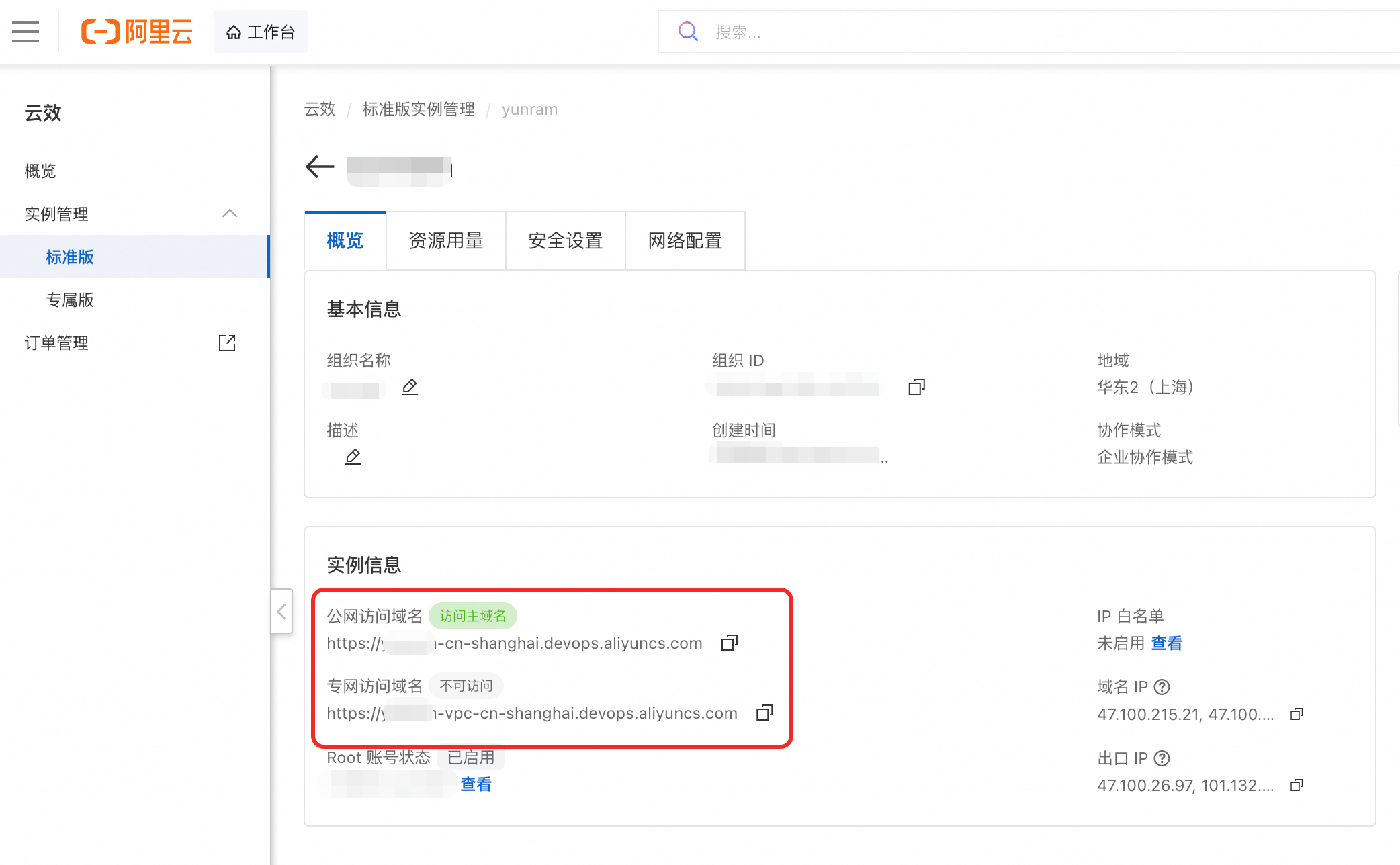references/api-docs/002-шО╖хПЦф╕кф║║шо┐щЧоф╗дчЙМ.md
# 获取个人访问令牌
个人访问令牌可用于访问云效 API 及通过 HTTP 协议进行 `git` 操作。本文介绍个人访问令牌安全性说明及获取方法。
## 令牌授权
- 在创建令牌时,需要选择令牌可访问的API权限点和有效时间,权限点选择遵循最小授权原则,有效时间尽量选择在需要的范围内,不使用永久时间。
- 令牌具有与令牌申请人相同的访问资源和对这些资源执行操作的能力,并且还受到授予令牌的API权限范围限制。令牌无法向用户授予额外访问权限功能。
## 安全保管
处理身份验证凭据的方式与处理密码或其他敏感凭据的方式相同:
- 不要使用未加密的消息或电子邮件、IM等系统共享令牌。
- 不要在命令行中以纯文本形式传递令牌。
- 不要将未加密的令牌推送到公共代码库等不受控的系统中。
## 谨慎使用
- 请勿将令牌硬编码到代码并推送到公共仓库。可以将令牌写到环境变量中,调用接口时通过访问环境变量将 token 写入请求体,避免因代码非正常访问造成的令牌泄露进而引发数据泄露风险。
- 请养成良好习惯,不使用永久令牌并定期或不定期更新令牌。
- 在发现令牌泄露时,请第一时间删除令牌。
## **操作步骤**
**重要** 为确保访问API 和Git操作代码的令牌安全,云效仅在首次创建时返回并显示令牌。在后续的令牌获取请求中,用户将无法再次获取原始令牌。同时,云效将对您创建的令牌进行加密存储,以确保令牌在保管过程中的安全性。在令牌的申请和使用过程中,请遵循**最小化授权、安全保管、谨慎使用**等安全原则,降低可能存在的安全风险。
1. 登录**云效 工作台**。登录方式请参见[个人账号与登录](https://help.aliyun.com/zh/yunxiao/user-guide/personal-account-and-login)。
2. 在**云效 工作台**页面,单击右上角的**用户头像**,然后在弹出的菜单中单击**个人设置**。

3. 在**个人设置**页面,单击**个人访问令牌**,然后单击**新建访问令牌**,填写必要信息,如下所示:
| **参数名称** | **说明** |
| --- | --- |
| **令牌名称** | 自定义令牌名称,最大支持输入64个字。 |
| **描述** | 对个人访问令牌进行描述,可不填。 |
| **到期时间** | 配置令牌有效期。 **警告** 令牌到期后将无法调用API接口。 |
| **选择权限** | 根据需求按最小化原则配置相关权限。 |

4. 确认配置无误后单击底部**新建**。
5. 保存生成的令牌密钥(仅此次可见,后续无法再次查看)。references/api-docs/003-щФЩшппчаБф╕нх┐Г.md
# 错误码中心 本文为您介绍 API 相关错误码,您可以根据本文错误码对照表查找对应的报错信息。 | **HTTP status code** | **错误码** | **错误信息** | **错误说明** | | --- | --- | --- | --- | | 400 | BadRequest | Bad Request | 错误请求。 | | UnsupportedInCurrentEnv | API unsupported in current deployed version | 当前实例版本暂未支持该API。 | | UnsupportedCurrentTokenType | API unsupported current token type | API暂不支持使用当前令牌类型,请查阅API文档确认鉴权方式。 | | 401 | Unauthorized | Unauthorized | 未授权。 | | ExpiredTokenError | Token has expired | 令牌已过期。 | | InvalidTokenError | Token is invalid | 令牌无效。 | | 403 | Forbidden.InvalidUser.UserNotInCurrentOrganization | The current user is not in the organization and has no right to operate. | 当前用户未加入组织。 | | 403 | Forbidden.InvalidOrganizationMember | The current user can not be used in the organization and has no right to operate. | 当前用户在组织中无效,没有操作权限。 | | 403 | Forbidden | Forbidden | 无权限。 | | 429 | TooManyRequests | Too many requests | 发送了过多请求。 | | 500 | InternalServerError | An internal error occurs | 发生了内部错误 |
AionUi
Free, local, open-source 24/7 Cowork app and OpenClaw for Gemini CLI, Claude Code, Codex, OpenCode, Qwen Code, Goose CLI, Auggie, and more | 🌟 Star if you like it!
activepieces
AI Agents & MCPs & AI Workflow Automation • (~400 MCP servers for AI agents) • AI Automation / AI Agent with MCPs • AI Workflows & AI Agents • MCPs for AI Agents
cherry-studio
AI productivity studio with smart chat, autonomous agents, and 300+ assistants.
CopilotKit
The Frontend for Agents & Generative UI. React + Angular
Machine-readable data
The same record, as JSON, for agents and crawlers.
{
  "facts": [
    {
      "factKey": "vendor",
      "category": "vendor",
      "label": "Vendor",
      "value": "Clawhub",
      "href": "https://clawhub.ai/codingadai/skills/yunxiao-devops",
      "sourceUrl": "https://clawhub.ai/codingadai/skills/yunxiao-devops",
      "sourceType": "profile",
      "confidence": "medium",
      "observedAt": "2026-10-09T15:33:35.628Z",
      "isPublic": true
    },
    {
      "factKey": "protocols",
      "category": "compatibility",
      "label": "Protocol compatibility",
      "value": "OpenClaw",
      "href": "https://www.xpersona.co/api/v1/agents/clawhub-codingadai-yunxiao-devops/contract",
      "sourceUrl": "https://www.xpersona.co/api/v1/agents/clawhub-codingadai-yunxiao-devops/contract",
      "sourceType": "contract",
      "confidence": "medium",
      "observedAt": "2026-10-09T15:33:35.628Z",
      "isPublic": true
    },
    {
      "factKey": "traction",
      "category": "adoption",
      "label": "Adoption signal",
      "value": "2.4K downloads",
      "href": "https://clawhub.ai/codingadai/yunxiao-devops",
      "sourceUrl": "https://clawhub.ai/codingadai/yunxiao-devops",
      "sourceType": "profile",
      "confidence": "medium",
      "observedAt": "2026-10-09T15:33:35.628Z",
      "isPublic": true
    },
    {
      "factKey": "latest_release",
      "category": "release",
      "label": "Latest release",
      "value": "2.5.0",
      "href": "https://clawhub.ai/codingadai/yunxiao-devops",
      "sourceUrl": "https://clawhub.ai/codingadai/yunxiao-devops",
      "sourceType": "release",
      "confidence": "medium",
      "observedAt": "2026-03-31T05:58:57.132Z",
      "isPublic": true
    },
    {
      "factKey": "handshake_status",
      "category": "security",
      "label": "Handshake status",
      "value": "UNKNOWN",
      "href": "https://www.xpersona.co/api/v1/agents/clawhub-codingadai-yunxiao-devops/trust",
      "sourceUrl": "https://www.xpersona.co/api/v1/agents/clawhub-codingadai-yunxiao-devops/trust",
      "sourceType": "trust",
      "confidence": "medium",
      "observedAt": null,
      "isPublic": true
    }
  ],
  "events": [
    {
      "eventType": "release",
      "title": "Release 2.5.0",
      "description": "修复 poll-pipeline/poll-appstack-stage 错误处理;release-flow 改用 spawn+unref 真正后台化;移除 workspace/scripts 重复脚本,统一到 skill 目录;新增 mr-action.mjs;SKILL.md 启动命令改为 nohup+disown",
      "href": "https://clawhub.ai/codingadai/yunxiao-devops",
      "sourceUrl": "https://clawhub.ai/codingadai/yunxiao-devops",
      "sourceType": "release",
      "confidence": "medium",
      "observedAt": "2026-03-31T05:58:57.132Z",
      "isPublic": true
    }
  ]
}
Record generated Oct 9, 2026.