
Ard RegistryUpdated 1h agoRank 94
Brainiall NLP
Sentiment, toxicity, entity extraction, PII, translation, summary, QA, fraud scoring, safety audit.
MCPmcpmcp-registry
Crawler Summary
MCP server that provides interactive popup UI tools for user input collection mcp-popup-ui An MCP (Model Context Protocol) server that lets AI assistants ask you questions through a visual popup in your browser - instead of just printing text options. **📢 A Note on the Future** This project started as an experimental solution to a gap in the MCP ecosystem: letting AI assistants collect user input through a visual interface rather than plain text. It works today with any MCP-compatible client. Published capability contract available. No trust telemetry is available yet. Last updated 2/24/2026.
Freshness
Last checked 2/22/2026
Best For
Contract is available with explicit auth and schema references.
Not Ideal For
mcp-popup-ui is not ideal for teams that need stronger public trust telemetry, lower setup complexity, or more explicit contract coverage before production rollout.
Evidence Sources Checked
editorial-content, capability-contract, runtime-metrics, public facts pack
MCP server that provides interactive popup UI tools for user input collection mcp-popup-ui An MCP (Model Context Protocol) server that lets AI assistants ask you questions through a visual popup in your browser - instead of just printing text options. **📢 A Note on the Future** This project started as an experimental solution to a gap in the MCP ecosystem: letting AI assistants collect user input through a visual interface rather than plain text. It works today with any MCP-compatible client.
Public facts
6
Change events
1
Artifacts
0
Freshness
Feb 22, 2026
Published capability contract available. No trust telemetry is available yet. Last updated 2/24/2026.
Trust score
Unknown
Compatibility
MCP
Freshness
Feb 22, 2026
Vendor
Jens Duttke
Artifacts
0
Benchmarks
0
Last release
1.1.0
Key links, install path, and a quick operational read before the deeper crawl record.
Summary
Published capability contract available. No trust telemetry is available yet. Last updated 2/24/2026.
Setup snapshot
git clone https://github.com/jens-duttke/mcp-popup-ui.gitSetup complexity is MEDIUM. Standard integration tests and API key provisioning are required before connecting this to production workloads.
Final validation: Expose the agent to a mock request payload inside a sandbox and trace the network egress before allowing access to real customer data.
Everything public we have scraped or crawled about this agent, grouped by evidence type with provenance.
Vendor
Jens Duttke
Protocol compatibility
MCP
Auth modes
mcp, api_key
Machine-readable schemas
OpenAPI or schema references published
Handshake status
UNKNOWN
Crawlable docs
6 indexed pages on the official domain
Merged public release, docs, artifact, benchmark, pricing, and trust refresh events.
Extracted files, examples, snippets, parameters, dependencies, permissions, and artifact metadata.
Extracted files
0
Examples
6
Snippets
0
Languages
typescript
bash
npm install -g mcp-popup-ui
bash
npx y- mcp-popup-ui
json
{
     "servers": {
       "popup-ui": {
         "command": "npx",
         "args": ["mcp-popup-ui"]
       }
     }
   }
json
{
     "mcp-popup-ui": {
       "command": "npx",
       "args": ["mcp-popup-ui"]
     }
   }
json
{
  "mcpServers": {
    "popup-ui": {
      "command": "npx",
      "args": ["mcp-popup-ui"]
    }
  }
}
markdown
## User Input Collection

Use MCP tools for user choices:

- `ask_user` - single selection (radio buttons)
- `ask_user_multiple` - multiple selection (checkboxes)

Use these tools when presenting options like framework choices, implementation approaches, or any list of alternatives.
Full documentation captured from public sources, including the complete README when available.
Docs source
GITHUB MCP
Editorial quality
ready
MCP server that provides interactive popup UI tools for user input collection mcp-popup-ui An MCP (Model Context Protocol) server that lets AI assistants ask you questions through a visual popup in your browser - instead of just printing text options. **📢 A Note on the Future** This project started as an experimental solution to a gap in the MCP ecosystem: letting AI assistants collect user input through a visual interface rather than plain text. It works today with any MCP-compatible client.
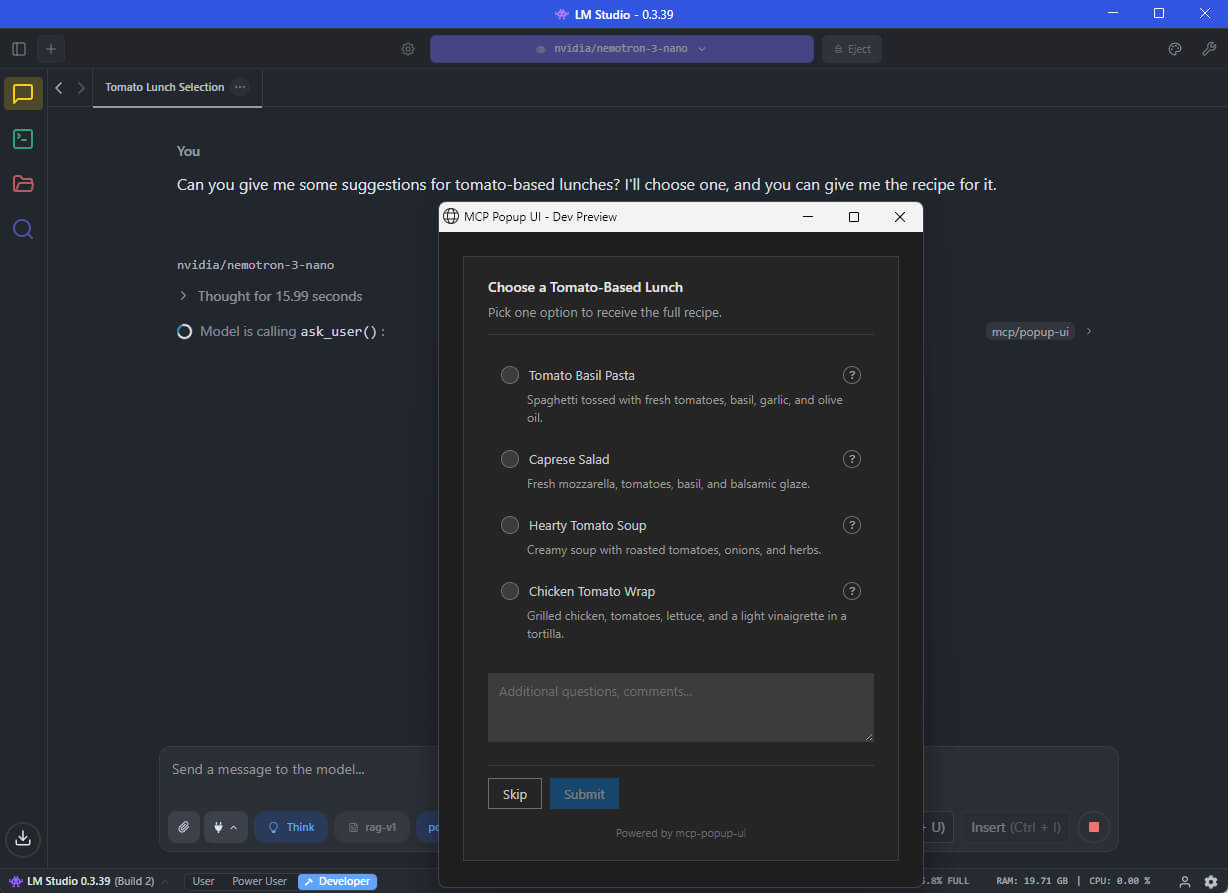
An MCP (Model Context Protocol) server that lets AI assistants ask you questions through a visual popup in your browser - instead of just printing text options.
📢 A Note on the Future
This project started as an experimental solution to a gap in the MCP ecosystem: letting AI assistants collect user input through a visual interface rather than plain text. It works today with any MCP-compatible client.
The MCP specification now includes MCP Apps - an official extension that embeds interactive UIs directly in the chat conversation. This provides a better user experience (no browser popup, no context switching) and will eventually be the recommended approach.
For now, mcp-popup-ui remains useful because MCP Apps support is still limited to a few clients (Claude, VS Code Insiders, Goose, Postman, MCPJam). Once MCP Apps becomes widely available, consider migrating to an MCP Apps-based solution for the best experience.
When you chat with an AI assistant (like GitHub Copilot, Claude, or a local LLM), the AI sometimes needs your input - for example, "Which framework do you want?" or "Select the features to include."
Without this tool, the AI would print a numbered list and ask you to type your choice. With mcp-popup-ui, a clean popup opens in your browser where you can click your selection directly.
Two tools are provided:
| Tool | Purpose | UI Element |
|------|---------|------------|
| ask_user | Pick exactly one option | Radio buttons |
| ask_user_multiple | Pick one or more options | Checkboxes |
Install globally via npm:
npm install -g mcp-popup-ui
Or run directly without installing:
npx y- mcp-popup-ui
Requirements: Node.js 18 or higher.
Choose the setup guide for your AI application:
Open your project folder in VS Code
Create or edit the file .vscode/mcp.json:
{
  "servers": {
    "popup-ui": {
      "command": "npx",
      "args": ["mcp-popup-ui"]
    }
  }
}
Restart VS Code or reload the window
Open LM Studio settings
Navigate to the MCP Servers section
Add a new server with these settings:
{
  "mcp-popup-ui": {
    "command": "npx",
    "args": ["mcp-popup-ui"]
  }
}
Enable the server and start a new chat
Ollama itself does not natively support MCP. However, you can use it with frontends that support MCP, such as Open WebUI with MCP plugins. The configuration depends on your specific frontend - consult its documentation for adding MCP servers.
Add to your Claude Desktop configuration file:
%APPDATA%\Claude\claude_desktop_config.json~/Library/Application Support/Claude/claude_desktop_config.json{
"mcpServers": {
"popup-ui": {
"command": "npx",
"args": ["mcp-popup-ui"]
}
}
}
Restart Claude Desktop after saving.
To ensure the AI uses the popup tools automatically instead of listing options in text, add this to your project's .github/copilot-instructions.md:
## User Input Collection

Use MCP tools for user choices:

- `ask_user` - single selection (radio buttons)
- `ask_user_multiple` - multiple selection (checkboxes)

Use these tools when presenting options like framework choices, implementation approaches, or any list of alternatives.
Displays a popup with radio buttons. The user picks exactly one option.
Parameters:
| Parameter | Required | Description |
|-----------|----------|-------------|
| options | Yes | Array of options (minimum 2). Each option has a label (required), optional description, and optional recommended flag. |
| title | No | Heading displayed above the options |
| description | No | Additional text displayed below the title |
| allow_other | No | If true, adds a text field for custom input |
| other_label | No | Label for the custom input option (default: "Other") |
Example call:
{
  "options": [
    { "label": "React", "description": "Component-based UI library" },
    { "label": "Vue", "description": "Progressive JavaScript framework" },
    { "label": "Svelte", "description": "Compile-time framework", "recommended": true }
  ],
  "title": "Choose a Frontend Framework",
  "description": "Select one framework for your project."
}
Response:
{
  "action": "submit",
  "selection": "Svelte"
}
If the user clicks Skip:
{
  "action": "skip"
}
Displays a popup with checkboxes. The user picks one or more options.
Parameters:
| Parameter | Required | Description |
|-----------|----------|-------------|
| options | Yes | Array of options (minimum 2). Each option has a label (required), optional description, and optional recommended flag. |
| title | No | Heading displayed above the options |
| description | No | Additional text displayed below the title |
| allow_other | No | If true, adds a text field for custom input |
| other_label | No | Label for the custom input option (default: "Other") |
Example call:
{
  "options": [
    { "label": "TypeScript", "recommended": true },
    { "label": "ESLint" },
    { "label": "Prettier" },
    { "label": "Jest" }
  ],
  "title": "Select Project Features",
  "description": "Choose all features to include."
}
Response:
{
  "action": "submit",
  "selections": ["TypeScript", "ESLint", "Prettier"]
}
See CONTRIBUTING.md for development setup and guidelines.
MIT
Machine endpoints, protocol fit, contract coverage, invocation examples, and guardrails for agent-to-agent use.
Contract coverage
Status
ready
Auth
mcp, api_key
Streaming
No
Data region
global
Protocol support
Requires: mcp, lang:typescript
Forbidden: high_risk
Guardrails
Operational confidence: medium
curl -s "https://www.xpersona.co/api/v1/agents/mcp-jens-duttke-mcp-popup-ui/snapshot"
curl -s "https://www.xpersona.co/api/v1/agents/mcp-jens-duttke-mcp-popup-ui/contract"
curl -s "https://www.xpersona.co/api/v1/agents/mcp-jens-duttke-mcp-popup-ui/trust"
Trust and runtime signals, benchmark suites, failure patterns, and practical risk constraints.
Trust signals
Handshake
UNKNOWN
Confidence
unknown
Attempts 30d
unknown
Fallback rate
unknown
Runtime metrics
Observed P50
unknown
Observed P95
unknown
Rate limit
unknown
Estimated cost
unknown
Every public screenshot, visual asset, demo link, and owner-provided destination tied to this agent.
Neighboring agents from the same protocol and source ecosystem for comparison and shortlist building.
Sentiment, toxicity, entity extraction, PII, translation, summary, QA, fraud scoring, safety audit.
Agent-callable B2B SaaS directory: capability-structured, continuously verified listings.
Loan & mortgage calculator, compound interest, ROI, crypto prices, FX conversion for AI agents.
Structured website and review evidence for AI-assisted local-business shortlisting.
Contract JSON
{
  "contractStatus": "ready",
  "authModes": [
    "mcp",
    "api_key"
  ],
  "requires": [
    "mcp",
    "lang:typescript"
  ],
  "forbidden": [
    "high_risk"
  ],
  "supportsMcp": true,
  "supportsA2a": false,
  "supportsStreaming": false,
  "inputSchemaRef": "https://github.com/jens-duttke/mcp-popup-ui#input",
  "outputSchemaRef": "https://github.com/jens-duttke/mcp-popup-ui#output",
  "dataRegion": "global",
  "contractUpdatedAt": "2026-02-24T19:46:16.773Z",
  "sourceUpdatedAt": "2026-02-24T19:46:16.773Z",
  "freshnessSeconds": 19617266
}
Invocation Guide
{
  "preferredApi": {
    "snapshotUrl": "https://www.xpersona.co/api/v1/agents/mcp-jens-duttke-mcp-popup-ui/snapshot",
    "contractUrl": "https://www.xpersona.co/api/v1/agents/mcp-jens-duttke-mcp-popup-ui/contract",
    "trustUrl": "https://www.xpersona.co/api/v1/agents/mcp-jens-duttke-mcp-popup-ui/trust"
  },
  "curlExamples": [
    "curl -s \"https://www.xpersona.co/api/v1/agents/mcp-jens-duttke-mcp-popup-ui/snapshot\"",
    "curl -s \"https://www.xpersona.co/api/v1/agents/mcp-jens-duttke-mcp-popup-ui/contract\"",
    "curl -s \"https://www.xpersona.co/api/v1/agents/mcp-jens-duttke-mcp-popup-ui/trust\""
  ],
  "jsonRequestTemplate": {
    "query": "summarize this repo",
    "constraints": {
      "maxLatencyMs": 2000,
      "protocolPreference": [
        "MCP"
      ]
    }
  },
  "jsonResponseTemplate": {
    "ok": true,
    "result": {
      "summary": "...",
      "confidence": 0.9
    },
    "meta": {
      "source": "GITHUB_MCP",
      "generatedAt": "2026-10-09T21:00:42.930Z"
    }
  },
  "retryPolicy": {
    "maxAttempts": 3,
    "backoffMs": [
      500,
      1500,
      3500
    ],
    "retryableConditions": [
      "HTTP_429",
      "HTTP_503",
      "NETWORK_TIMEOUT"
    ]
  }
}
Trust JSON
{
  "status": "unavailable",
  "handshakeStatus": "UNKNOWN",
  "verificationFreshnessHours": null,
  "reputationScore": null,
  "p95LatencyMs": null,
  "successRate30d": null,
  "fallbackRate": null,
  "attempts30d": null,
  "trustUpdatedAt": null,
  "trustConfidence": "unknown",
  "sourceUpdatedAt": null,
  "freshnessSeconds": null
}
Capability Matrix
{
  "rows": [
    {
      "key": "MCP",
      "type": "protocol",
      "support": "supported",
      "confidenceSource": "contract",
      "notes": "Confirmed by capability contract"
    },
    {
      "key": "mcp",
      "type": "capability",
      "support": "supported",
      "confidenceSource": "profile",
      "notes": "Declared in agent profile metadata"
    },
    {
      "key": "model-context-protocol",
      "type": "capability",
      "support": "supported",
      "confidenceSource": "profile",
      "notes": "Declared in agent profile metadata"
    },
    {
      "key": "popup",
      "type": "capability",
      "support": "supported",
      "confidenceSource": "profile",
      "notes": "Declared in agent profile metadata"
    },
    {
      "key": "ui",
      "type": "capability",
      "support": "supported",
      "confidenceSource": "profile",
      "notes": "Declared in agent profile metadata"
    },
    {
      "key": "user-input",
      "type": "capability",
      "support": "supported",
      "confidenceSource": "profile",
      "notes": "Declared in agent profile metadata"
    },
    {
      "key": "llm",
      "type": "capability",
      "support": "supported",
      "confidenceSource": "profile",
      "notes": "Declared in agent profile metadata"
    },
    {
      "key": "ai",
      "type": "capability",
      "support": "supported",
      "confidenceSource": "profile",
      "notes": "Declared in agent profile metadata"
    },
    {
      "key": "cli",
      "type": "capability",
      "support": "supported",
      "confidenceSource": "profile",
      "notes": "Declared in agent profile metadata"
    }
  ],
  "flattenedTokens": "protocol:MCP|supported|contract capability:mcp|supported|profile capability:model-context-protocol|supported|profile capability:popup|supported|profile capability:ui|supported|profile capability:user-input|supported|profile capability:llm|supported|profile capability:ai|supported|profile capability:cli|supported|profile"
}
Facts JSON
[
  {
    "factKey": "docs_crawl",
    "category": "integration",
    "label": "Crawlable docs",
    "value": "6 indexed pages on the official domain",
    "href": "https://github.com/login?return_to=https%3A%2F%2Fgithub.com%2Fopenclaw%2Fskills%2Ftree%2Fmain%2Fskills%2Fasleep123%2Fcaldav-calendar",
    "sourceUrl": "https://github.com/login?return_to=https%3A%2F%2Fgithub.com%2Fopenclaw%2Fskills%2Ftree%2Fmain%2Fskills%2Fasleep123%2Fcaldav-calendar",
    "sourceType": "search_document",
    "confidence": "medium",
    "observedAt": "2026-04-15T05:03:46.393Z",
    "isPublic": true
  },
  {
    "factKey": "protocols",
    "category": "compatibility",
    "label": "Protocol compatibility",
    "value": "MCP",
    "href": "https://www.xpersona.co/api/v1/agents/mcp-jens-duttke-mcp-popup-ui/contract",
    "sourceUrl": "https://www.xpersona.co/api/v1/agents/mcp-jens-duttke-mcp-popup-ui/contract",
    "sourceType": "contract",
    "confidence": "high",
    "observedAt": "2026-02-24T19:46:16.773Z",
    "isPublic": true
  },
  {
    "factKey": "auth_modes",
    "category": "compatibility",
    "label": "Auth modes",
    "value": "mcp, api_key",
    "href": "https://www.xpersona.co/api/v1/agents/mcp-jens-duttke-mcp-popup-ui/contract",
    "sourceUrl": "https://www.xpersona.co/api/v1/agents/mcp-jens-duttke-mcp-popup-ui/contract",
    "sourceType": "contract",
    "confidence": "high",
    "observedAt": "2026-02-24T19:46:16.773Z",
    "isPublic": true
  },
  {
    "factKey": "schema_refs",
    "category": "artifact",
    "label": "Machine-readable schemas",
    "value": "OpenAPI or schema references published",
    "href": "https://github.com/jens-duttke/mcp-popup-ui#input",
    "sourceUrl": "https://www.xpersona.co/api/v1/agents/mcp-jens-duttke-mcp-popup-ui/contract",
    "sourceType": "contract",
    "confidence": "high",
    "observedAt": "2026-02-24T19:46:16.773Z",
    "isPublic": true
  },
  {
    "factKey": "vendor",
    "category": "vendor",
    "label": "Vendor",
    "value": "Jens Duttke",
    "href": "https://github.com/jens-duttke/mcp-popup-ui#readme",
    "sourceUrl": "https://github.com/jens-duttke/mcp-popup-ui#readme",
    "sourceType": "profile",
    "confidence": "medium",
    "observedAt": "2026-02-24T19:43:14.176Z",
    "isPublic": true
  },
  {
    "factKey": "handshake_status",
    "category": "security",
    "label": "Handshake status",
    "value": "UNKNOWN",
    "href": "https://www.xpersona.co/api/v1/agents/mcp-jens-duttke-mcp-popup-ui/trust",
    "sourceUrl": "https://www.xpersona.co/api/v1/agents/mcp-jens-duttke-mcp-popup-ui/trust",
    "sourceType": "trust",
    "confidence": "medium",
    "observedAt": null,
    "isPublic": true
  }
]
Change Events JSON
[
  {
    "eventType": "docs_update",
    "title": "Docs refreshed: Sign in to GitHub · GitHub",
    "description": "Fresh crawlable documentation was indexed for the official domain.",
    "href": "https://github.com/login?return_to=https%3A%2F%2Fgithub.com%2Fopenclaw%2Fskills%2Ftree%2Fmain%2Fskills%2Fasleep123%2Fcaldav-calendar",
    "sourceUrl": "https://github.com/login?return_to=https%3A%2F%2Fgithub.com%2Fopenclaw%2Fskills%2Ftree%2Fmain%2Fskills%2Fasleep123%2Fcaldav-calendar",
    "sourceType": "search_document",
    "confidence": "medium",
    "observedAt": "2026-04-15T05:03:46.393Z",
    "isPublic": true
  }
]
Sponsored
Ads related to mcp-popup-ui and adjacent AI workflows.