
Gitlab Ai CatalogUpdated 1h agoRank 86
gitlab-mcp
A Model Context Protocol (MCP) server for GitLab
MCPAImcpmodel-context-protocol
Crawler Summary
MCP server for previewing Mermaid diagrams in Claude Code Claude Mermaid MCP Server MCP server for rendering Mermaid diagrams in Claude Code with **live reload** functionality and a built-in skill for expert guidance. Automatically renders diagrams in your browser with real-time updates as you refine them. Perfect for iterative diagram development and documentation workflows. ✨ Features - 🔄 **Live Reload** - Diagrams auto-refresh in your browser as you edit - 🎨 **Multiple Capability contract not published. No trust telemetry is available yet. 73 GitHub stars reported by the source. Last updated 2/25/2026.
Freshness
Last checked 2/25/2026
Best For
claude-mermaid is best for mcp, mermaid, claude workflows where MCP compatibility matters.
Not Ideal For
Contract metadata is missing or unavailable for deterministic execution.
Evidence Sources Checked
editorial-content, GITHUB MCP, runtime-metrics, public facts pack
MCP server for previewing Mermaid diagrams in Claude Code Claude Mermaid MCP Server MCP server for rendering Mermaid diagrams in Claude Code with **live reload** functionality and a built-in skill for expert guidance. Automatically renders diagrams in your browser with real-time updates as you refine them. Perfect for iterative diagram development and documentation workflows. ✨ Features - 🔄 **Live Reload** - Diagrams auto-refresh in your browser as you edit - 🎨 **Multiple
Public facts
5
Change events
1
Artifacts
0
Freshness
Feb 25, 2026
Capability contract not published. No trust telemetry is available yet. 73 GitHub stars reported by the source. Last updated 2/25/2026.
Trust score
Unknown
Compatibility
MCP
Freshness
Feb 25, 2026
Vendor
Veelenga
Artifacts
0
Benchmarks
0
Last release
1.5.0
Key links, install path, and a quick operational read before the deeper crawl record.
Summary
Capability contract not published. No trust telemetry is available yet. 73 GitHub stars reported by the source. Last updated 2/25/2026.
Setup snapshot
git clone https://github.com/veelenga/claude-mermaid.gitSetup complexity is MEDIUM. Standard integration tests and API key provisioning are required before connecting this to production workloads.
Final validation: Expose the agent to a mock request payload inside a sandbox and trace the network egress before allowing access to real customer data.
Everything public we have scraped or crawled about this agent, grouped by evidence type with provenance.
Vendor
Veelenga
Protocol compatibility
MCP
Adoption signal
73 GitHub stars
Handshake status
UNKNOWN
Crawlable docs
6 indexed pages on the official domain
Merged public release, docs, artifact, benchmark, pricing, and trust refresh events.
Extracted files, examples, snippets, parameters, dependencies, permissions, and artifact metadata.
Extracted files
0
Examples
6
Snippets
0
Languages
typescript
bash
/plugin marketplace add veelenga/claude-mermaid
/plugin install claude-mermaid@claude-mermaid
bash
npm install -g claude-mermaid
bash
git clone https://github.com/veelenga/claude-mermaid.git
cd claude-mermaid
npm install && npm run build && npm install -g .
bash
/mcp
bash
claude mcp add --scope user mermaid claude-mermaid
bash
claude mcp list
Full documentation captured from public sources, including the complete README when available.
Docs source
GITHUB MCP
Editorial quality
ready
MCP server for previewing Mermaid diagrams in Claude Code Claude Mermaid MCP Server MCP server for rendering Mermaid diagrams in Claude Code with **live reload** functionality and a built-in skill for expert guidance. Automatically renders diagrams in your browser with real-time updates as you refine them. Perfect for iterative diagram development and documentation workflows. ✨ Features - 🔄 **Live Reload** - Diagrams auto-refresh in your browser as you edit - 🎨 **Multiple
MCP server for rendering Mermaid diagrams in Claude Code with live reload functionality and a built-in skill for expert guidance.
Automatically renders diagrams in your browser with real-time updates as you refine them. Perfect for iterative diagram development and documentation workflows.
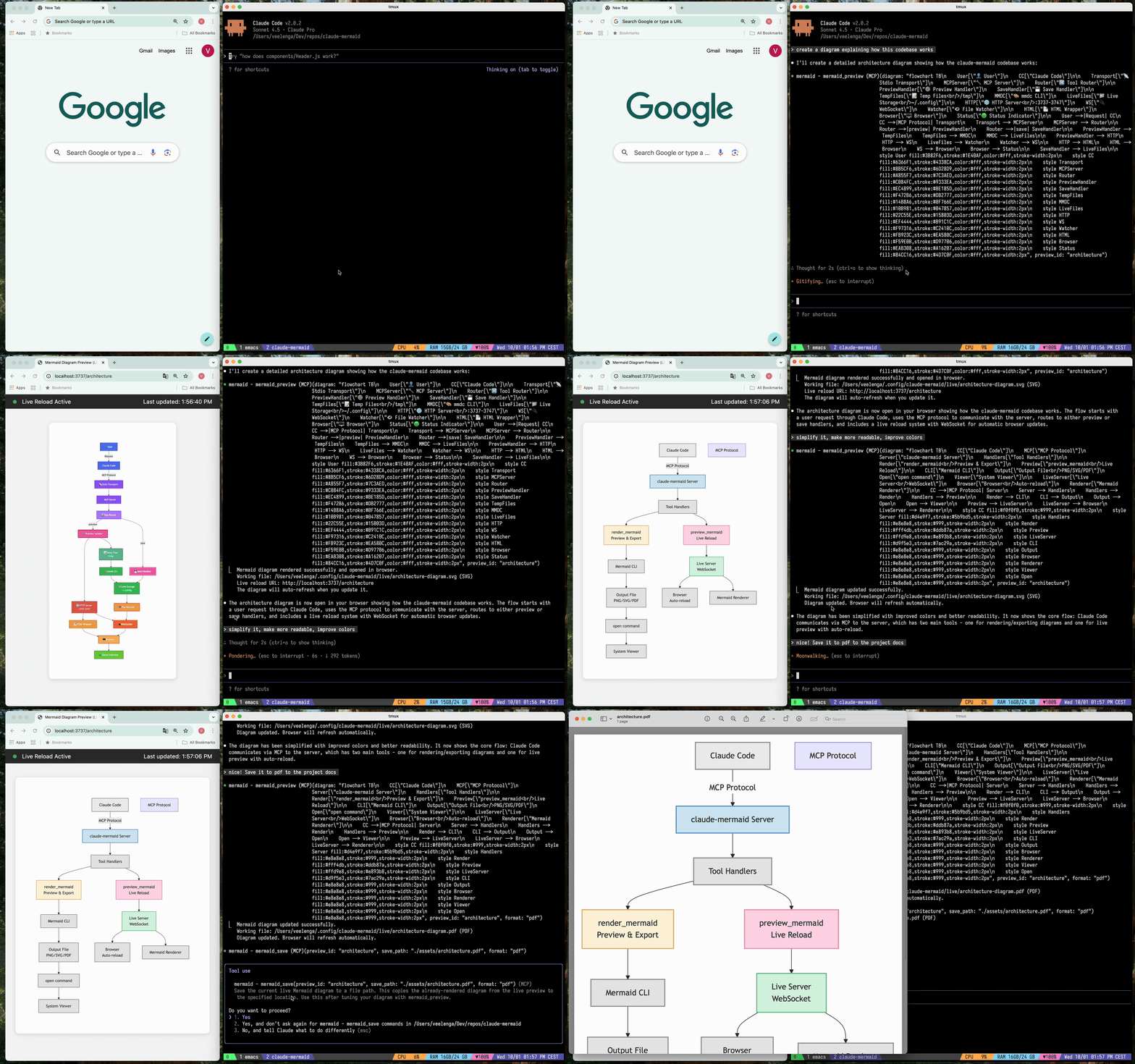
preview_id to work on multiple diagrams simultaneously~/.config/claude-mermaid/live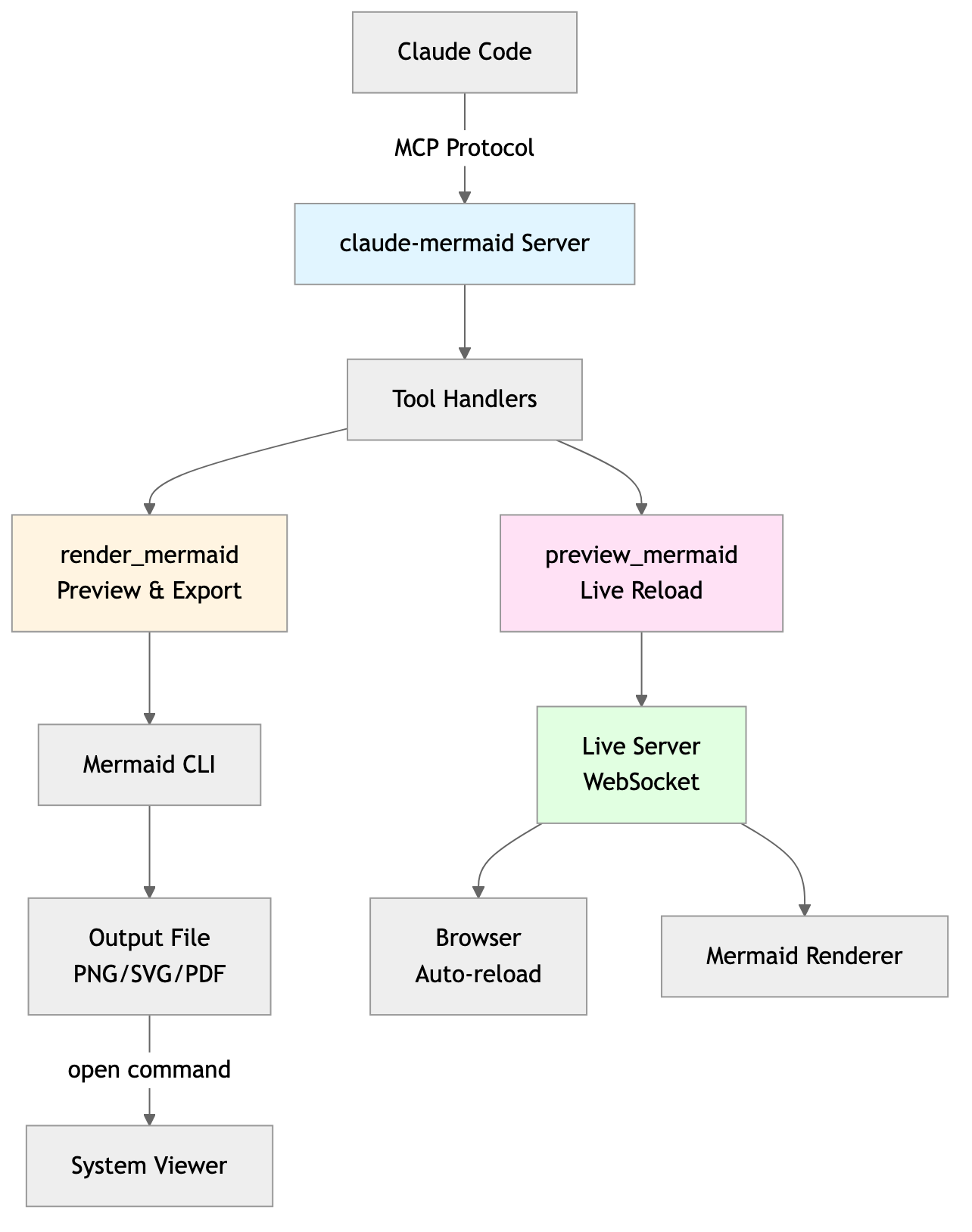
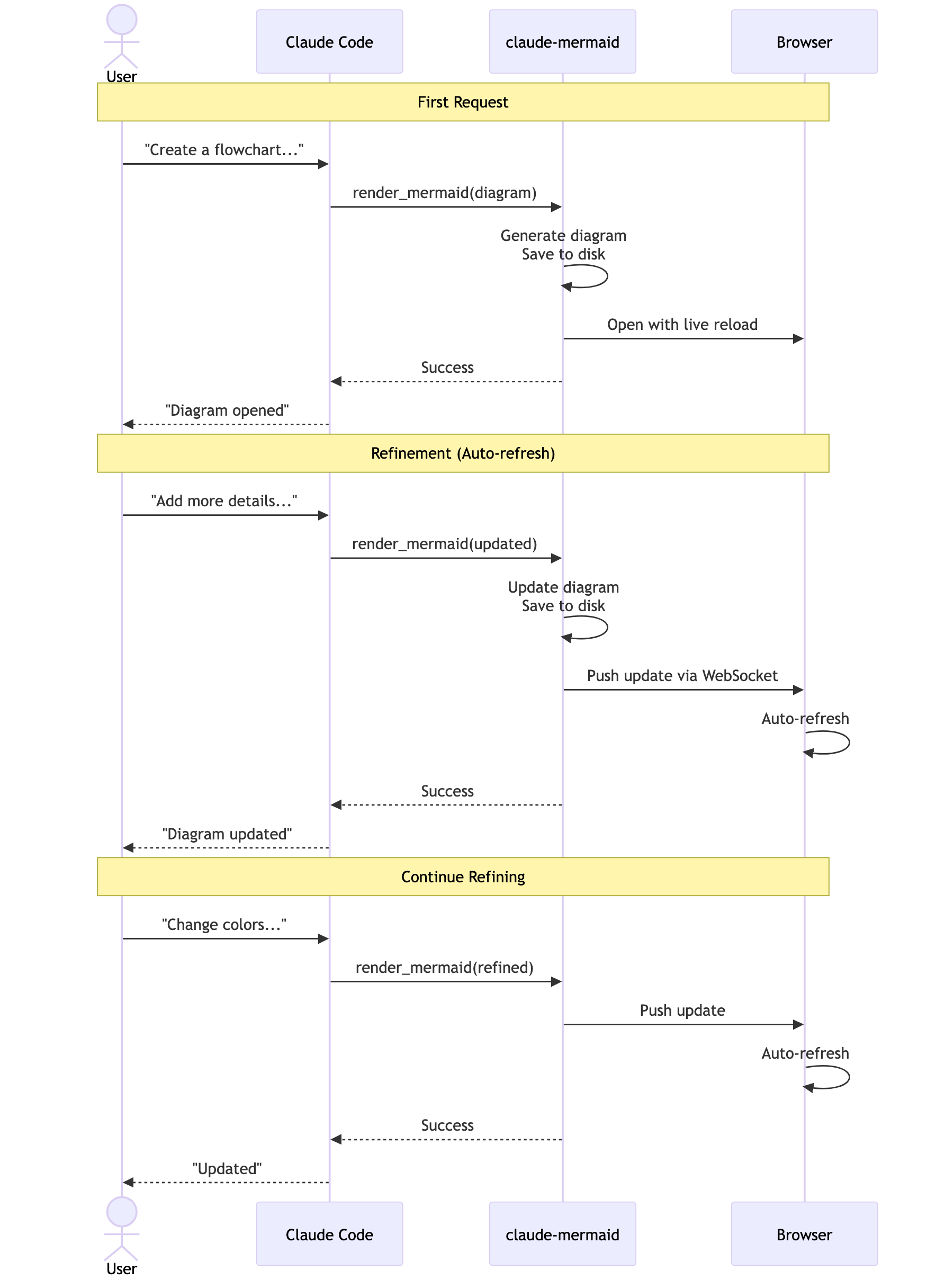
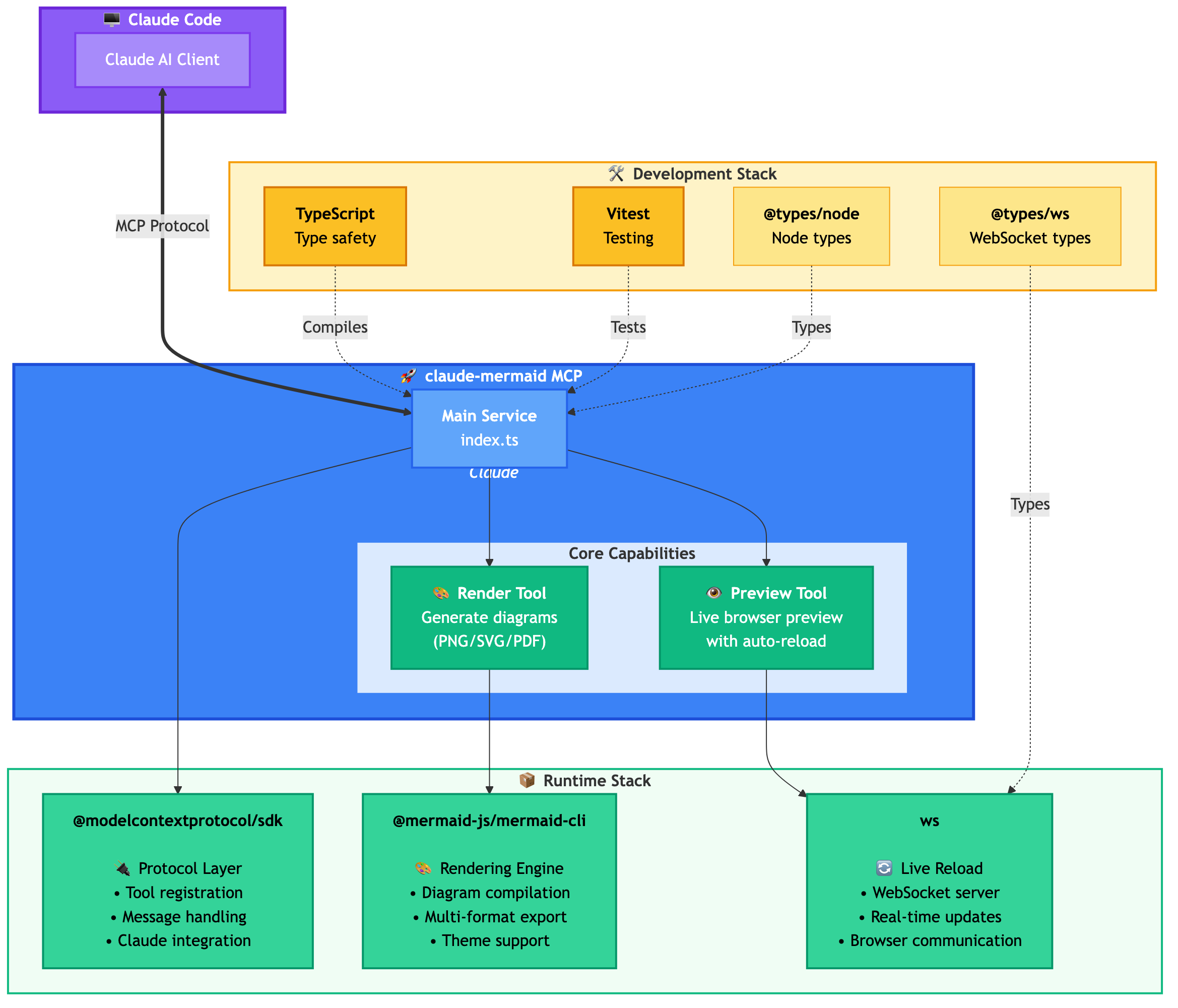
Plugin Install (Recommended)
In Claude Code, add the marketplace and install the plugin:
/plugin marketplace add veelenga/claude-mermaid
/plugin install claude-mermaid@claude-mermaid
Then restart Claude Code to activate the plugin.
From npm:
npm install -g claude-mermaid
From source:
git clone https://github.com/veelenga/claude-mermaid.git
cd claude-mermaid
npm install && npm run build && npm install -g .
Plugin install: The MCP server is configured automatically. Just verify:
/mcp
You should see mermaid in the MCP server list.
npm install: Configure the MCP server manually:
claude mcp add --scope user mermaid claude-mermaid
Then verify:
claude mcp list
You should see mermaid: claude-mermaid - ✓ Connected
While this server is optimized for Claude Code, it can work with any MCP-compatible client. Here's how to configure it for other popular tools:
<details> <summary><strong>Codex</strong></summary>Add to your Codex MCP settings file (~/.codex/mcp_settings.json):
{
  "mcpServers": {
    "mermaid": {
      "command": "claude-mermaid"
    }
  }
}
Or configure via Codex CLI:
codex mcp add mermaid claude-mermaid
Add to your Cursor MCP config file (.cursor/mcp.json or settings):
{
  "mcpServers": {
    "mermaid": {
      "command": "claude-mermaid"
    }
  }
}
Or use Cursor's settings UI:
claude-mermaidIf using the Cline extension for VSCode:
{
  "mcpServers": {
    "mermaid": {
      "command": "claude-mermaid"
    }
  }
}
Add to Windsurf's MCP configuration file:
{
  "mcpServers": {
    "mermaid": {
      "command": "claude-mermaid"
    }
  }
}
Configuration location varies by platform:
~/Library/Application Support/Windsurf/mcp.json~/.config/windsurf/mcp.json%APPDATA%\Windsurf\mcp.jsonAdd to Gemini CLI's MCP configuration file (~/.gemini/mcp.json):
{
  "mcpServers": {
    "mermaid": {
      "command": "claude-mermaid"
    }
  }
}
Or use the Gemini CLI to configure:
gemini config mcp add mermaid --command claude-mermaid
For any MCP-compatible client, use the standard configuration:
{
  "mcpServers": {
    "mermaid": {
      "command": "claude-mermaid"
    }
  }
}
The command claude-mermaid should be available in your PATH after installation.
Note: Some clients may require the full path to the executable:
which claude-mermaid (Unix/macOS) or where claude-mermaid (Windows)"command": "/path/to/claude-mermaid"Simply ask Claude Code to create Mermaid diagrams naturally. When installed as a plugin, the built-in mermaid-diagrams skill provides expert guidance, best practices, and automatic workflow management.
"Create a Mermaid diagram showing the user authentication flow"
"Draw a sequence diagram for the payment process"
"Generate a flowchart for the deployment pipeline"
With custom formatting:
"Create a dark theme architecture diagram with transparent background"
"Generate a forest theme flowchart and save to ./docs/flow.svg"
With specific output format:
"Create an ER diagram and save as PDF to ./docs/schema.pdf"
"Save the flowchart as PNG to ./docs/flow.png"
Note: Browser always shows SVG for live preview, while saving to your chosen format.
Iterative refinement:
"Create a class diagram for the User module"
// Browser opens with live preview
"Add the Address and Order classes with relationships"
// Diagram updates automatically in browser!
"Create a flowchart and save to ./docs/auth-flow.svg:

graph LR
    A[User Login] --> B{Valid Credentials?}
    B -->|Yes| C[Access Granted]
    B -->|No| D[Access Denied]
    C --> E[Dashboard]
    D --> F[Try Again]

    style A fill:#e1f5ff
    style C fill:#d4edda
    style D fill:#f8d7da
"
The diagram will be saved to ./docs/auth-flow.svg and opened in your browser with live reload enabled.
There are two tools exposed by the MCP server:
mermaid_preview — render and open a live previewdiagram (string, required) — Mermaid diagram codepreview_id (string, required) — Identifier for this preview session. Use different IDs for multiple concurrent diagrams (e.g., architecture, flow).format (string, default svg) — One of svg, png, pdf. Live preview is available only for svg.theme (string, default default) — One of default, forest, dark, neutral.background (string, default white) — Background color. Examples: transparent, white, #F0F0F0.width (number, default 800) — Diagram width in pixels.height (number, default 600) — Diagram height in pixels.scale (number, default 2) — Scale factor for higher quality output.mermaid_save — save the current live diagram to a pathsave_path (string, required) — Destination path (e.g., ./docs/diagram.svg).preview_id (string, required) — Must match the preview_id used in mermaid_preview.format (string, default svg) — One of svg, png, pdf. If the live working file for this format doesn’t exist yet, it is rendered on demand before saving.http://localhost:3737/{preview_id}The live server uses ports 3737-3747 and automatically finds an available port.
svg format only; PNG/PDF are rendered without live reload.style directives inside sequenceDiagram.You can start the preview server without an AI agent using the --serve flag:
claude-mermaid --serve
This opens the diagram gallery in your browser with all previously rendered diagrams. Useful for browsing and exporting diagrams outside of a Claude Code session.
# Install dependencies
npm install

# Build the project
npm run build

# Run tests
npm test

# Watch mode for development
npm run dev

# Start the MCP server directly
npm start
Error: Cannot find package 'puppeteer':
This is a rare environment-specific issue. Try these solutions:
Install claude-mermaid globally:
npm install -g claude-mermaid
Reinstall the plugin in Claude Code:
/plugin uninstall claude-mermaid
/plugin install claude-mermaid@claude-mermaid
Server not connecting:
# Check if server is installed
claude-mermaid -v

# Reinstall if needed
npm install -g claude-mermaid

# Verify MCP configuration
claude mcp list
Permission denied error:
# Make sure the binary is executable
chmod +x $(which claude-mermaid)
Port already in use:
lsof -i :3737-3747Diagrams not rendering or live reload not working:
The server logs to ~/.config/claude-mermaid/logs/:
mcp.log - Tool requests and diagram renderingweb.log - HTTP/WebSocket connections and live reloadEnable debug logging in your MCP config:
{
  "mcpServers": {
    "mermaid": {
      "command": "claude-mermaid",
      "env": {
        "CLAUDE_MERMAID_LOG_LEVEL": "DEBUG"
      }
    }
  }
}
Then check the logs:
# View MCP operations
tail -f ~/.config/claude-mermaid/logs/mcp.log

# View WebSocket connections
tail -f ~/.config/claude-mermaid/logs/web.log
Available log levels: DEBUG, INFO (default), WARN, ERROR, OFF
Contributions are welcome! Please feel free to submit a Pull Request.
MIT - see LICENSE file for details
If you like this project, you might also be interested in
Machine endpoints, protocol fit, contract coverage, invocation examples, and guardrails for agent-to-agent use.
Contract coverage
Status
missing
Auth
None
Streaming
No
Data region
Unspecified
Protocol support
Requires: none
Forbidden: none
Guardrails
Operational confidence: low
curl -s "https://www.xpersona.co/api/v1/agents/mcp-veelenga-claude-mermaid/snapshot"
curl -s "https://www.xpersona.co/api/v1/agents/mcp-veelenga-claude-mermaid/contract"
curl -s "https://www.xpersona.co/api/v1/agents/mcp-veelenga-claude-mermaid/trust"
Trust and runtime signals, benchmark suites, failure patterns, and practical risk constraints.
Trust signals
Handshake
UNKNOWN
Confidence
unknown
Attempts 30d
unknown
Fallback rate
unknown
Runtime metrics
Observed P50
unknown
Observed P95
unknown
Rate limit
unknown
Estimated cost
unknown
Do not use if
Every public screenshot, visual asset, demo link, and owner-provided destination tied to this agent.
Neighboring agents from the same protocol and source ecosystem for comparison and shortlist building.
A Model Context Protocol (MCP) server for GitLab
A Model Context Protocol (MCP) server for GitLab
This agent researches trends, scripts videos, sets up engagement automation, and compiles everything into a shareable document.
This agent analyzes Reddit data to generate trending content concepts tailored to your audience.
Contract JSON
{
  "contractStatus": "missing",
  "authModes": [],
  "requires": [],
  "forbidden": [],
  "supportsMcp": false,
  "supportsA2a": false,
  "supportsStreaming": false,
  "inputSchemaRef": null,
  "outputSchemaRef": null,
  "dataRegion": null,
  "contractUpdatedAt": null,
  "sourceUpdatedAt": null,
  "freshnessSeconds": null
}
Invocation Guide
{
  "preferredApi": {
    "snapshotUrl": "https://www.xpersona.co/api/v1/agents/mcp-veelenga-claude-mermaid/snapshot",
    "contractUrl": "https://www.xpersona.co/api/v1/agents/mcp-veelenga-claude-mermaid/contract",
    "trustUrl": "https://www.xpersona.co/api/v1/agents/mcp-veelenga-claude-mermaid/trust"
  },
  "curlExamples": [
    "curl -s \"https://www.xpersona.co/api/v1/agents/mcp-veelenga-claude-mermaid/snapshot\"",
    "curl -s \"https://www.xpersona.co/api/v1/agents/mcp-veelenga-claude-mermaid/contract\"",
    "curl -s \"https://www.xpersona.co/api/v1/agents/mcp-veelenga-claude-mermaid/trust\""
  ],
  "jsonRequestTemplate": {
    "query": "summarize this repo",
    "constraints": {
      "maxLatencyMs": 2000,
      "protocolPreference": [
        "MCP"
      ]
    }
  },
  "jsonResponseTemplate": {
    "ok": true,
    "result": {
      "summary": "...",
      "confidence": 0.9
    },
    "meta": {
      "source": "GITHUB_MCP",
      "generatedAt": "2026-10-09T02:27:52.574Z"
    }
  },
  "retryPolicy": {
    "maxAttempts": 3,
    "backoffMs": [
      500,
      1500,
      3500
    ],
    "retryableConditions": [
      "HTTP_429",
      "HTTP_503",
      "NETWORK_TIMEOUT"
    ]
  }
}
Trust JSON
{
  "status": "unavailable",
  "handshakeStatus": "UNKNOWN",
  "verificationFreshnessHours": null,
  "reputationScore": null,
  "p95LatencyMs": null,
  "successRate30d": null,
  "fallbackRate": null,
  "attempts30d": null,
  "trustUpdatedAt": null,
  "trustConfidence": "unknown",
  "sourceUpdatedAt": null,
  "freshnessSeconds": null
}
Capability Matrix
{
  "rows": [
    {
      "key": "MCP",
      "type": "protocol",
      "support": "unknown",
      "confidenceSource": "profile",
      "notes": "Listed on profile"
    },
    {
      "key": "mcp",
      "type": "capability",
      "support": "supported",
      "confidenceSource": "profile",
      "notes": "Declared in agent profile metadata"
    },
    {
      "key": "mermaid",
      "type": "capability",
      "support": "supported",
      "confidenceSource": "profile",
      "notes": "Declared in agent profile metadata"
    },
    {
      "key": "claude",
      "type": "capability",
      "support": "supported",
      "confidenceSource": "profile",
      "notes": "Declared in agent profile metadata"
    },
    {
      "key": "diagram",
      "type": "capability",
      "support": "supported",
      "confidenceSource": "profile",
      "notes": "Declared in agent profile metadata"
    },
    {
      "key": "cli",
      "type": "capability",
      "support": "supported",
      "confidenceSource": "profile",
      "notes": "Declared in agent profile metadata"
    }
  ],
  "flattenedTokens": "protocol:MCP|unknown|profile capability:mcp|supported|profile capability:mermaid|supported|profile capability:claude|supported|profile capability:diagram|supported|profile capability:cli|supported|profile"
}
Facts JSON
[
  {
    "factKey": "docs_crawl",
    "category": "integration",
    "label": "Crawlable docs",
    "value": "6 indexed pages on the official domain",
    "href": "https://github.com/login?return_to=https%3A%2F%2Fgithub.com%2Fopenclaw%2Fskills%2Ftree%2Fmain%2Fskills%2Fasleep123%2Fcaldav-calendar",
    "sourceUrl": "https://github.com/login?return_to=https%3A%2F%2Fgithub.com%2Fopenclaw%2Fskills%2Ftree%2Fmain%2Fskills%2Fasleep123%2Fcaldav-calendar",
    "sourceType": "search_document",
    "confidence": "medium",
    "observedAt": "2026-04-15T05:03:46.393Z",
    "isPublic": true
  },
  {
    "factKey": "vendor",
    "category": "vendor",
    "label": "Vendor",
    "value": "Veelenga",
    "href": "https://github.com/veelenga/claude-mermaid#readme",
    "sourceUrl": "https://github.com/veelenga/claude-mermaid#readme",
    "sourceType": "profile",
    "confidence": "medium",
    "observedAt": "2026-02-25T03:04:03.591Z",
    "isPublic": true
  },
  {
    "factKey": "protocols",
    "category": "compatibility",
    "label": "Protocol compatibility",
    "value": "MCP",
    "href": "https://www.xpersona.co/api/v1/agents/mcp-veelenga-claude-mermaid/contract",
    "sourceUrl": "https://www.xpersona.co/api/v1/agents/mcp-veelenga-claude-mermaid/contract",
    "sourceType": "contract",
    "confidence": "medium",
    "observedAt": "2026-02-25T03:04:03.591Z",
    "isPublic": true
  },
  {
    "factKey": "traction",
    "category": "adoption",
    "label": "Adoption signal",
    "value": "73 GitHub stars",
    "href": "https://github.com/veelenga/claude-mermaid",
    "sourceUrl": "https://github.com/veelenga/claude-mermaid",
    "sourceType": "profile",
    "confidence": "medium",
    "observedAt": "2026-02-25T03:04:03.591Z",
    "isPublic": true
  },
  {
    "factKey": "handshake_status",
    "category": "security",
    "label": "Handshake status",
    "value": "UNKNOWN",
    "href": "https://www.xpersona.co/api/v1/agents/mcp-veelenga-claude-mermaid/trust",
    "sourceUrl": "https://www.xpersona.co/api/v1/agents/mcp-veelenga-claude-mermaid/trust",
    "sourceType": "trust",
    "confidence": "medium",
    "observedAt": null,
    "isPublic": true
  }
]
Change Events JSON
[
  {
    "eventType": "docs_update",
    "title": "Docs refreshed: Sign in to GitHub · GitHub",
    "description": "Fresh crawlable documentation was indexed for the official domain.",
    "href": "https://github.com/login?return_to=https%3A%2F%2Fgithub.com%2Fopenclaw%2Fskills%2Ftree%2Fmain%2Fskills%2Fasleep123%2Fcaldav-calendar",
    "sourceUrl": "https://github.com/login?return_to=https%3A%2F%2Fgithub.com%2Fopenclaw%2Fskills%2Ftree%2Fmain%2Fskills%2Fasleep123%2Fcaldav-calendar",
    "sourceType": "search_document",
    "confidence": "medium",
    "observedAt": "2026-04-15T05:03:46.393Z",
    "isPublic": true
  }
]
Sponsored
Ads related to claude-mermaid and adjacent AI workflows.