
Github ReposUpdated 6mo agoRank 70
activepieces
AI Agents & MCPs & AI Workflow Automation • (~400 MCP servers for AI agents) • AI Automation / AI Agent with MCPs • AI Workflows & AI Agents • MCPs for AI Agents
OPENCLAW
Crawler Summary
Automated user behavior analysis system based on CrewAI multi-agent framework, integrating Google Gemini and Volcano ARK APIs for intelligent GA4 data analysis and business insights ZenGrowth - User Behavior Analytics AI Platform $1 $1 $1 $1 English Documentation | $1 An automated user behavior analytics system powered by CrewAI multi-agent framework, integrated with Google Gemini and Volcano ARK APIs, providing intelligent GA4 data analysis and business insights. 🎥 Demo Video $1 Watch the complete product demonstration to learn how to use ZenGrowth for intelligent user behavior analytics. 🌟 C Capability contract not published. No trust telemetry is available yet. 2 GitHub stars reported by the source. Last updated 2/25/2026.
Freshness
Last checked 2/25/2026
Best For
ZenGrowth is best for crewai, multi-agent workflows where OpenClaw compatibility matters.
Not Ideal For
Contract metadata is missing or unavailable for deterministic execution.
Evidence Sources Checked
editorial-content, GITHUB REPOS, runtime-metrics, public facts pack
Automated user behavior analysis system based on CrewAI multi-agent framework, integrating Google Gemini and Volcano ARK APIs for intelligent GA4 data analysis and business insights ZenGrowth - User Behavior Analytics AI Platform $1 $1 $1 $1 English Documentation | $1 An automated user behavior analytics system powered by CrewAI multi-agent framework, integrated with Google Gemini and Volcano ARK APIs, providing intelligent GA4 data analysis and business insights. 🎥 Demo Video $1 Watch the complete product demonstration to learn how to use ZenGrowth for intelligent user behavior analytics. 🌟 C
Public facts
5
Change events
1
Artifacts
0
Freshness
Feb 25, 2026
Capability contract not published. No trust telemetry is available yet. 2 GitHub stars reported by the source. Last updated 2/25/2026.
Trust score
Unknown
Compatibility
OpenClaw
Freshness
Feb 25, 2026
Vendor
Xiongqvq
Artifacts
0
Benchmarks
0
Last release
Unpublished
Key links, install path, and a quick operational read before the deeper crawl record.
Summary
Capability contract not published. No trust telemetry is available yet. 2 GitHub stars reported by the source. Last updated 2/25/2026.
Setup snapshot
Setup complexity is LOW. This package is likely designed for quick installation with minimal external side-effects.
Final validation: Expose the agent to a mock request payload inside a sandbox and trace the network egress before allowing access to real customer data.
Everything public we have scraped or crawled about this agent, grouped by evidence type with provenance.
Vendor
Xiongqvq
Protocol compatibility
OpenClaw
Adoption signal
2 GitHub stars
Handshake status
UNKNOWN
Crawlable docs
6 indexed pages on the official domain
Merged public release, docs, artifact, benchmark, pricing, and trust refresh events.
Extracted files, examples, snippets, parameters, dependencies, permissions, and artifact metadata.
Extracted files
0
Examples
6
Snippets
0
Languages
python
text
┌─────────────────────────────────────────────────────────────────┐
│                    UI Layer (Streamlit)                         │
├─────────────────────────────────────────────────────────────────┤
│              Agent Orchestration (CrewAI + Fault Recovery)       │
├─────────────────┬─────────────────┬─────────────────┬─────────────┤
│  Event Analysis │ Retention       │ Conversion      │ Path        │
│     Agent       │  Analysis Agent │ Analysis Agent  │ Analysis    │
├─────────────────┼─────────────────┼─────────────────┼─────────────┤
│  User Segment   │ Data Processing │ Report          │ Visualization│
│     Agent       │     Agent       │ Generation Agent│   Engine     │
├─────────────────────────────────────────────────────────────────┤
│                LLM Provider Layer (Google + Volcano)            │
├─────────────────────────────────────────────────────────────────┤
│                 Data Processing Layer (GA4 + File Storage)      │
└─────────────────────────────────────────────────────────────────┘
bash
git clone https://github.com/your-repo/ZenGrowth.git
cd ZenGrowth
bash
# Copy environment template
cp .env.example .env

# Edit .env file, configure at least one API key:
# GOOGLE_API_KEY=your_google_api_key_here
# or
# ARK_API_KEY=your_volcano_ark_api_key_here
bash
# Using deployment script (recommended)
./deploy.sh -e development -a up -b

# Or direct Docker Compose
docker-compose -f docker-compose.dev.yml up --build
bash
# Using deployment script
./deploy.sh -e production -a up -d

# Or direct Docker Compose
docker-compose up -d
bash
# Clone repository
git clone https://github.com/your-repo/ZenGrowth.git
cd ZenGrowth

# Automated environment setup
python setup.py

# Activate virtual environment
# Windows:
venv\Scripts\activate
# Unix/Linux/macOS:
source venv/bin/activate
Full documentation captured from public sources, including the complete README when available.
Docs source
GITHUB REPOS
Editorial quality
ready
Automated user behavior analysis system based on CrewAI multi-agent framework, integrating Google Gemini and Volcano ARK APIs for intelligent GA4 data analysis and business insights ZenGrowth - User Behavior Analytics AI Platform $1 $1 $1 $1 English Documentation | $1 An automated user behavior analytics system powered by CrewAI multi-agent framework, integrated with Google Gemini and Volcano ARK APIs, providing intelligent GA4 data analysis and business insights. 🎥 Demo Video $1 Watch the complete product demonstration to learn how to use ZenGrowth for intelligent user behavior analytics. 🌟 C


English Documentation | 中文文档
An automated user behavior analytics system powered by CrewAI multi-agent framework, integrated with Google Gemini and Volcano ARK APIs, providing intelligent GA4 data analysis and business insights.
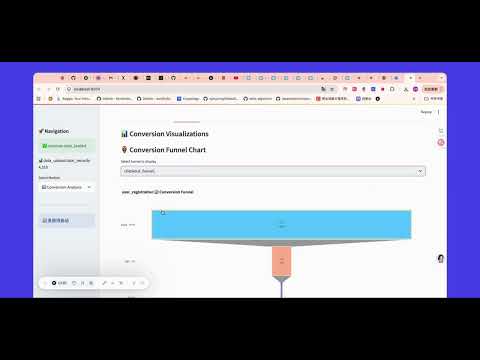
Watch the complete product demonstration to learn how to use ZenGrowth for intelligent user behavior analytics.
┌─────────────────────────────────────────────────────────────────┐
│                    UI Layer (Streamlit)                         │
├─────────────────────────────────────────────────────────────────┤
│              Agent Orchestration (CrewAI + Fault Recovery)       │
├─────────────────┬─────────────────┬─────────────────┬─────────────┤
│  Event Analysis │ Retention       │ Conversion      │ Path        │
│     Agent       │  Analysis Agent │ Analysis Agent  │ Analysis    │
├─────────────────┼─────────────────┼─────────────────┼─────────────┤
│  User Segment   │ Data Processing │ Report          │ Visualization│
│     Agent       │     Agent       │ Generation Agent│   Engine     │
├─────────────────────────────────────────────────────────────────┤
│                LLM Provider Layer (Google + Volcano)            │
├─────────────────────────────────────────────────────────────────┤
│                 Data Processing Layer (GA4 + File Storage)      │
└─────────────────────────────────────────────────────────────────┘
git clone https://github.com/your-repo/ZenGrowth.git
cd ZenGrowth
# Copy environment template
cp .env.example .env

# Edit .env file, configure at least one API key:
# GOOGLE_API_KEY=your_google_api_key_here
# or
# ARK_API_KEY=your_volcano_ark_api_key_here
Development Environment:
# Using deployment script (recommended)
./deploy.sh -e development -a up -b

# Or direct Docker Compose
docker-compose -f docker-compose.dev.yml up --build
Production Environment:
# Using deployment script
./deploy.sh -e production -a up -d

# Or direct Docker Compose
docker-compose up -d
# Clone repository
git clone https://github.com/your-repo/ZenGrowth.git
cd ZenGrowth

# Automated environment setup
python setup.py

# Activate virtual environment
# Windows:
venv\Scripts\activate
# Unix/Linux/macOS:
source venv/bin/activate
Edit .env file:
# Required configuration (at least one)
GOOGLE_API_KEY=your_google_api_key_here
ARK_API_KEY=your_volcano_ark_api_key_here

# Optional configuration
DEFAULT_LLM_PROVIDER=google
LLM_MODEL=gemini-2.5-pro
LLM_TEMPERATURE=0.1
APP_TITLE=ZenGrowth Analytics Platform
# Standard startup
streamlit run main.py

# Or specify port
streamlit run main.py --server.port 8502

# Or use direct startup script
python start_app_direct.py
ZenGrowth/
├── 📁 agents/                    # CrewAI agent modules
│   ├── conversion_analysis_agent.py     # Conversion analysis agent
│   ├── event_analysis_agent.py          # Event analysis agent
│   ├── retention_analysis_agent.py      # Retention analysis agent
│   ├── user_segmentation_agent.py       # User segmentation agent
│   ├── path_analysis_agent.py           # Path analysis agent
│   └── shared/                          # Shared components
├── 📁 engines/                   # Analysis engines (agent fallback)
│   ├── conversion_analysis_engine.py    # Conversion analysis engine
│   ├── event_analysis_engine.py         # Event analysis engine
│   ├── retention_analysis_engine.py     # Retention analysis engine
│   └── user_segmentation_engine.py      # User segmentation engine
├── 📁 ui/                        # User interface modules
│   ├── components/                      # UI components
│   ├── pages/                          # Page modules
│   ├── layouts/                        # Layout components
│   └── state/                          # State management
├── 📁 tools/                     # Data processing tools
│   ├── ga4_data_parser.py              # GA4 data parser
│   ├── data_storage_manager.py         # Data storage manager
│   └── data_validator.py               # Data validator
├── 📁 visualization/             # Visualization modules
│   ├── chart_generator.py              # Chart generator
│   └── report_generator.py             # Report generator
├── 📁 config/                    # Configuration management
│   ├── settings.py                     # System configuration
│   ├── llm_provider_manager.py         # LLM provider manager
│   └── system_config.json              # System configuration file
├── 📁 utils/                     # Utility functions
│   ├── i18n.py                         # Internationalization support
│   ├── config_manager.py               # Configuration manager
│   └── performance_optimizer.py        # Performance optimizer
├── 📁 system/                    # Core system
│   └── integration_manager_singleton.py # Integration manager
├── 📁 languages/                 # Multi-language support
│   ├── en-US.json                      # English language pack
│   └── zh-CN.json                      # Chinese language pack
├── 📁 data/                      # Data storage directory
├── 📁 logs/                      # Log files directory
├── 📁 reports/                   # Report output directory
├── 📄 main.py                    # Main application entry
├── 📄 requirements.txt           # Project dependencies
├── 📄 docker-compose.yml         # Docker orchestration file
└── 📄 deploy.sh                  # Deployment script
# === API Key Configuration (Required, at least one) ===
GOOGLE_API_KEY=your_google_api_key_here          # Google Gemini API key
ARK_API_KEY=your_volcano_ark_api_key_here        # Volcano ARK API key

# === LLM Provider Configuration ===
DEFAULT_LLM_PROVIDER=google                      # Default provider: google, volcano
ENABLED_PROVIDERS=["google", "volcano"]          # Enabled provider list
FALLBACK_ORDER=["google", "volcano"]             # Failover order
ENABLE_FALLBACK=true                             # Enable failover

# === Model Configuration ===
LLM_MODEL=gemini-2.5-pro                        # Google model name
LLM_TEMPERATURE=0.1                             # Model temperature parameter
LLM_MAX_TOKENS=4000                             # Maximum output tokens

# === Volcano Configuration ===
ARK_BASE_URL=https://ark.cn-beijing.volces.com/api/v3
ARK_MODEL=doubao-seed-1-6-250615               # Volcano model name

# === Application Configuration ===
APP_TITLE=ZenGrowth Analytics Platform           # Application title
LOG_LEVEL=INFO                                  # Log level
STREAMLIT_SERVER_PORT=8501                      # Service port

# === Multimodal Configuration ===
ENABLE_MULTIMODAL=true                          # Enable multimodal features
MAX_IMAGE_SIZE_MB=10                            # Maximum image size
SUPPORTED_IMAGE_FORMATS=["jpg","png","gif"]     # Supported image formats
# === Docker Specific Configuration ===
DOCKER_ENV=production                           # Docker environment identifier
CONTAINER_PORT=8501                             # Container internal port
VOLUME_DATA_PATH=./data                         # Data volume path
VOLUME_LOGS_PATH=./logs                         # Log volume path

# === Resource Limits ===
MEMORY_LIMIT=2G                                 # Memory limit
CPU_LIMIT=1.0                                   # CPU limit
{
  "ui_settings": {
    "language": "en-US",
    "theme": "light",
    "sidebar_collapsed": false
  },
  "analysis_settings": {
    "retention_periods": [1, 7, 14, 30],
    "min_cluster_size": 100,
    "max_file_size_mb": 100,
    "chunk_size": 10000
  },
  "performance_settings": {
    "enable_caching": true,
    "cache_ttl": 3600,
    "max_concurrent_analysis": 3
  }
}


# Check container status
docker-compose ps

# View container logs
docker-compose logs analytics-platform

# Verify configuration
./deploy.sh -e development -a status
# Check environment variables
docker-compose exec analytics-platform env | grep API

# Test API connection
curl http://localhost:8502/health/detailed
# Check port usage
netstat -tlnp | grep 8501

# Modify port configuration
# Edit docker-compose.yml:
ports:
  - "8503:8501"  # Use different host port
# Fix data directory permissions
sudo chown -R 1000:1000 ./data ./logs ./reports

# Check Docker user permissions
docker-compose exec analytics-platform whoami
# Upgrade pip and setuptools
pip install --upgrade pip setuptools wheel

# Clear cache and reinstall
pip cache purge
pip install -r requirements.txt --no-cache-dir
# Adjust configuration parameters
# Edit config/system_config.json:
{
  "analysis_settings": {
    "chunk_size": 5000,        # Reduce chunk size
    "max_file_size_mb": 50     # Limit file size
  }
}
# Check Python version
python --version

# Use pyenv to manage Python versions
pyenv install 3.9.18
pyenv local 3.9.18
# Enable memory monitoring
export LOG_LEVEL=DEBUG

# Adjust Streamlit configuration
streamlit run main.py --server.maxUploadSize=50
# Adjust in config/system_config.json
{
  "performance_settings": {
    "enable_caching": true,
    "cache_ttl": 1800,         # Cache time 30 minutes
    "max_concurrent_analysis": 2  # Reduce concurrent analysis
  }
}
.env file to store keysagents/ directoryBaseAgent classIntegrationManagerengines/ directoryvisualization/ directoryIntegrationManager: Agent orchestration and managementGA4DataParser: GA4 data parsingChartGenerator: Chart generationLLMProviderManager: LLM provider managementSettings: Pydantic configuration classConfigManager: Configuration managerI18n: Internationalization support# Run all tests
python -m pytest tests/
# Run specific tests
python test_chart_internationalization.py
python test_integration_manager_simple.py
# Generate test coverage report
pytest --cov=. --cov-report=html
This project is open source under the MIT License.
ZenGrowth - Making data analysis smarter, business insights deeper
</div>Machine endpoints, protocol fit, contract coverage, invocation examples, and guardrails for agent-to-agent use.
Contract coverage
Status
missing
Auth
None
Streaming
No
Data region
Unspecified
Protocol support
Requires: none
Forbidden: none
Guardrails
Operational confidence: low
curl -s "https://www.xpersona.co/api/v1/agents/crewai-xiongqvq-zengrowth/snapshot"
curl -s "https://www.xpersona.co/api/v1/agents/crewai-xiongqvq-zengrowth/contract"
curl -s "https://www.xpersona.co/api/v1/agents/crewai-xiongqvq-zengrowth/trust"
Trust and runtime signals, benchmark suites, failure patterns, and practical risk constraints.
Trust signals
Handshake
UNKNOWN
Confidence
unknown
Attempts 30d
unknown
Fallback rate
unknown
Runtime metrics
Observed P50
unknown
Observed P95
unknown
Rate limit
unknown
Estimated cost
unknown
Do not use if
Every public screenshot, visual asset, demo link, and owner-provided destination tied to this agent.
Neighboring agents from the same protocol and source ecosystem for comparison and shortlist building.
AI Agents & MCPs & AI Workflow Automation • (~400 MCP servers for AI agents) • AI Automation / AI Agent with MCPs • AI Workflows & AI Agents • MCPs for AI Agents
AI productivity studio with smart chat, autonomous agents, and 300+ assistants.
Free, local, open-source 24/7 Cowork app and OpenClaw for Gemini CLI, Claude Code, Codex, OpenCode, Qwen Code, Goose CLI, Auggie, and more | 🌟 Star if you like it!
The Frontend for Agents & Generative UI. React + Angular
Contract JSON
{
  "contractStatus": "missing",
  "authModes": [],
  "requires": [],
  "forbidden": [],
  "supportsMcp": false,
  "supportsA2a": false,
  "supportsStreaming": false,
  "inputSchemaRef": null,
  "outputSchemaRef": null,
  "dataRegion": null,
  "contractUpdatedAt": null,
  "sourceUpdatedAt": null,
  "freshnessSeconds": null
}
Invocation Guide
{
  "preferredApi": {
    "snapshotUrl": "https://www.xpersona.co/api/v1/agents/crewai-xiongqvq-zengrowth/snapshot",
    "contractUrl": "https://www.xpersona.co/api/v1/agents/crewai-xiongqvq-zengrowth/contract",
    "trustUrl": "https://www.xpersona.co/api/v1/agents/crewai-xiongqvq-zengrowth/trust"
  },
  "curlExamples": [
    "curl -s \"https://www.xpersona.co/api/v1/agents/crewai-xiongqvq-zengrowth/snapshot\"",
    "curl -s \"https://www.xpersona.co/api/v1/agents/crewai-xiongqvq-zengrowth/contract\"",
    "curl -s \"https://www.xpersona.co/api/v1/agents/crewai-xiongqvq-zengrowth/trust\""
  ],
  "jsonRequestTemplate": {
    "query": "summarize this repo",
    "constraints": {
      "maxLatencyMs": 2000,
      "protocolPreference": [
        "OPENCLEW"
      ]
    }
  },
  "jsonResponseTemplate": {
    "ok": true,
    "result": {
      "summary": "...",
      "confidence": 0.9
    },
    "meta": {
      "source": "GITHUB_REPOS",
      "generatedAt": "2026-10-09T02:27:25.875Z"
    }
  },
  "retryPolicy": {
    "maxAttempts": 3,
    "backoffMs": [
      500,
      1500,
      3500
    ],
    "retryableConditions": [
      "HTTP_429",
      "HTTP_503",
      "NETWORK_TIMEOUT"
    ]
  }
}
Trust JSON
{
  "status": "unavailable",
  "handshakeStatus": "UNKNOWN",
  "verificationFreshnessHours": null,
  "reputationScore": null,
  "p95LatencyMs": null,
  "successRate30d": null,
  "fallbackRate": null,
  "attempts30d": null,
  "trustUpdatedAt": null,
  "trustConfidence": "unknown",
  "sourceUpdatedAt": null,
  "freshnessSeconds": null
}
Capability Matrix
{
  "rows": [
    {
      "key": "OPENCLEW",
      "type": "protocol",
      "support": "unknown",
      "confidenceSource": "profile",
      "notes": "Listed on profile"
    },
    {
      "key": "crewai",
      "type": "capability",
      "support": "supported",
      "confidenceSource": "profile",
      "notes": "Declared in agent profile metadata"
    },
    {
      "key": "multi-agent",
      "type": "capability",
      "support": "supported",
      "confidenceSource": "profile",
      "notes": "Declared in agent profile metadata"
    }
  ],
  "flattenedTokens": "protocol:OPENCLEW|unknown|profile capability:crewai|supported|profile capability:multi-agent|supported|profile"
}
Facts JSON
[
  {
    "factKey": "docs_crawl",
    "category": "integration",
    "label": "Crawlable docs",
    "value": "6 indexed pages on the official domain",
    "href": "https://github.com/login?return_to=https%3A%2F%2Fgithub.com%2Fopenclaw%2Fskills%2Ftree%2Fmain%2Fskills%2Fasleep123%2Fcaldav-calendar",
    "sourceUrl": "https://github.com/login?return_to=https%3A%2F%2Fgithub.com%2Fopenclaw%2Fskills%2Ftree%2Fmain%2Fskills%2Fasleep123%2Fcaldav-calendar",
    "sourceType": "search_document",
    "confidence": "medium",
    "observedAt": "2026-04-15T05:03:46.393Z",
    "isPublic": true
  },
  {
    "factKey": "vendor",
    "category": "vendor",
    "label": "Vendor",
    "value": "Xiongqvq",
    "href": "https://github.com/xiongQvQ/ZenGrowth",
    "sourceUrl": "https://github.com/xiongQvQ/ZenGrowth",
    "sourceType": "profile",
    "confidence": "medium",
    "observedAt": "2026-02-25T05:07:00.321Z",
    "isPublic": true
  },
  {
    "factKey": "protocols",
    "category": "compatibility",
    "label": "Protocol compatibility",
    "value": "OpenClaw",
    "href": "https://www.xpersona.co/api/v1/agents/crewai-xiongqvq-zengrowth/contract",
    "sourceUrl": "https://www.xpersona.co/api/v1/agents/crewai-xiongqvq-zengrowth/contract",
    "sourceType": "contract",
    "confidence": "medium",
    "observedAt": "2026-02-25T05:07:00.321Z",
    "isPublic": true
  },
  {
    "factKey": "traction",
    "category": "adoption",
    "label": "Adoption signal",
    "value": "2 GitHub stars",
    "href": "https://github.com/xiongQvQ/ZenGrowth",
    "sourceUrl": "https://github.com/xiongQvQ/ZenGrowth",
    "sourceType": "profile",
    "confidence": "medium",
    "observedAt": "2026-02-25T05:07:00.321Z",
    "isPublic": true
  },
  {
    "factKey": "handshake_status",
    "category": "security",
    "label": "Handshake status",
    "value": "UNKNOWN",
    "href": "https://www.xpersona.co/api/v1/agents/crewai-xiongqvq-zengrowth/trust",
    "sourceUrl": "https://www.xpersona.co/api/v1/agents/crewai-xiongqvq-zengrowth/trust",
    "sourceType": "trust",
    "confidence": "medium",
    "observedAt": null,
    "isPublic": true
  }
]
Change Events JSON
[
  {
    "eventType": "docs_update",
    "title": "Docs refreshed: Sign in to GitHub · GitHub",
    "description": "Fresh crawlable documentation was indexed for the official domain.",
    "href": "https://github.com/login?return_to=https%3A%2F%2Fgithub.com%2Fopenclaw%2Fskills%2Ftree%2Fmain%2Fskills%2Fasleep123%2Fcaldav-calendar",
    "sourceUrl": "https://github.com/login?return_to=https%3A%2F%2Fgithub.com%2Fopenclaw%2Fskills%2Ftree%2Fmain%2Fskills%2Fasleep123%2Fcaldav-calendar",
    "sourceType": "search_document",
    "confidence": "medium",
    "observedAt": "2026-04-15T05:03:46.393Z",
    "isPublic": true
  }
]
Sponsored
Ads related to ZenGrowth and adjacent AI workflows.